| TL;DR – The six best US patent examiner statistics tools for in-house IP teams in 2026 are Triangle IP’s Examiner Analysis, Patent Bots’ Examiner Statistics, LexisNexis PatentAdvisor, IronCrow IP’s Prosecution Statistics, Juristat’s Examiner Analytics, and Questel’s Grant Statistics. Among them, Triangle IP’s Examiner Analysis stands out for benchmarking allowance rates in context, showing RCE and appeal outcome data, and connecting prosecution intelligence directly to your live portfolio. The right tool depends on your portfolio size, how much prosecution visibility you need beyond basic allowance rates, and whether you need examiner data as a standalone lookup or connected to your full IP workflow. |
Most patent examiner statistics tools out there are built for patent prosecutors. But, if you’re an in-house IP manager, patent committee lead, or General Counsel responsible for a portfolio of 50-500+ active cases, this breakdown is written specially for you.
Your law firm is doing their job but without shared data, you’re having budget conversations based on invoices rather than insight.
A large part of prosecution cost overruns aren’t strategy failures. They’re examiner mismatches. An examiner with a 12% allowance rate can turn a routine filing into a three-year, $30,000 problem. Your outside counsel has this data. Now you can too. Hence this line-up of tools is evaluated through the lens of corporate IP oversight, not day-to-day prosecution by outside counsel. Triangle IP’s Examiner Analysis tops our list as in this examiner insights are connected directly to your live patent portfolio, not siloed in a separate tab.
What to Look For in a US Patent Examiner Statistics Tool (Eight Key Factors Explained)
Choosing the right examiner statistics tool isn’t just about access to data. It’s about getting the right insights to have more informed conversations with outside counsel, set realistic budget expectations with leadership, and make confident calls on whether to keep prosecuting, request an interview, or cut a case loose before costs compound.
To make an informed selection ask these eight key questions:
- Does it Show Examiner Allowance Rates in Context?
- Does the Tool Show the Full Prosecution Path?
- Does it Break Down Interview and Pre-appeal Outcomes?
- Can You Compare Examiners Side by Side?
- Does it Connect to Your Live Portfolio?
- Does it Show Law Firm Performance Alongside Examiner Data?
- Can You Filter for Current, Relevant Data?
- Is the Output Easy for Stakeholders to Understand?
Now, let’s see what to expect in response to these questions.
Does it Show Examiner Allowance Rates in Context?
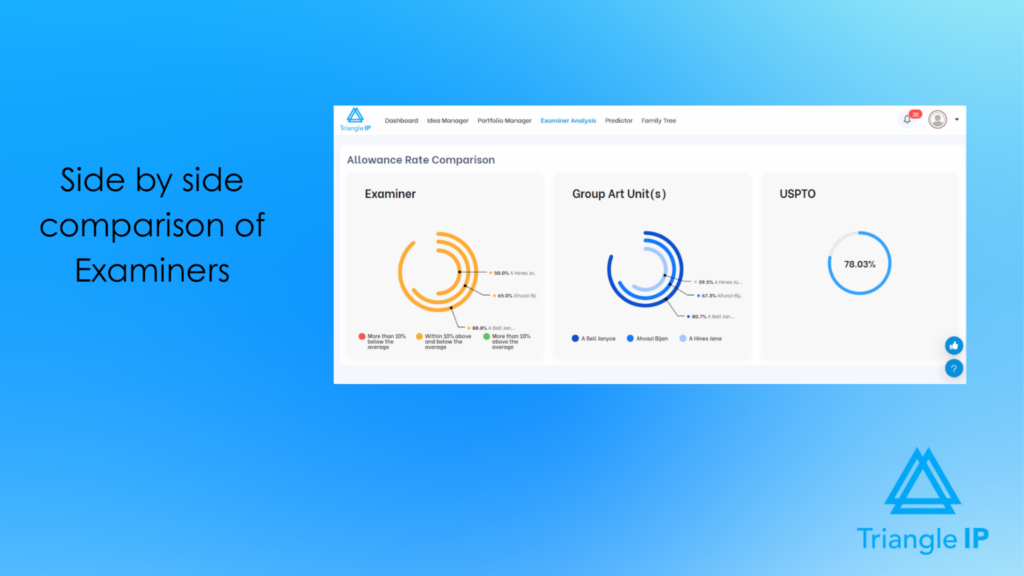
An individual examiner’s allowance rate gives you an incomplete picture.. What matters is how an examiner compares to their GAU (Group Art Unit) and the broader USPTO (United States Patent and Trademark Office) average.
| What is a GAU (Group Art Unit)? A Group Art Unit (GAU) is basically a small team of patent examiners at the USPTO who specialize in reviewing inventions from a specific technology area. Think of it like this: The USPTO is a big office It’s divided into teams, each covering a specific field (like chemistry, software, medical devices, etc.) Each of those teams is called a GAU Every GAU has a team lead (called a Supervisory Patent Examiner) and several examiners under them So when you file a patent, your application gets sent to the GAU that handles your type of invention, and they decide whether your invention qualifies for a patent. |
This helps you identify whether difficulty is examiner-specific or driven by the technical domain. That clarity enables better decisions on whether to continue prosecuting, adjust strategy, or abandon that patent early.
2. Does the Tool Show the Full Prosecution Path?
One data point does not tell you the complete story. You need to be able to evaluate the exact steps and path followed by the applicant through each process from first office action to final rejection/appeal/grant.
This will enable you to develop a strategy using what has actually worked with that examiner in the past; thus leaving no room for guess work.
3. Does it Break Down Interview and Pre-appeal Outcomes?
Strategically using interview and pre-appeal data significantly improves patent outcomes. A tool should show how often these approaches lead to allowance or further rejection by that examiner.
This helps you decide when an interview is worth the effort and when escalation through appeal may be the better option.
4. Can You Compare Examiners Side by Side?
Looking at one examiner in isolation limits your perspective. What matters is how multiple examiners compare across key metrics like allowance rates, office actions, RCEs, and timelines.
This helps you prioritize which cases are likely to require more effort, allocate budget more effectively, and prepare different prosecution strategies depending on examiner difficulty across your portfolio.
5. Does it Connect to Your Live Portfolio?
Teams can lose up to 40% of productive time due to context switching across tools. In a patent workflow, this often shows up as switching between examiner data and active cases just to connect the two.
Examiner data that lives in a separate tab from your actual applications creates unnecessary work. The most useful tools surface examiner insights directly alongside the cases they affect.
This helps your team act on insights immediately, without manual cross-referencing, making prosecution decisions faster and more consistent.
6. Does it Show Law Firm Performance Alongside Examiner Data?
Analyzing law firm and attorney data alongside examiner stats shows you exactly how difficult a specific examiner is to work with.
This data let’s evaluate external counsel or even benchmarking your internal IP teams with respect to a specific examiner.
If you found at least one firm that has consistently secured allowances, it may be worth learning from their approach or even reaching out to increase allowance rate for your patent applications.
7. Can You Filter for Current, Relevant Data?
An examiner’s behavior from five years ago may not reflect how they work today. Examiners change, and dockets shift over time.
A good tool lets you filter data by date range, technology area, and case type so the patterns you rely on are actually current and relevant to your applications. This helps you avoid decisions based on outdated trends and respond with strategies that reflect how the examiner is operating today.
8. Is the Output Easy for Stakeholders to Understand?
In-house IP counsel rarely presents data only to themselves. The insights need to travel to budget holders, innovation managers, and leadership who do not live inside prosecution day to day. A tool that produces clear, readable outputs saves you the time of translating data into a format people will actually engage with.
Now you know what to look for. So let us get into the tools themselves and see which ones actually deliver on that checklist.
6 Best US Patent Examiner Statistics Tools For In-House IP Teams To Choose From
(Find Your Right Fit Tool to Smartly Prosecute Growing Patent Portfolios)
While you can always evaluate tools on features, pricing, limitations, and real-world results, sometimes the philosophy behind why a tool was built can be the real deal maker or breaker. With that in mind, here is a quick lineup of the six tools and the philosophy each one was built on, before we get into the deep dive.
- Examiner Analysis by Triangle IP: Built by a former Big Law patent attorney who watched corporate clients pay for prosecution they didn’t understand and couldn’t control. The tool exists to give in-house teams back the steering wheel.
- Examiner Statistics by Patent Bots: Built to help attorneys get broader claims allowed more quickly and at lower cost. Examiner data as a practical prosecution aid, organized around the questions attorneys are already asking during prosecution.
- PatentAdvisor by LexisNexis: Built on the belief that transparency and predictability should be standard in patent prosecution. Examiner data is one layer inside a broader enterprise IP intelligence ecosystem.
- Prosecution Statistics by IronCrow IP: Built by practicing patent professionals frustrated that high-priced firms had access to examiner data that smaller practitioners didn’t. The free statistics exist to level that playing field.
- Examiner Analytics by Juristat: Built around one question: what if patent prosecution could be faster, easier, and more predictable? Juristat treats uncertainty as the core problem and data as the solution.
- Grant Statistics by Questel: Built as one part of a comprehensive IP management platform. The philosophy is integration over specialization, with examiner data sitting alongside search, portfolio management, and foreign filing in one ecosystem.
Let’s get into the details of each, one by one.
1. Examiner Analysis by Triangle IP
Examiner Analysis is a purpose-built feature inside the TIP Tool™, designed by a former patent attorney with 25+ years of prosecution experience. It is built into the TIP Tool™ and is also available as a standalone add-on.
It gives in-house IP teams a statistical profile of any USPTO patent examiner, covering allowance rates benchmarked against the examiner’s GAU and the overall USPTO average, office action trends, RCE patterns, appeal behavior, interview outcomes, and grant timelines.
The tool recently added multi-examiner comparison, letting teams analyze up to three examiners side by side. See how this works:
New Feature Unlock: Compare Multiple Patent Examiners at Once in the TIP Tool™
It also connects directly to your live portfolio, surfacing examiner insights right alongside your active applications rather than in a separate workflow.
Benefits of Examiner Analysis by Triangle IP
Triangle IP’s Examiner Analysis was built for in-house teams managing portfolios at scale, not for attorneys working case by case. Here is what that difference looks like in practice.
- Anticipate Prosecution Complexity Early
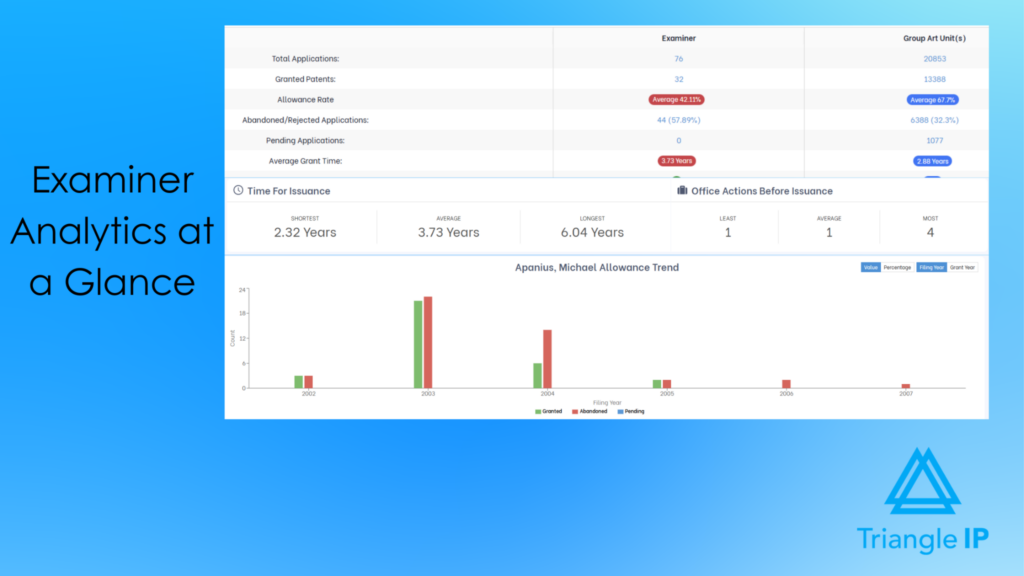
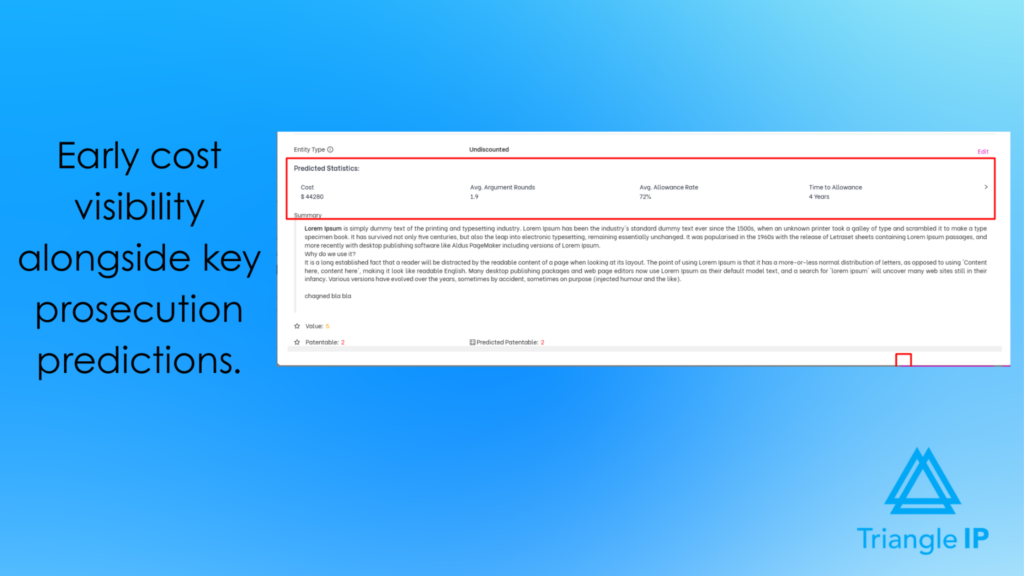
Before you spend a dollar on prosecution, Triangle IP shows you exactly what kind of examiner you are dealing with. It displays allowance rates alongside GAU and USPTO averages, providing essential context rather than just a number in isolation. You can see right away whether an examiner is genuinely difficult or whether the domain itself is the challenge.
- Plan Prosecution Budgets with Confidence
The tool shows average office actions before allowance and estimated grant timelines. For in-house teams that need to forecast prosecution costs and set expectations with business stakeholders, this data takes a lot of the guesswork out of budget conversations.
- Predict Likely Next Steps in Prosecution with More Clarity
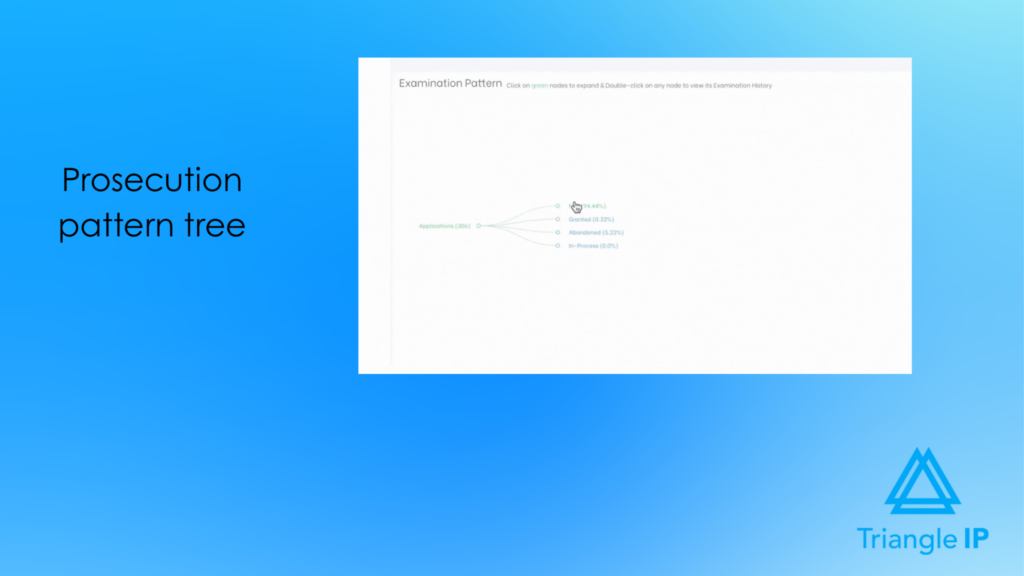
The prosecution pattern tree maps out how applications examined by your selected examiner typically play out allowance, RCE, appeal, or abandonment. Built from real historical data, it allows you to click any node to see what commonly happens next. This way, you already know the likely paths ahead, before you draft your response strategy.
- Decide when challenging a rejection makes sense.
The tool shows RCE success rates, appeal outcomes, and grant index data for each examiner. When you are sitting on a final rejection and trying to decide whether to fight, file an RCE, or walk away, this data helps you make that call with something more than gut instinct.
- Evaluate Outside Counsel Performance
Examiner Analysis connects prosecution outcomes to your law firm’s performance, not just the examiner’s behavior. That means when a case is struggling, you can tell the difference between an examiner who is difficult for everyone and a strategy that is underperforming. It makes conversations with outside counsel a lot more grounded.
- Run More Targeted Examiner Analysis
There is an advanced search option of patent examiners. With which you can filter by date range and technology area so the data you are working with reflects recent behavior, not patterns from years ago. Examiners change over time, and the tool makes sure your analysis keeps pace with those changes.
- Track Changes in Examiner Behavior Over Time
The tool tracks how an examiner’s behavior has shifted across different periods so you can spot trends that a static snapshot would miss. An examiner who used to be accommodating but has become stricter recently is a very different situation than one who has always been difficult.
- Compare Examiners Side by Side
You can line up to three examiners and compare them across allowance rates, office actions, abandonments, RCEs, appeals, and timelines. When you’re allocating prosecution resources across a diverse portfolio with multiple active cases, this view tells you where to lean in and where to prepare for a longer road.
Strengths of Examiner Analysis by Triangle IP
The TIP Tool holds a strong rating of approximately 5 out of 5 on G2. Reviewers consistently highlight three things:
- the platform is intuitive enough for non-IP professionals to use without a learning curve,
- the data is actionable rather than decorative
- and the portfolio integration means insights don’t sit in isolation.
One reviewer on Capterra noted that the tool helps protect only the strongest inventions with patents, replacing gut-based decisions with patent analytics for more informed IP choices.
What makes Examiner Analysis specifically valuable for in-house IP teams is the connection to the portfolio layer.
Limitations of Examiner Analysis by Triangle IP
- The full value of Examiner Analysis is realized when used within an ongoing portfolio workflow. Teams looking for one-off examiner lookups may not fully benefit from its integrated capabilities.
- Initial Learning Curve: For teams new to data-driven prosecution, the depth of metrics like RCE impact, and Art Unit predictors can feel overwhelming at first glance. However, Triangle IP mitigates this with a comprehensive Knowledge Base and guided onboarding to ensure users can quickly translate these complex statistics into winning strategies.
How Has Examiner Analysis by Triangle IP Performed in the Real World for an IP Team?
A leading Silicon Valley technology company was dealing with a familiar challenge. Patent outcomes were hard to predict. Prosecution costs were uncertain. Examiner behavior felt opaque case to case.
After adopting the TIP ToolTM, patent analytics began guiding their filing choices, prosecution strategy, and resource allocation.
The results were higher allowance rates, lower prosecution costs, and a more focused portfolio overall.
How Much Does the Examiner Analysis Tool by Triangle IP Cost
Examiner Analysis is available as part of Triangle IP’s TIP ToolTM full package, or as a standalone add-on. The examiner tool starts at $5/month. Triangle IP offers a freemium plan to get started, with paid tiers that unlock advanced prosecution insights.
You can find the full pricing details on their pricing page.
Can I Try the Examiner Analysis Tool by Triangle IP Before Buying?
Yes. Triangle IP offers a free one-month trial of the TIP ToolTM, which includes access to Examiner Analysis. No credit card is required to get started.
2. Examiner Statistics by Patent Bots
Patent Bot’s Examiner Statistics feature gives attorneys a dedicated page per USPTO examiner, pulling grant rates, prosecution timelines, appeals directly from USPTO data.
The tool is designed around a specific set of prosecution questions: should you amend claims, request an interview, or file an appeal? The data is organized to help answer those questions quickly.
Benefits of Patent Bot Examiner Statistics
- Appeals Statistics reveals appeal success rates and past decisions to help determine whether escalating to appeal is a viable path.
- Free statistics are available to all logged-in users. Premium statistics require a paid subscription and unlock rejection-level detail and advanced prosecution analytics.
- Provides grant rates, difficulty rankings, and interview benefits to inform prosecution strategies.
- Helps manage client expectations with clear timelines like 3-year grant rates.
Strengths Patent Bot Examiner Statistics
- User-friendly presentation of stats praised by practitioners like Sanders IP Law for easy application
- Practitioners report being better informed about potential obstacles, approval rates, and appeal strategies, and find the tool useful for managing client expectations.
- The free tier is a genuine differentiator. Basic examiner lookup requires no subscription, which makes it accessible for occasional use or smaller teams evaluating before committing.
- Rejection type breakdowns (e.g., 101, 102) highlight common arguments that have succeeded
Limitations of Patent Bot Examiner Statistics
- Premium features, such as detailed rejection-level data, require a paid subscription beyond the free basics.
- It lacks deep integration with portfolio management systems, limiting its use for enterprise oversight.
How Has Patent Bot Examiner Statistics Performed in the Real World for an IP Team
According to Patent Bots, practitioners using the tool have reported getting broader claims allowed, reaching allowance more quickly, and reducing prosecution costs. The grant rate timeline in particular is noted as useful for setting honest expectations with clients before prosecution gets expensive.
For in-house IP teams, the practical value depends on how directly you are involved in prosecution decisions versus relying on outside counsel to bring this data to the table.
How Much Does the Patent Bot Examiner Statistics Cost
Pricing starts at $25 per month or $486 per year for individual users, with firm-wide options available.
Can I Try the Patent Bot Examiner Statistics Before Buying?
Yes. The first time you log in to Patent Bots, you get a two-week trial that gives access to all statistics at no charge. After the trial, a subscription is required for premium statistics.
3. PatentAdvisor by LexisNexis
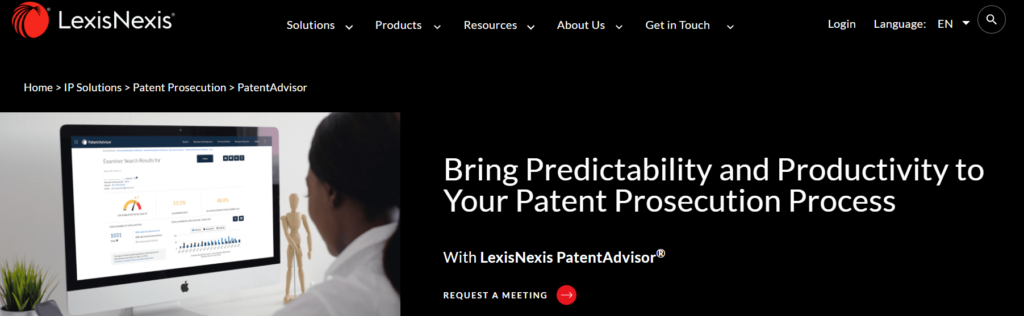
PatentAdvisor by LexisNexis gives patent professionals examiner-level data, prosecution timeline visibility, and performance benchmarking, all pulled from USPTO data.
It is built for law firms and in-house IP teams that want to make prosecution decisions based on numbers.
Benefits of PatentAdvisor by LexisNexis
- The Examiner Time Allocation (ETA) metric rates examiners as green, yellow, or red, providing an instant difficulty gauge.
- QuickPAIR offers a full prosecution timeline visualization with direct access to office actions and appeals.
- File wrapper search enables full-text querying across USPTO documents for strategy insights.
Strengths of PatentAdvisor by LexisNexis
- The free browser extension integrates stats directly into USPTO sites, highly valued for real-time planning.
- Proprietary metrics like examiner lottery predict assignment risks effectively.
- PTAB Decisions has access to more than 124,000 pre-grant decisions tagged to 227 legal issues.
- Measure and compare prosecution efficiency against USPTO averages and peers.
Limitations of PatentAdvisor by LexisNexis
- Pricing details are not public and require contacting sales, adding evaluation friction.
- It operates separately from portfolio tools, necessitating workflow switches.
How Has PatentAdvisor by LexisNexis Performed in the Real World for an IP Team
A documented PatentAdvisor user, SAP’s IP counsel used the tool to ensure prosecution spend was as efficient as possible, using art unit and examiner data to decide when to cut prosecution short versus when extending or filing an appeal was worth the investment.
The team also used it to put numbers on their own prosecution performance and identify where they could improve.
How Much Does the PatentAdvisor by LexisNexis Cost
This information is not publicly listed on their website. Contact LexisNexis for a quote. The browser extension is free with no payment required.
Can I Try the PatentAdvisor by LexisNexis Before Buying?
Yes. Demos are available on request. The free browser extension lets you evaluate data quality before committing to a subscription.
4. Prosecution Statistics by IronCrow IP
Prosecution Statistics is built for practitioners who need fast examiner lookup without a subscription commitment.
IronCrow AI has compiled prosecution statistics for all 10,000+ patent examiners and 500+ art units in the USPTO.
It is presented as multi-tab dashboards with interactive visualizations, detailed application data, appeals analysis, and strategic recommendations.

Benefits of Prosecution Statistics by IronCrow IP
- According to McCoy Russell LLP the tool has Interactive dashboards covering over 10,000 examiners and 500 art units, including appeals and interview data.
- Provides strategic recommendations based on visualized prosecution patterns.
- Enables quick comparisons of examiner behaviors and timelines..
Strengths of Prosecution Statistics by IronCrow IP
- Completely free access promotes USPTO data transparency for all users.
- User-friendly interface praised in comparisons for search functionality.
Limitations of Prosecution Statistics by IronCrow IP
- Lacks advanced AI features available in IronCrow’s paid add-ons.
- Primarily a lookup tool without built-in portfolio tracking.
How Has Prosecution Statistics by IronCrow IP Performed in the Real World for an IP Team
IronCrow AI is used by in-house counsel at multiple Fortune 100 companies. However, no published case studies specific to the Prosecution Statistics tool are available at this time.
How Much Does the Prosecution Statistics by IronCrow IP Cost
Prosecution Statistics is offered as a completely free service, with no credit card required, no trial period.
Can I Try the Prosecution Statistics by IronCrow IP Before Buying?
No purchase is needed. The statistics are freely accessible directly on IronCrow’s website.
5. Examiner Analytics by Juristat
Juristat Analytics helps IP teams reduce costs, improve prosecution outcomes, and manage portfolios at scale.
The Examiner Analytics module sits within this broader platform, giving you examiner-level data to inform prosecution decisions before you commit to a response path.
Benefits of Examiner Analytics by Juristat
- Examiner Analytics provides allowance rates, average office actions to allowance, pendency, and interview/appeal tendencies for each examiner, framed against art unit and tech center benchmarks.
- It reveals quarter-end end-loading behavior, showing how allowance probability shifts, helping time responses strategically.
- Custom filters by timeframe, application type, rejection basis, firm, or attorney tailor data to your case precisely.
- Prosecution pattern visualizations map outcomes from first office action to allowance or abandonment via flow graphs.
- Custom alerts flag high-risk cases based on OA counts or examiner metrics to prevent cost escalation.
Strengths of Examiner Analytics by Juristat
- Built on a comprehensive USPTO database with real-time updates and 300,000+ appeals outcomes for unmatched depth.
- Delivers 10-20% annual cost reductions and $1M+ savings through optimized strategies, per user testimonials.
- Enables +10% higher allowance rates vs. USPTO average and 10x ROI in the first year.
Limitations of Examiner Analytics by Juristat
- Reporting dashboards may feel complex initially for users new to advanced analytics platforms.
- Functions as a dedicated analytics tool, complementing but not replacing full portfolio management systems.
How Has Examiner Analytics by Juristat Performed in the Real World for an IP Team
By identifying unnecessary costs and optimizing prosecution strategies, firms have cut spend by 10 to 20% without sacrificing results. The end-loading data has also helped teams time prosecution responses more strategically around examiner quarterly behavior.
How Much Does the Examiner Analytics by Juristat Cost
Offers customizable pricing plans tailored to organizational needs; specific details available via quote request
Can I Try the Examiner Analytics by Juristat Before Buying?
Juristat offers a free trial. A demo is also available on request through their website.
6. Grant Statistics (Prosecution Pack) by Questel
Grant Statistics is a module within Questel’s Prosecution Pack, which itself sits inside the broader Orbit Intelligence platform.
It covers US and JP patent applications and gives prosecution teams examiner behavior data, art unit predictions, rejection analysis, and appeal statistics.
It is one component of a larger IP management ecosystem, not a standalone examiner tool.
Benefits of Grant Statistics by Questel
- Examiner analytics delivers case outcomes, rejection rates, and interview openness data to anticipate prosecution challenges early.
- Art unit prediction uses semantic analysis on application text in English, Chinese, Japanese, or German for proactive assignment forecasting.
- Rejection analysis filters by cited patents, examiner, firm, or applicant to spot patterns like habitual prior art reliance.
- Prosecution path prediction reveals next-stage stats and likely final outcomes for strategic planning.
Strengths of Grant Statistics by Questel
- Orbit Intelligence’s fast database and intuitive interface earn high marks from Gartner reviewers for patent analysis.
- Seamless integration within Questel’s ecosystem benefits teams handling US/JP workflows without tool-switching.
Limitations of Grant Statistics by Questel
- According to Patsnap, Software occasionally runs slow, with non-intuitive options causing user confusion per Gartner feedback.
- Exports require manual editing for use in other systems, adding post-analysis work.
- Not standalone; demands broader Orbit subscription for access.
How Has Grant Statistics by Questel Performed in the Real World for an IP Team
Questel’s documentation does not surface specific case studies tied to Grant Statistics as a discrete feature.
How Much Does the Grant Statistics (Prosecution Pack) by Questel Cost
Questel does not publish pricing publicly. You can contact Questel directly for pricing details.
Can I Try the Grant Statistics (Prosecution Pack) by Questel Before Buying?
Questel offers demos on request through their website. A free trial option for the Prosecution Pack is not publicly available.
Each tool on this list gives you a window into examiner behavior. Some do it through fast lookup. Others through deep analytics or enterprise-grade data layers.
But examiner data only moves the needle when it connects to the decisions your team makes every day:
- which cases to push
- which to abandon
- how to brief outside counsel
- how to defend your prosecution budget to leadership.
And that is the gap Triangle IP’s TIP Tool™ was built to close.
Beyond Examiner Data: How Triangle IP’s TIP ToolTM Connects Prosecution Insights with Portfolio Strategy
Choosing the right patent examiner statistics tool is important, but solving only for examiner behavior isn’t enough.
In-house IP teams like yours are also responsible for capturing innovation across the enterprise, prioritizing the strongest ideas, collaborating with inventors and outside counsel, and tracking every application from disclosure through prosecution and post-filing.
Triangle IP’s TIP Tool™ brings this together by enabling end-to-end patent lifecycle management, from idea capture and filing decisions to examiner analysis, prosecution tracking, and portfolio oversight, all within a single platform. This eliminates the need for disconnected tools, manual spreadsheets, and costly docketing systems.
If you want to see how this fits your workflow, you can book a short demo with the founder for a guided walkthrough.
Curious what your prosecution data actually reveals about your portfolio?
Book a personalized demo from the form below and see exactly where the TIP Tool™ fits your workflow.
Disclaimer: The information in this article is sourced from the internet and may not be entirely accurate or up-to-date. We recommend visiting the respective software websites for the most current and reliable information. The opinions expressed here are those of the author and may not reflect the views of Triangle IP. We are not liable for any consequences that may arise from relying on the information provided in this article.
Frequently Asked Questions Around US Patent Examiner Statistics
1. Who Are the Strictest US Patent Examiners in History?
Using Triangle IP’s Examiner Analysis Tool, we identified several examiners with allowance rates under 10%:
| Examiner | Allowance Rate |
| A. Janice Mooneyham | 1.64% |
| Mathew Richard Syrowik | 3.47% |
| J. Jonathan Whitaker | 5.49% |
| Henry M. Rodney | 7.21% |
| Kevin Worrell | 7.24% |
2. How Can I Find Out Which Examiner Is Assigned to My Patent Application?
You can check the USPTO’s Patent Center or Public PAIR by entering your application number. Once your application has been assigned, the examiner’s name will appear in the application details. Triangle IP’s Examiner Analysis tool, will also surface the assigned examiner directly within your portfolio view.
3. What Is Considered a Low Examiner Allowance Rate?
The USPTO’s overall allowance rate is around 78%. Generally, an examiner with an allowance rate below 50% is considered strict, and anything below 20% signals a significantly difficult prosecution ahead. However, allowance rates vary by technology domain, so it helps to compare your examiner’s rate against their specific Art Unit average rather than the USPTO average alone.
4. What Does Interview Responsiveness Data Actually Tell Me About an Examiner?
Interview responsiveness data shows whether an examiner interview is likely to improve your chances of allowance. By analyzing post-interview outcomes, in-house IP teams can identify which examiners are receptive to discussions and which are not. This helps prioritize interviews where they are most effective.
5. How Is Art Unit Data Different From Examiner-Level Data?
Art Unit data sets the baseline by showing average behavior within a technology domain.With tools like Triangle IP’s Art Unit Predictor, you can see their allowance rates, office action frequency, and response to RCEs or interviews. Examiner data goes deeper, revealing how the specific person assigned to your case behaves.
6. Can Examiner Statistics Help Me Evaluate Whether My Outside Counsel Is Performing Well?
Yes, patent examiner statistics can help you evaluate outside counsel performance by comparing their prosecution outcomes against examiner benchmarks. If your attorney requires significantly more office actions than the examiner’s average, it may indicate inefficiencies in strategy. Conversely, strong results with difficult examiners highlight effective counsel.
7. How Can an Examiner Statistics Tool Help Me Budget More Accurately for Patent Prosecution?
When you pull examiner data before prosecution begins, you can set realistic cost expectations per case, flag high-risk applications early, and allocate resources to the filings most likely to succeed.
8. What examiner data should I look for before filing a patent application?
Focus on allowance rates, average office actions, RCE/appeal success, interview outcomes, and pendency ideally benchmarked to art unit/US PTO averages.