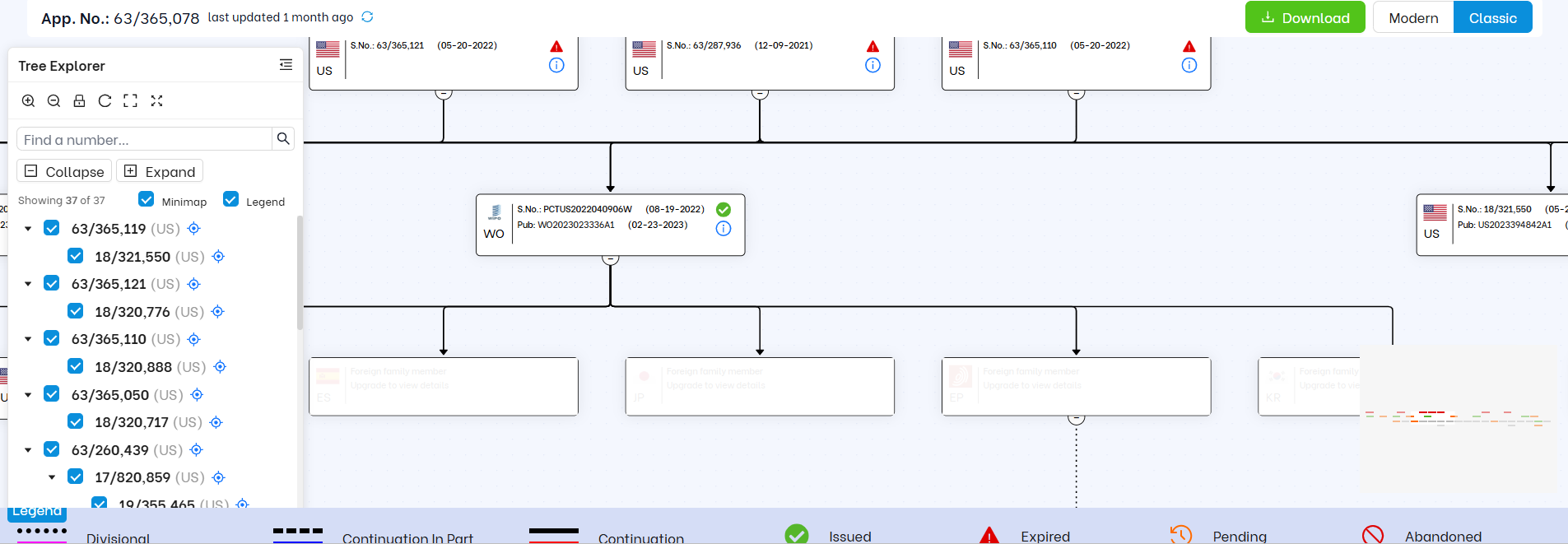
Explore patent family relationships in three ways: Classic, Modern, and Gantt views. Use Tree Explorer to quickly guide your patent strategy for global expansion, continuation filings, new product launches, and portfolio maintenance.
Uncover the Advantages that the Patent Family Trees by Triangle IP Offer
See Patent Families Clearly
Manage Your Patent Portfolio Confidently
A View for Every Perspective
Triangle IP’s Family Tree Generator gives you three powerful options—Classic, Modern, and Gantt Chart. Choose the view that works best for you.
Global Coverage, Simplified
View U.S. and international filings together for a complete global perspective. Instantly spot gaps or confirm protection in key markets with intuitive flag indicators.
All the Details, One Click Away
Get the bibliographic details you need in seconds—application numbers, issue dates, priority data, and direct links to Espacenet and Global Dossier.
Instantly download patent PDFs for immediate reference.
Study Large Patent Families Easily
Tree Explorer lets you manage even the largest patent families right in your browser. Search by application number, show or hide branches, and isolate a single lineage, all without losing sight of the full family.
Clear Prosecution Timelines
See your portfolio’s story unfold with intuitive Gantt Chart timelines. Filing dates, statuses, and expirations—beautifully color-coded and easy to follow.
Instant Clarity Into Your Patent Portfolio
The legend in Triangle IP’s Patent Family Tree Generator, with intuitive symbols and color codes, is your shortcut to instant insights.
From the navigation bar, click on Family Tree to open the Patent Family Tree Generator.
3. Enter Your Application Number
Type the patent number or patent application number into the search field.
4. Generate Your Family Tree
Once you search, the tool maps out the full patent family for you.
5. Explore Your Tree
Tree Explorer helps you move through even the largest patent families. You can also switch between the Modern and Classic views.
6. Download Your Family Tree
Click the Download button to save your family tree as an SVG file. It’s ready to share or drop into presentations and portfolio reviews.
Great Tools. Zero Cost to Start.
The Patent Family Tree Generator comes built into the TIP Tool™ or stands on its own. You can start with a free trial or opt for the paid plan. Here’s how the two compare:
Note:After your free trial ends, applications already in your portfolio still show both their US and foreign family members. Any new application you add will show US family members only. You can subscribe anytime to get full access back.
Explore the complete pricing plans that fit your needs and unlock the Family Tree Generator plus other advanced IP features.
With Triangle IP’s Examiner Analytics tool, get the insights you need—allowance rates, prosecution rounds, and timelines. Decide when to push, when to negotiate, or when to move on.