
| TL;DR – Most patent portfolio software focuses on tracking issued patents, pending applications, and deadlines. Winning IP teams focus on the next set of decisions: what to file, continue, abandon, or prioritize as filing, maintenance, and counsel costs increase. This guide compares 7 leading patent portfolio software. It highlights the capabilities that support smarter, lower-risk IP decision-making. The TIP Tool™ differentiates itself by starting at ideation and carrying decision intelligence through the full patent lifecycle. It helps teams file less, spend smarter, and protect what truly matters. |
If you’re searching for patent portfolio software, something probably feels harder than it should.
The patents exist. Deadlines are managed. Yet simple questions slow everything down: Where should we file next? Which patents are worth maintaining? Which no longer justifies the cost? The answers are scattered across emails, spreadsheets, and outside counsel updates. This makes it difficult to see not just legal status, but the market potential of each patent.
That’s why teams turn to patent portfolio software. Not just to track patents, but to gain clarity and make better decisions earlier.
In this guide, we compare 7 widely used patent portfolio software, including the TIP Tool™, and explore how they differ in real-world workflows.
Before diving in, it’s worth understanding which capabilities truly support better IP decisions.
Not All Patent Portfolio Software Is the Same. Here are the Core Capabilities You Must Look For
Look at companies like Apple, Qualcomm, and Amazon. They didn’t build massive patent portfolios by accident. Recent data shows that leading firms are deliberately shaping their portfolios around core technologies. They decide what to grow, what to trim, and where patents actually support market leadership.
Managing portfolios at that level requires more than tracking patents. It requires the right patent portfolio software that helps teams make clear, defensible decisions at every stage.
So what actually matters when you choose a patent portfolio platform? Let’s look at the capabilities that help IP teams move forward with confidence.
1. Portfolio Visibility (Single Source of Truth)
What to look for
- One centralized view of all patents and applications
- Clear status tracking (pending, granted, abandoned, expired)
- Easy filtering by technology, business unit, jurisdiction, or owner
Why it matters
Without visibility, portfolios grow blindly. Good software should answer:
- What do we own?
- Where are we spending money?
- What’s actually valuable?
2. Decision Support — Not Just Record Keeping
What to look for
- Built-in analytics and dashboards
- Metrics beyond counts: prosecution progress, delays, bottlenecks
- Ability to compare cases, trends, and outcomes
Why it matters
Spreadsheets tell you what exists.
Smart portfolio software helps you decide what to continue, expand, or abandon.
3. Early-Stage Evaluation Capabilities
What to look for
- Idea or invention disclosure management
- Early signals on patentability or strategic value
- Structured internal vetting before filing
Why it matters
The most expensive patent is the one you never should have filed.
Strong tools help you make better decisions before costs escalate.
4. Cost Awareness & Budget Forecasting
What to look for
- Visibility into cost-to-date and projected costs
- Ability to associate spend with individual patents or families
- Support for budgeting and portfolio pruning decisions
Why it matters
Patent portfolios are financial assets and liabilities.
You should always know:
- What this case has cost
- What it’s likely to cost next
- Whether the investment still makes sense
5. Examiner, Art Unit, or Prosecution Insights
What to look for
- Historical prosecution data and trends
- Insights into delays, rejection behavior, or allowance likelihood
- Comparisons across examiners, art units, or cases
Why it matters
Not all patents face the same difficulty.
Software that adds context to prosecution behavior helps teams plan smarter strategies rather than reacting blindly.
6. Collaboration Across Stakeholders
What to look for
- Role-based access (inventors, managers, legal, admins)
- Clear workflows for review, approval, and drafting
- Reduced reliance on email threads and attachments
Why it matters
Patent decisions involve R&D, legal, and business teams.
Good software keeps everyone aligned without chaos.
7. Scalability as the Portfolio Grows
What to look for
- Tagging, filtering, and search at scale
- Support for multiple portfolios or business units
- Clean handling of large volumes (hundreds or thousands of cases)
Why it matters
What works for 20 patents breaks at 200.
Portfolio software should scale without increasing complexity.
8. Reporting for Leadership & Strategy Reviews
What to look for
- Visual summaries for executives
- Easy exports for board or management meetings
- Real-time data instead of manually prepared reports
Why it matters
Leadership doesn’t want raw data — they want clarity. The right software turns IP data into strategic conversations.
9. Integration With Existing IP Operations
What to look for
- Ability to work alongside or ingest data from docketing systems
- Flexible import/export options
- Reduced duplicate data entry
Why it matters
Patent teams already use multiple systems.
Portfolio software should connect the dots, not create more silos.
Using these capabilities as a guide, the table below offers a quick, side-by-side snapshot of leading patent portfolio software options. This makes it easier to spot which platforms align with what you’re actually looking for.
A Quick Comparison Snapshot of the Top 7 Patent Portfolio Software
If you’ve ever felt that “all these tools sound the same,” this table is where the differences start to show.
| Tool | Best For | User Rating | Pricing | Trial Info |
| The TIP ToolTM | –startups –enterprises –individual inventors–patent practitioners. | ~ 5/5 | Start for free. For full details, visit the pricing page. | Demo Free Trial |
| Foundation IP | High performing law firms | 4/5 | Not available | Demo |
| Anaqua AQX Corporate | –Corporates | 4.4/5 | Not available | Demo |
| Equinox | –Law Firms–Corporates | Not Available | Not available | Demo |
| Patsnap | –Law Firms–Life Sciences–High-Tech | 4.3/5 | Contact Sales to know the pricing. | Demo |
| AppColl | –Law firms–Corporations | 4.7/5 | Plans start at $100 per user/month for law firms & $130 per user/month for corporate teams. For full details, visit the pricing page. | Demo Free Trial |
| IamIP | –IP teams–R&D leaders–law firms | 4.1/5 | IamIP offers Starter, Pro, and Corporate plans. For full details, visit the pricing page. | Demo |
A table can help you scan options. But choosing the right patent portfolio software requires understanding how these tools perform in real-world IP workflows.
That’s where the detailed breakdown begins.
Make Informed IP Decisions: Choose From These Seven Best Patent Portfolio Software Options in 2026
Patent portfolios are no longer measured by how many patents you hold, but by how much value they deliver. According to IAM analysis, tech companies face over $4.7B in annual patent renewal fees. Industry leaders like IBM have already cut ≈38% of their portfolios by pruning low-value assets early. That shift exposes a hard truth: tracking deadlines isn’t enough. IP teams now need tools that model cost, quality, and strategic impact—before renewal decisions hit.
Below are the 7 best patent portfolio software for 2026, built to help IP leaders see value clearly, act earlier, and defend every portfolio decision with data. They are:
- The TIP ToolTM
- FoundationIP
- Anaqua AQX Corporate
- Questel Equinox
- PatSnap
- AppColl
- IamIP
Let’s start with the TIP ToolTM.
1. The TIP Tool™
User Rating: ~ 5/5
Best For
The TIP Tool™ is designed for startups, enterprises, individual inventors, and patent practitioners. The platform supports the entire IP lifecycle. This includes everything from early invention disclosure to active portfolio monitoring and prosecution management.
Overview
The TIP Tool is a patent portfolio software built to give organizations a clear, working view of their patents.
It supports the full lifecycle: from early invention disclosure through filing, prosecution, and ongoing portfolio management.
The platform centralizes ideas, applications, and portfolio status in one system, so teams can see what they have, where each patent stands, and what decisions are required next. By applying patent data analytics across the lifecycle, the TIP Tool™ helps teams move beyond basic tracking and manage their portfolios with visibility into progress, priority, and cost.
Key Features & Benefits
The following features highlight how the platform approaches patent portfolio management in practice.
End-to-End Patent Portfolio Visibility
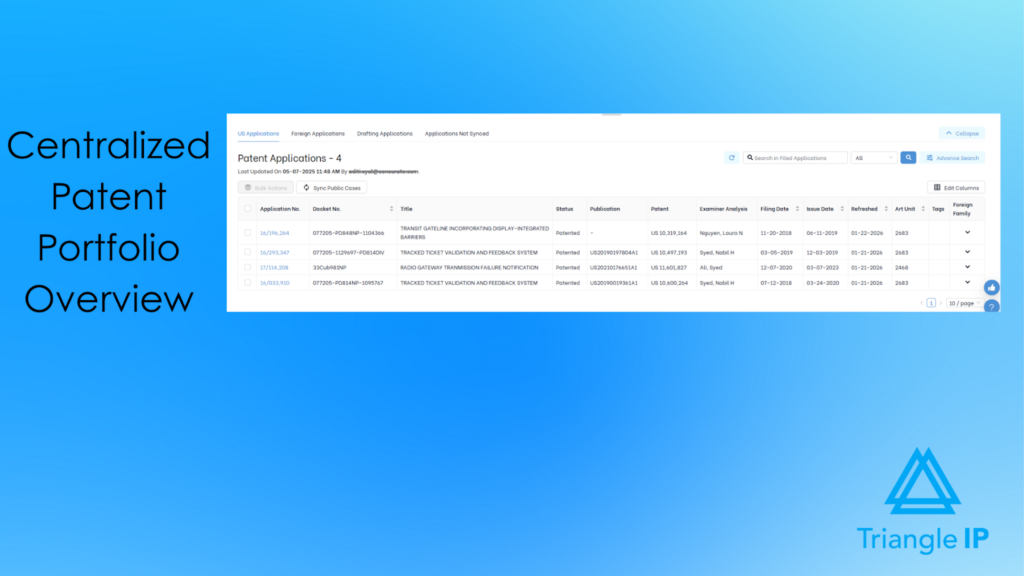
The TIP Tool™ centralizes invention disclosures, patent applications, and active portfolios in a single system through its Portfolio Manager. This gives teams a clear, up-to-date view of what they own and where each case stands. It also shows how the portfolio is distributed, without relying on spreadsheets, emails, or static reports.
Structured Lifecycle Workflows
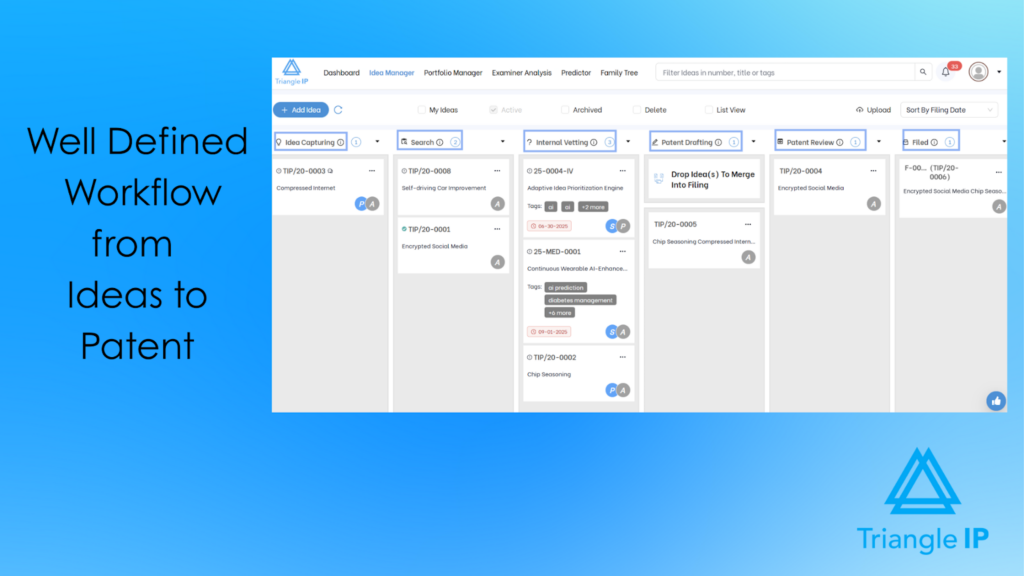
The platform supports defined workflow stages that track innovation from early disclosure through internal vetting, drafting, filing, and active portfolio management. This makes progress visible and reduces handoff friction. It also ensures ideas don’t get lost as they move across teams and time.
Early-Stage Idea Capture and Nurturing
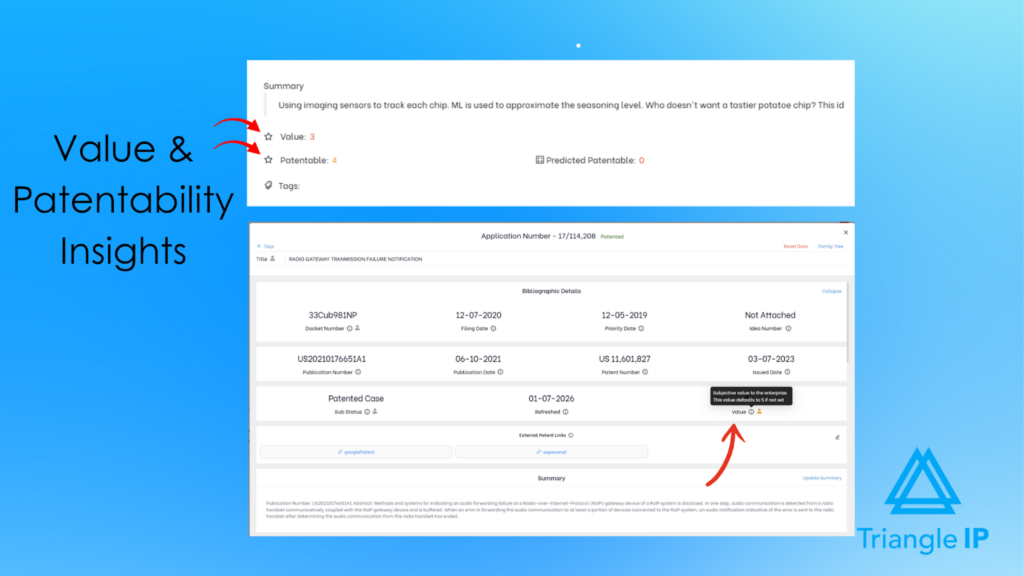
The TIP Tool™enables teams to capture invention disclosures early and continue refining, reviewing, and nurturing ideas before filing. By supporting structured evaluation upfront, teams can assess patentability and strategic relevance before costs escalate.
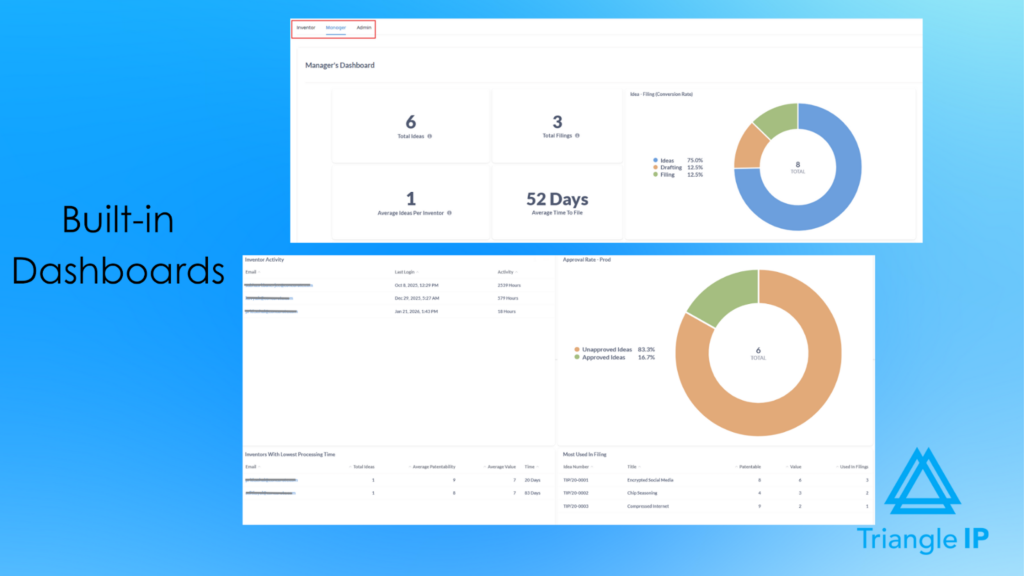
Decision Support Through Patent Data Analytics
Built-in dashboards and portfolio views surface more than raw counts. Teams can identify delays, bottlenecks, and trends across cases. This enables informed decisions about which patents to continue, expand, pause, or abandon.
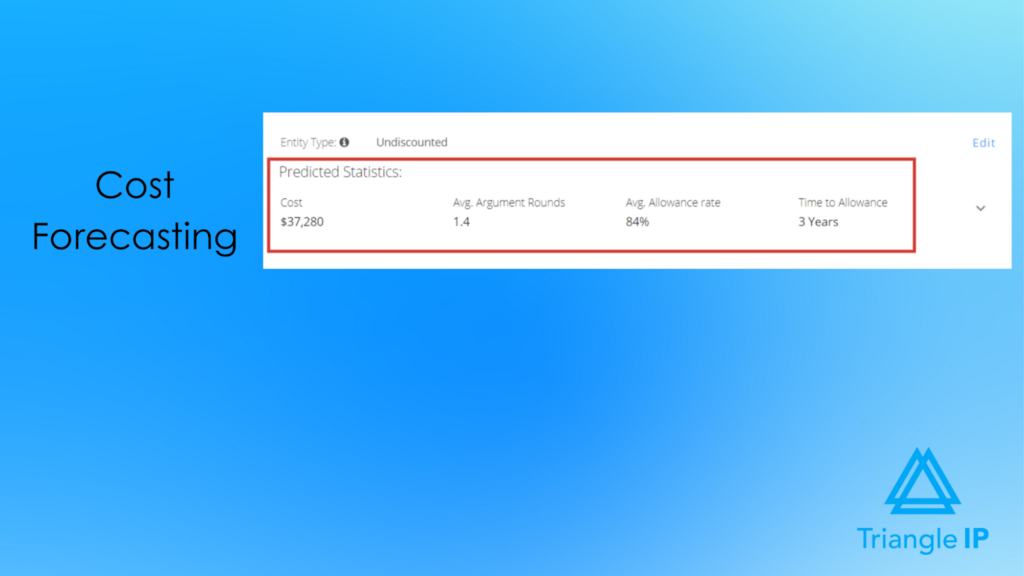
Cost Awareness and Budget Forecasting Across the Lifecycle
The platform provides visibility into cost-to-date and projected costs at the case level. This allows IP teams to associate spend with outcomes, support budgeting decisions, and evaluate whether continued investment still makes sense.
Examiner, Art Unit, and Prosecution Intelligence
The TIP Tool™ adds context to prosecution by analyzing examiner behavior, art unit trends, allowance patterns, and delays. These insights help teams plan prosecution strategies proactively instead of reacting blindly during examination.
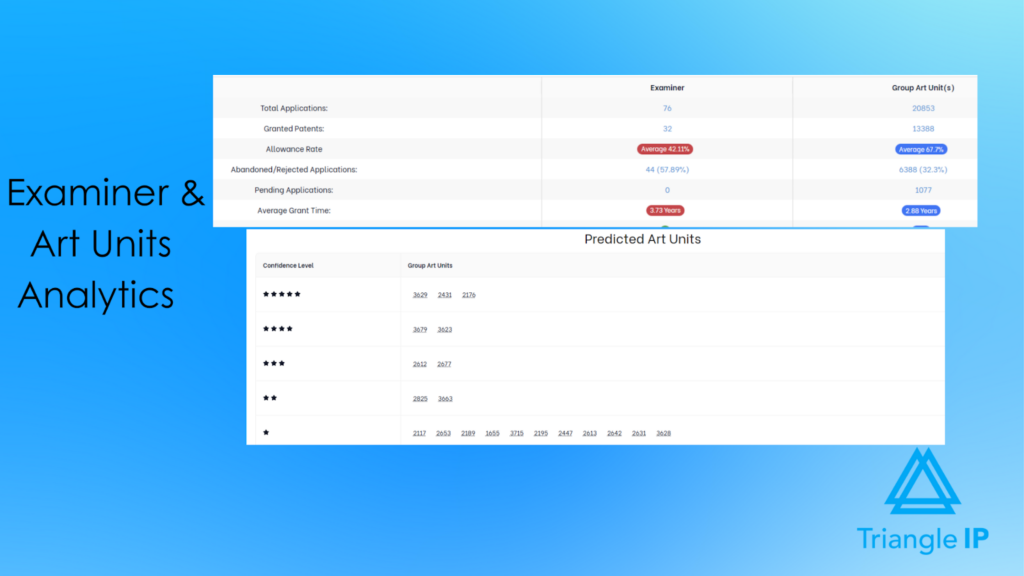
Explore the art unit predictor for free.
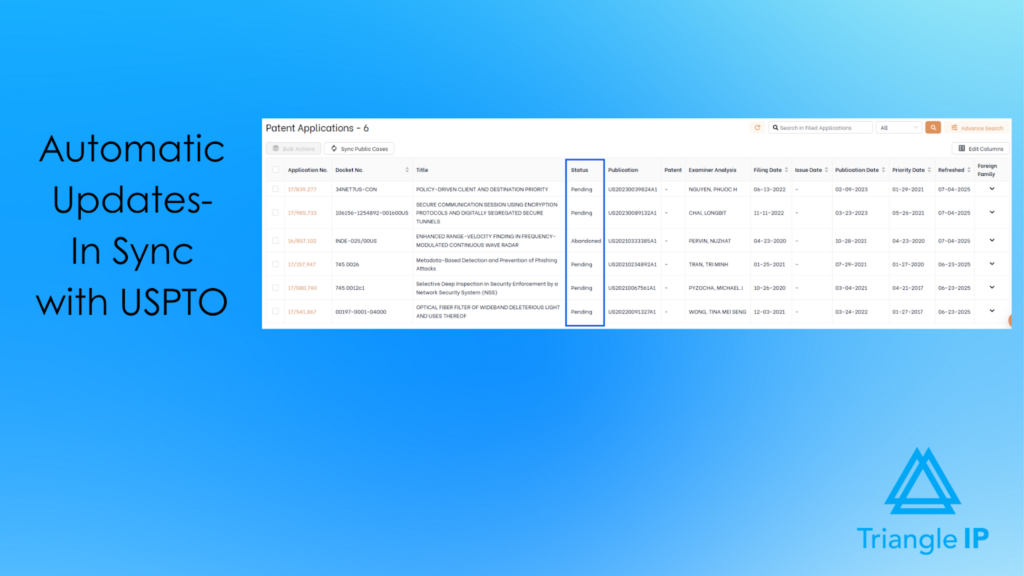
Automatic USPTO Status Updates (Public & Private PAIR)
The platform automatically tracks both published and unpublished U.S. applications using USPTO data sources. This reduces manual status checking and ensures portfolio views reflect the latest prosecution activity.
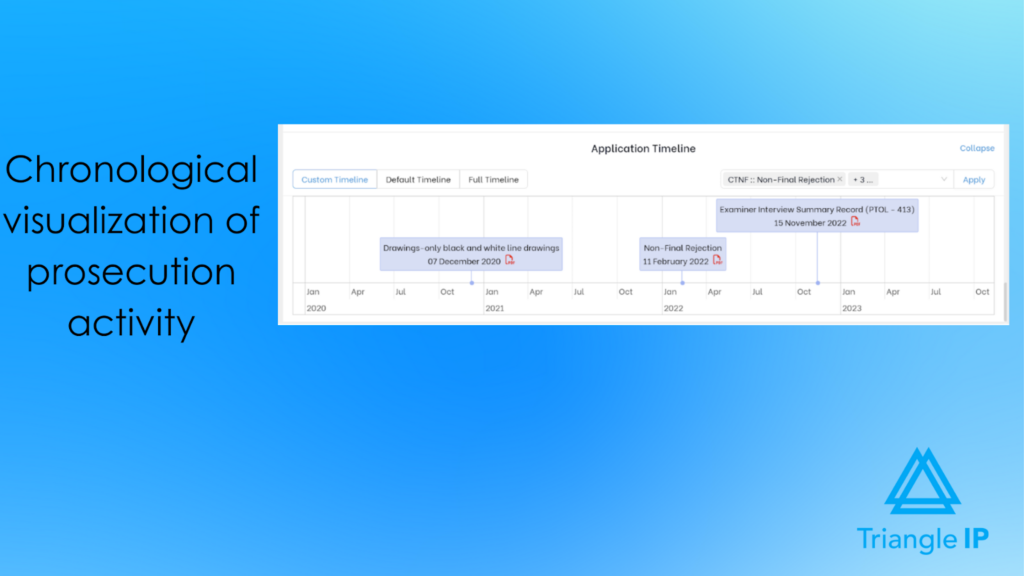
Application Timeline Visualization
Each patent application includes a chronological timeline of prosecution events. This makes it easy to see how a case has progressed, where time is being spent, and where delays occur. It is useful for audits, reviews, and strategy discussions.
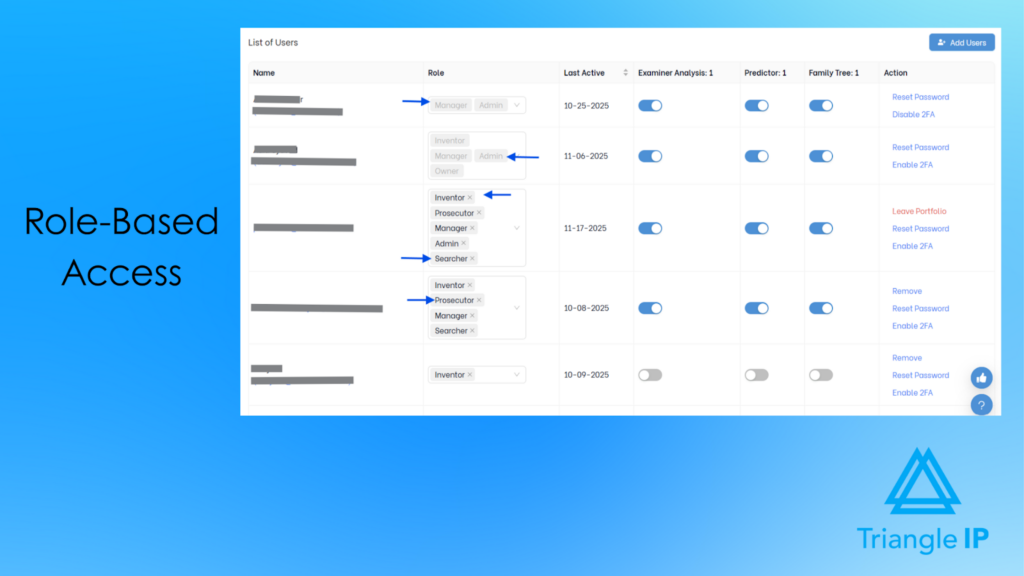
Role-Based Collaboration Across Stakeholders
Inventors, managers, legal teams, prosecutors, and admins work within defined roles and permissions. This keeps collaboration structured, reduces email dependency, and ensures everyone operates from the same, up-to-date information.
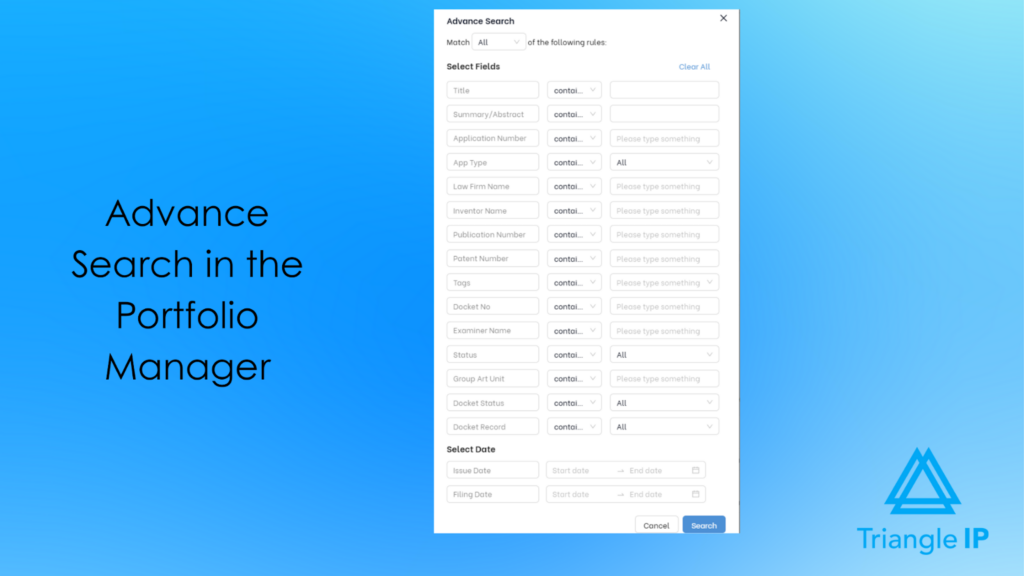
Scalable Organization Using Tags, Filters, and Search
As portfolios grow, TIP Tool supports tagging, filtering, and advanced search across ideas and applications. This allows teams to manage multiple portfolios, technologies, or business units without increasing complexity.
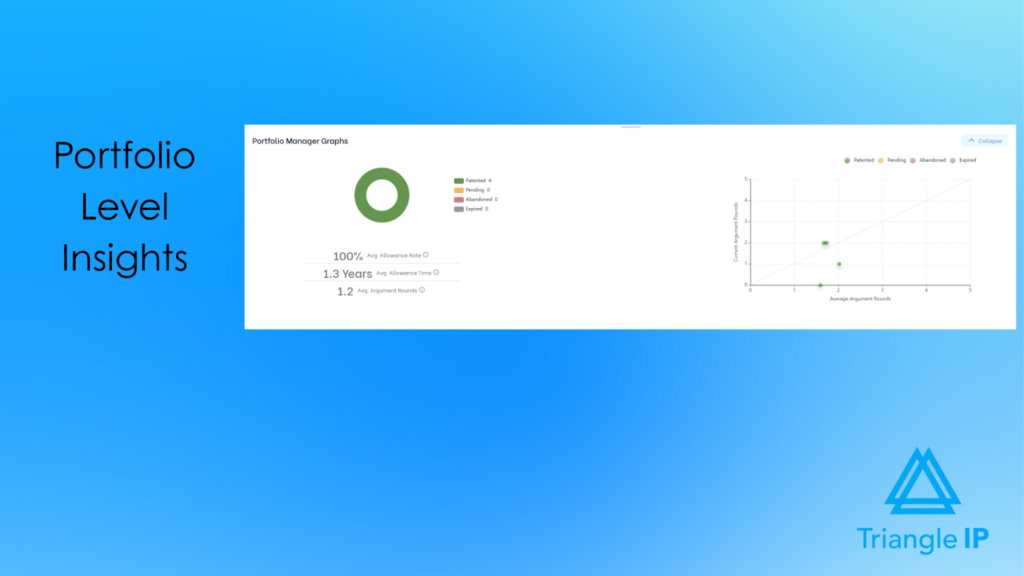
Executive-Ready Reporting and Portfolio Views
Visual summaries and real-time portfolio views support leadership reviews and strategic discussions. Teams can present current data without manual report preparation, helping leadership focus on risk, value, and direction.
Integration With Existing IP Operations and Docketing Systems
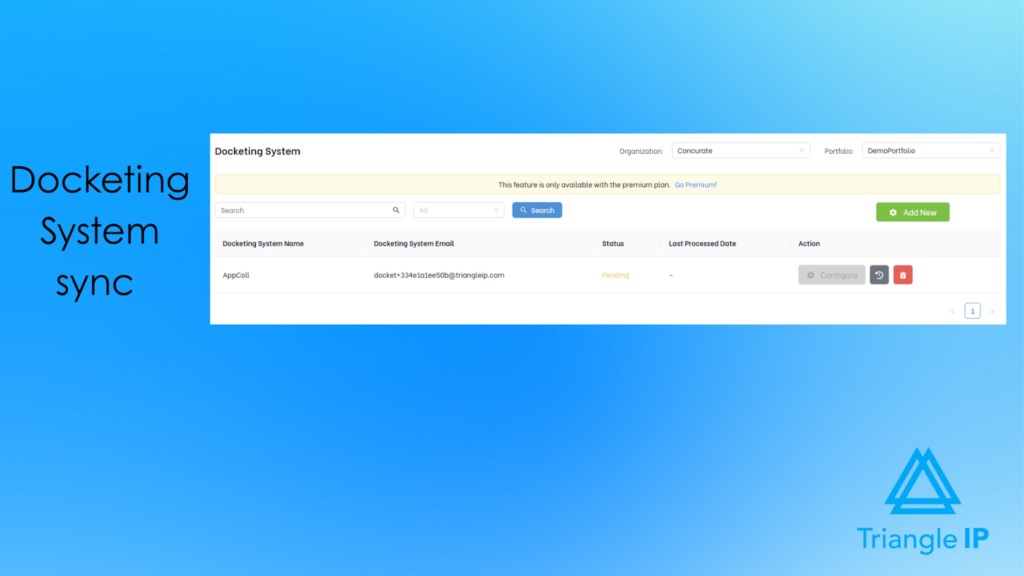
The TIP Tool™ integrates with existing IP workflows through flexible import/export options and docketing system sync. This allows teams to connect operational data with portfolio-level strategy while reducing duplicate data entry.
Limitations
Teams that are new to structured IP workflows may experience an initial learning curve. To ease onboarding, the TIP Tool™ offers a comprehensive knowledge base with step-by-step helpdesk articles and short walkthrough videos. These resources help users get up to speed quickly and minimize reliance on trial and error.
Pricing
The TIP Tool™ uses flexible pricing to accommodate teams at different stages of growth.
- Free Plan: A simple way to get started, with support for up to 10 users.
- Premium Plan: Affordable monthly pricing for growing teams that need additional users, storage, and functionality.
- Custom Plan: Designed for large enterprises with advanced requirements. Contact the team to create your plan.
Teams can also add standalone tools such as Examiner Analysis, Art Unit Predictor, or the Patent Family Tree Generator as needed.
For full plan details and add-on options, visit the pricing page.
Demo & Trial Availability
If you’d like to see how the TIP Tool™ works in practice, you can book an interactive demo or explore the platform through a free trial after signing up.
2. FoundationIP
User Rating: 4.0/5
Best For
IP law firms managing large or growing patent portfolios that need structured docketing, accurate patent data, and scalable portfolio oversight.
Overview
FoundationIP is a cloud-based patent portfolio software designed to help law firms manage patents alongside other IP assets in a centralized system. It focuses on improving operational efficiency, reducing risk, and supporting portfolio-level oversight through automation, task management, and access to Clarivate patent data.
Source: FoundationIP page
Key Features & Benefits
Here are the key features that define how this platform supports patent portfolio management.
Patent Docketing and Deadline Management
Helps firms track patent deadlines and reduce risk with one-click docketing, task dashboards, and automated reminders.
Centralized Patent Portfolio Management
Enables teams to manage patent records, prosecution history, and related IP assets in one configurable system.
Access to Clarivate Patent Data
Improves patent portfolio accuracy with verified data, automatic law updates, and recalculations across 300+ jurisdictions.
Patent Family and Lineage Tracking
Supports portfolio clarity by visualizing priority claims, terminal disclaimers, and relationships through family tree views.
Patent Portfolio Reporting and Dashboards
Allows firms to analyze patent data, generate portfolio reports, and measure KPIs using customizable analytics.
Patent Renewals and Maintenance Workflows
Simplifies renewal decision tracking and automates renewal date management for patent portfolios.
Portfolio Analysis Integrations
Extends patent portfolio insights through integrations with Clarivate tools such as Innography and PatentScout.
Limitations
- Average setup time is around four months, with some users reporting delays.
- Creating custom reports can be challenging and may require additional training.
- Some users find the pricing expensive, particularly for smaller firms.
- A few reviews note inconsistent customer support during implementation.
Pricing
Not disclosed on the website
Demo & Trial Availability
Demo is available upon request.
3. Anaqua AQX Corporate
User Rating: 4.4 / 5
Best For
Corporate IP teams managing large, global patent portfolios that need centralized oversight, analytics, and data-driven portfolio decisions.
Overview
AQX Corporate is patent portfolio software designed to give IP teams a unified view of their patents across jurisdictions, lifecycle stages, and costs. Built on the AQX® platform, it centralizes patent records, deadlines, renewals, and spend data to help teams monitor portfolio health and make informed strategic decisions.

Source: Anaqua AQX Product page
The platform emphasizes AI-assisted classification, integrated patent analytics, and portfolio-level reporting to support long-term planning and portfolio optimization.
Key Features & Benefits
Below are the primary features teams rely on when using this platform in real IP workflows.
Centralized Patent Portfolio Management
Brings patent documents, tasks, deadlines, and spending into one unified platform for complete portfolio visibility.
AI-Powered Patent Classification (AI Classifier)
Automatically maps patents and competing patents to internal taxonomies, improving portfolio organization and comparison.
Integrated Patent Analytics (AcclaimIP™)
Enables portfolio and competitive analysis across 150+ million patent documents from over 100 countries.
Patent Portfolio Monitoring Dashboards
Helps IP leaders track portfolio KPIs, filings, and activity with personalized views for strategic oversight.
Patent Renewal Decision Support
Makes it easier to determine which patents to renew using annuity decision reports, patent scores, and historical trends.
IP Spend and Budget Tracking
Allows teams to monitor patent portfolio costs against budget to support pruning and optimization decisions.
Portfolio Cost Forecasting
Provides cost estimates for entire patent portfolios using integrated global estimation tools.
Portfolio Analysis by Use Case
Enables analysis of patent sets for acquisition, licensing, sale, or infringement scenarios.
Limitations
- Steep learning curve due to platform complexity.
- Requires training to fully use advanced features.
- Interface can feel cluttered or outdated for some users.
- Higher perceived cost compared to simpler tools.
- Performance issues are reported in areas like document uploads.
Pricing
Not disclosed on the website.
Demo & Trial Availability
Request a demo through the contact forms.
4. Equinox
User Rating: Not available
Best For
Corporate IP teams and law firms managing complex, multi-jurisdiction patent portfolios
Overview
Equinox by Questel is a suite of patent portfolio software designed for both law firms and corporate IP teams. It centralizes patent data, deadlines, renewals, costs, and reporting to support portfolio-level visibility and strategic decision-making.
The platform is offered in multiple editions—Equinox Law Firm, Law Firm+, Corporate, and Corporate+—allowing organizations to choose the level of automation, analytics, and scalability needed to manage patent portfolios at different sizes and complexities.

Source: Equinox Homepage
Key Features & Benefits
The following features highlight how the platform approaches patent portfolio management in practice.
Patent Portfolio Reporting and Dashboards
Supports strategic decision-making with executive and commercial insights across client or corporate portfolios.
Cost Forecasting & Budgeting
Helps teams plan renewals and forecast spend for long-term portfolio optimisation.
AI-Assisted IP Docketing (Qthena)
Enhances deadline tracking and portfolio review with AI-assisted workflows and insights.
Automatic Updates From Global Patent Offices
Keeps portfolio data aligned with official registers and reduces manual maintenance.
Document Management & Communication
Lets teams store, share, and tag official correspondence and documents directly within the system.
Centralised Portfolio Tracking
Enables teams to monitor patents from idea through registration and renewal in one unified view.
Enterprise-Grade Security
Built-in GDPR compliance, multi-factor authentication, and secure access controls ensure portfolio safety.
Edition-Specific Scalability
Law Firm and Law Firm+ focus on client portfolio management and firm workflows, while Corporate and Corporate+ add deep strategic analytics and cross-department collaboration.
Limitations
- No free trial option for hands-on evaluation
- Limited public visibility into customer reviews or testimonials
Pricing
Not publicly disclosed on the Questel website
Demo & Trial Availability
Demo available on request
5. Patsnap
User Rating: 4.3 / 5
Best For
IP professionals, Heads of R&D, and innovation teams that need advanced patent portfolio insights, competitive intelligence, and landscape analysis to guide strategic IP decisions.
Overview
Patsnap is patent portfolio software built to help organizations analyze and position their patent assets using AI and large-scale innovation data. At the core of the platform is Patsnap Eureka, which combines domain-expert AI agents with one of the world’s largest proprietary patent and innovation datasets.

Source: Patsnap Homepage
Rather than focusing on docketing or renewals, Patsnap Eureka is designed to help teams understand portfolio strength, identify white spaces, benchmark competitors, and align IP strategy with innovation goals.
Key Features & Benefits
Below are the primary features teams rely on when using this platform in real IP workflows.
Global Patent Database Coverage
Enables portfolio analysis across 200M+ patents from 170+ jurisdictions for comprehensive visibility.
Patent Analytics and Landscaping
Helps teams visualize technology trends, competitive positioning, and portfolio strengths through advanced analytics.
AI-Powered Portfolio Insights
Uses domain-specific AI agents to convert complex patent data into actionable strategic insights.
White-Space and Opportunity Analysis
Supports innovation planning by identifying underexplored technology areas within patent landscapes.
Competitive Patent Benchmarking
Allows side-by-side comparison of your patent portfolio against competitors and industry peers.
Freedom-to-Operate (FTO) Analysis Support
Assists teams in assessing patent risk and navigating competitive IP environments.
Patent Portfolio Visualization Tools
Makes it easier to understand portfolio distribution, trends, and overlaps through intuitive visual formats.
Enterprise-Grade Security and Compliance
Provides ISO 27001 and SOC 2–certified security for handling sensitive patent data.
Limitations
- Standard plans have restrictions on report generation and file downloads.
- Some users find advanced features and add-ons expensive.
- New or advanced features can be hard to find.
- Users note issues with wildcard syntax, recalling complex searches, and filter accessibility.
- Some users report difficulty locating application numbers and filing dates for diligence workflows.
Pricing
Contact Sales to know the pricing.
Demo & Trial Availability
Demo available on request
6. AppColl
User Rating: 4.7/5
Best For
Law firms and corporate IP teams that are looking for practical, workflow-driven patent portfolio software with strong docketing, financial tracking, and collaboration features.
Overview
AppColl is cloud-based patent portfolio software designed to manage patents from invention disclosure through prosecution, maintenance, and financial oversight. It offers separate solutions for law firms and corporations, with modules that centralize patent matters, documents, deadlines, prior art, and portfolio finances in a single platform.

Source: AppColl Homepage
The system emphasizes ease of use, customization, and budget visibility, making it suitable for teams that want structured portfolio control without heavy enterprise complexity.
Key Features & Benefits
The following features highlight how the platform approaches patent portfolio management in practice.
Centralized Patent Portfolio Management
Brings patent matters, tasks, prior art, contacts, and documents into one unified system.
Automated Patent Docketing
Helps teams track patent deadlines accurately with automated workflows and PTO integrations.
Patent Portfolio Reporting
Enables teams to generate real-time reports to analyze portfolio status and workload.
Financial Tracking and Forecasting
Supports portfolio-level budget control with tools for legal spend tracking, invoice review, and expense forecasting.
Customizable Workflows and Forms
Allows teams to tailor docketing workflows, emails, and disclosure forms to their internal processes.
Invention Disclosure Management (Invention Manager™)
Streamlines early-stage idea intake, review, and decision-making for patent filings.
Corporate–Law Firm Portfolio Visibility (AppColl® Tandem™)
Gives corporate clients a single portal to view and report on their patent portfolios synced from outside counsel.
Easy Data Import and Export
Simplifies portfolio migration and reporting through CSV-based bulk uploads and exports.
Limitations
- Advanced customization can be complex for non-technical users.
- UI design feels dated compared to newer platforms.
- Minor performance lag reported during peak usage times.
- Accounting and billing features may lack flexibility for complex financial needs.
- Foreign patent workflow customization may require manual setup.
Pricing
Plans start at $100 per user/month for law firms and $130 per user/month for corporate teams, with a free read-only option for corporate users via AppColl Tandem.
View full details on the pricing page.
Demo & Trial Availability
Demo is available. A free trial is available.
Recommended: AppColl Keeps Your Patents on Track — But Are Your Filing Decisions Optimized?
7. IamIP
User Rating: 4.1 / 5
Best For
IP teams, R&D leaders, and law firms that need AI-powered patent monitoring, competitor tracking, and collaborative patent portfolio reviews
Overview
IamIP is an AI-powered patent portfolio software focused on real-time patent monitoring, competitive intelligence, and collaborative review. It helps organizations track global patent activity, analyze trends, and share insights across teams to support strategic IP and R&D decisions.

Source: IamIP patent platform
Key Features & Benefits
Below are the key features teams rely on when using this platform in real IP workflows.
AI-Powered Patent Monitoring
Tracks newly filed patents worldwide and delivers actionable alerts on competitors, technologies, and inventors.
Advanced Patent Search
Supports complex global searches with machine translation for faster portfolio analysis.
AI Tagger
Automatically tags patents using your internal taxonomy to keep portfolios organized.
AI Summarizer
Generates concise patent summaries to speed up portfolio review.
AI Categorizer
Highlights the most relevant patents within monitoring results to reduce noise.
AI Claim Clarifier
Explains patent claims using definitions from the patent description for quicker understanding.
Collaborative Workspaces
Enables cross-functional teams to review, comment, and share patent insights in one place.
Portfolio Analytics and Visualization
Helps identify key competitors, technologies, and trends to support strategic planning.
Limitations
- Reporting and statistical analysis are relatively basic.
- Export options are limited.
- Full-text coverage and legal status depth vary by country.
- Advanced search and analysis may require some patent expertise.
- Limited documentation for advanced features.
- No ability to save, rerun, or share search queries (noted by some users).
Pricing
IamIP offers Starter, Pro, and Corporate plans with custom pricing based on users and usage. Plans are quote-based, with tailored options available for enterprises and law firms.
Demo & Trial Availability
Get a demo here.
Now that you’ve looked closely at how these patent portfolio software work, it’s easier to judge where most of them begin—and where they stop. But for teams that want portfolio decisions shaped earlier and carried through the lifecycle, the TIP Tool™ clearly takes a different approach.
Why Do IP Teams Choose the TIP Tool™ as Their Patent Portfolio Software?
Patent portfolio software is judged by outcomes. Specifically, whether it improves decision quality and protects portfolio value over time.
That became clear when a leading global technology company adopted the TIP Tool™ to bring predictability to patent prosecution. The team used examiner and counsel analytics upfront, before committing time or budget. This enabled a move from reactive responses to deliberate portfolio decision-making.
The impact was measurable. 30% higher allowance rates, 35% lower prosecution costs, and 40% more strategically selected filings. And clearer control for leadership over risk, spend, and direction.
This is why many IP teams choose the TIP Tool™ as their patent portfolio software. Unlike platforms that begin after filing, it starts at ideation with capabilities like:
- Early invention disclosure capture to ensure ideas enter the portfolio before value or timing is lost.
- Structured evaluation workflows that support clear, defensible filing decisions.
- Bulk Import/Export that simplifies onboarding and maintaining large portfolios.
- Visibility for high-potential ideas so they remain reviewable until strategy and budget align.
- Continuity across applications, patent families, and portfolios, eliminating lifecycle handoff gaps.
- Unified prosecution and portfolio context in one system, so decisions are made with full visibility—not hindsight.
The result isn’t more data. It’s earlier, defensible judgment that changes outcomes.
If you’re evaluating patent portfolio software with outcomes in mind, the TIP Tool™ is worth seeing in action.

Get started now to see how it helps you manage your patent portfolio the right way.
FAQs
1. How Easy Is It to Migrate Patent Data From Spreadsheets, Docketing Systems, or Outside Counsel Into Patent Portfolio Software?
Migration difficulty depends less on volume and more on structure.
Most patent portfolio tools, like the TIP Tool™, are designed to ingest data from spreadsheets and docketing systems into a centralized portfolio system without forcing teams to rebuild everything manually. Bulk import templates, field mapping, and docketing-system sync reduce friction significantly. In practice:
- Spreadsheets can usually be imported with minimal cleanup, especially for core fields like application number, title, status, dates, and tags.
- Docketing systems can be synced or imported in bulk, preserving prosecution status, key dates, and identifiers.
- Outside counsel databases often require one structured export, but context is largely preserved if metadata is consistent.
What typically does not migrate automatically is informal context—emails, reasoning behind past decisions, or undocumented strategy discussions. That context usually needs to be captured moving forward inside the platform rather than reconstructed retroactively.
Bottom line: Migration is manageable and does not require starting from scratch, but no tool can magically recreate historical intent that was never structured in the first place.
2. Do Patent Portfolio Software Meaningfully Support Global Portfolios Outside the U.S., or Are Key Features U.S.-Centric?
Most modern patent portfolio tools support global portfolios structurally, but the depth of automation varies by jurisdiction.
- Portfolio visibility, tagging, search, cost tracking, and reporting typically work the same way for U.S. and non-U.S. cases.
- Foreign applications and patents can be added, grouped into families, tracked by status, and reviewed at the portfolio level.
- U.S.-specific depth is most noticeable in areas like examiner analytics, art unit insights, and automated prosecution data—because those rely on USPTO-specific datasets.
For global portfolios, the tools still deliver value by:
- Centralizing U.S. and foreign cases in one system
- Supporting continuation and family-level strategy
- Enabling budgeting, pruning, and reporting across jurisdictions
They are best understood as globally usable portfolio platforms with deeper analytics where public data is richest (the U.S.), not as U.S.-only systems.
3. How Much Internal IP Expertise Is Still Required to Interpret the Insights Patent Portfolio Software Provides, Especially for Startups or First-Time IP Teams?
These tools reduce dependency on deep IP expertise, but they do not eliminate the need for judgment.
For startups and first-time IP teams:
- Dashboards, scores, timelines, and visual summaries make it easier to understand what is happening in the portfolio.
- Built-in analytics help teams spot delays, high-cost cases, or low-probability paths without needing to read prosecution histories line by line.
- Structured workflows prevent common mistakes like losing track of ideas, deadlines, or ownership.
However:
- The tools do not replace legal interpretation or strategic decision-making.
- Deciding whether to continue, abandon, license, or expand a case still benefits from attorney input or experienced IP leadership.
In practice:
These platforms shift teams from guessing blindly to asking better, more informed questions. Startups can operate with less internal IP expertise day-to-day, while still relying on counsel for critical decisions.