| TL;DR: Patent portfolio management is about tradeoffs: what to keep prosecuting, where costs will rise, and how decisions align with business strategy. The right software unifies prosecution history, cost forecasts, examiner behavior, and portfolio structure. This guide reviews eight patent portfolio management software IP teams rely on, including the Portfolio Manager Module From The TIP Tool™, to help you make smarter portfolio decisions. |
Your patent portfolio management software must offer benefits like reduced legal fees, better patent prosecution efficiency, and optimum IP budget utilization.
Hence, we reviewed the market to identify eight leading patent portfolio management software platforms, focusing on capabilities such as portfolio visibility, prosecution insight, cost control, collaboration, and strategic decision support.
Each platform brings a different strength. Tools like the TIP Tool™ center on lifecycle visibility with decision-ready insight. Anaqua AQX Corporate emphasizes enterprise-grade automation and analytics, while AppColl focuses on usability and collaboration.
Before diving into the tools, let’s examine the questions that matter most when selecting patent portfolio management software.
Choosing Patent Portfolio Management Software? Ask These Questions First
Most tools sold as patent portfolio management software are really docketing tools with a portfolio view on top. You don’t need one. It’s simply an overkill.
Thomas Franklin, founder of Triangle IP, breaks down why. Worth a watch before you invest in one.
What IP managers and in-house IP counsels actually need is simpler. A centralized view of the portfolio. A sync with the USPTO. Reports without the spreadsheet gymnastics. A way to manage prosecution. A way to track annuities.
So don’t go after a long list of features. Ask if the platform will help you with:
Understanding Your Portfolio
1. Can it give me a bird’s-eye view of my whole portfolio?
You should be able to see everything in one place. What’s filed, what’s granted, what’s pending, what’s abandoned, how related applications connect across jurisdictions, and the current status of each case. Everything at a glance.
2. How easy is it to organize, filter, and find what I need?
A large portfolio becomes hard to manage if every search turns into a manual exercise. The software should let you quickly filter and search by status, jurisdiction, filing date, application number, inventor, and family.
Strengthening Your Portfolio
3. Can it help me prioritize where to invest next?
The software should surface which patents, applications, and families deserve more attention, and where additional protection like continuations or divisionals would strengthen coverage around a growing product line.
4. Can it help me identify what to prune?
Pruning usually starts with granted patents up for renewal. The software should show each one with its maintenance cost and the value it’s delivering, so you can decide if it’s worth keeping.
The other kind of pruning happens mid-prosecution. When an application has already burned through several argument rounds with an examiner who rarely allows, the software should make that history easy to see, so you can decide whether to keep pushing or let it go.
For a deeper perspective, watch Triangle IP’s founder, Thomas Franklin, explain the five ways to strengthen a patent portfolio.
Connecting Your Portfolio to the Business
5. Can I see which patents support which parts of the business?
The software should let you connect patents and applications to product lines, technologies, business units, markets, or strategic initiatives. That way, when a product or priority changes, you can quickly see which parts of the portfolio are affected.
6. Can I score and reassess the business value of my assets?
As products change, markets evolve, and business priorities shift, an asset’s importance can change too. The software should let you assign a patentability score as well as a business-value score and update it over time, so that assessment stays relevant as the business evolves.
| Patentability Score | Value Score | Pre-Filing | Under Prosecution | Granted |
| High | High | Prioritize Filing | Continue Prosecution | Continue Maintenance |
| High | Low | Review Before Filing | Reassess Prosecution | Review Maintenance |
| Low | High | Consider Selective Filing | Review Prosecution Strategy | Prioritize Maintenance |
| Low | Low | Deprioritize Filing | Reassess Prosecution | Reassess Maintenance |
Managing Patent Spend
7. Can I see which applications are exceeding the set budget cost?
You should be able to spot applications that are taking longer, going through repeated argument rounds, or requiring more prosecution effort than expected. A clear prosecution history, combined with examiner and Art Unit insights, helps you see where cases are getting stuck and where a change in strategy may be worth discussing.
8. Can I decide where my patent budget should go?
Portfolio budgeting is not just about forecasting total spend. You need to see where continued investment is justified. The software should help you weigh expected prosecution cost based on the patentability against business value, so you can put more budget behind important assets and reconsider spend on applications that are consuming resources without enough strategic value.
Switching From Your Existing Software
9. Will it sync with my outside counsel’s docketing system?
Portfolio data has to stay current. The software should connect with the docketing systems your outside counsel already uses, so nothing gets re-entered by hand.
10. Can I bulk import and export my portfolio?
The software should handle large datasets without manual cleanup when you’re migrating from spreadsheets or legacy systems, and let you export the same way for reporting, sharing, and data portability.
11. Will it scale with my portfolio and team?
The software should hold up as you add more patents, more jurisdictions, and more users, with the same visibility and control.
With these questions in mind, the next step is seeing how today’s leading tools stack up in practice.
A Quick Comparison of Eight Best Patent Portfolio Management Software Options in 2026
| Tool | User Rating | Best For | Prosecution History | Examiner Intelligence | Docketing Integration | AI Summary/Features | Free Plan |
| Portfolio Manager Module From The TIP Tool™ | 4.8/5 | Deep-tech startups, growth-stage companies, patent practitioners and lean in-house IP teams. | ✅ | ✅ | ✅ | ✅ | ✅ |
| Anaqua AQX Corporate | 4.4/5 | Corporate IP teams | ✅ | ✅ | ✅ | ✅ | ❌ |
| FoundationIP by Clarivate | 4/5 | IP law firms | ✅ | ❌ | ✅ | ❌ | ❌ |
| Equinox by Questel | 5/5 | Enterprises and law firms | ✅ | ❌ | ✅ | ✅ | ❌ |
| DIAMSiQ by Dennemeyer | 4.5/5 | Corporates and firms needing custom workflows | ✅ | ❌ | ✅ | ❌ | ❌ |
| AppColl | 4.7/5 | Corporations and law firms | ✅ | ❌ | ✅ | ❌ | ❌ |
| IamIP | 4.1/5 | IP managers and R&D teams | ✅partially supported | ❌ | ❌ | ✅ | ❌ |
| Inteum Minuet | 4.4/5 | Universities, research institutes, enterprises | ✅ | ❌ | ✅ | ✅ | ❌ |
All feature information in this table is sourced directly from each tool’s official website and product pages. Details may change as vendors update their offerings
A comparison table is just the starting point to find out which patent portfolio management software suits you.
However, looking at the individual tools in detail will give you a clearer picture of the trade-offs.
Eight Best Patent Portfolio Management Software Options Every IP Team Should Know
Patent portfolio management today is shaped by cost and quality tradeoffs. Recent IAM analysis shows that 13.4% of active patent families across leading semiconductor companies were pruned over five years, with decisions closely tied to measurable patent quality.
At the same time, global annuity obligations exceed $4.3 billion, raising the stakes of every portfolio decision.
Against this backdrop, IP teams need tools that provide clear visibility into portfolio health, costs, and pruning opportunities. Below, we’ve shortlisted eight patent portfolio management software platforms that help teams manage these decisions with greater clarity:
- Portfolio Manager Module From The TIP Tool™
- Anaqua AQX Corporate
- FoundationIP by Clarivate
- Equinox by Questel
- DIAMSiQ by Dennemeyer
- AppColl
- IamIP
- Inteum Minuet
Let’s begin with the Portfolio Manager module of the TIP Tool™.
1. Portfolio Manager (A Module of the TIP Tool™by Triangle IP)
User Rating: ~4.8/5
Best For
Lean in-house IP teams and patent practitioners managing growing patent portfolios of deep-tech startups and growth-stage companies in the USA.
Overview
Portfolio Manager module in the TIP Tool™ unifies patent portfolio visibility, cost forecasting, and prosecution intelligence into one secure workspace.
All of that helps IP teams review and prune portfolios, prioritize investments, manage spend, and make better prosecution decisions with data, not gut feeling.
This integrated approach reduces friction and helps teams move beyond reactive filing toward deliberate, strategy-led patent portfolio management.

Key Features For Patent Portfolio Management:
Managing a patent portfolio means balancing strategy with budgets, timelines, priorities, and examiner variability. The TIP Tool™ Portfolio Manager gives IP teams the visibility to manage these tradeoffs. Key features include:
Portfolio Health at a Glance
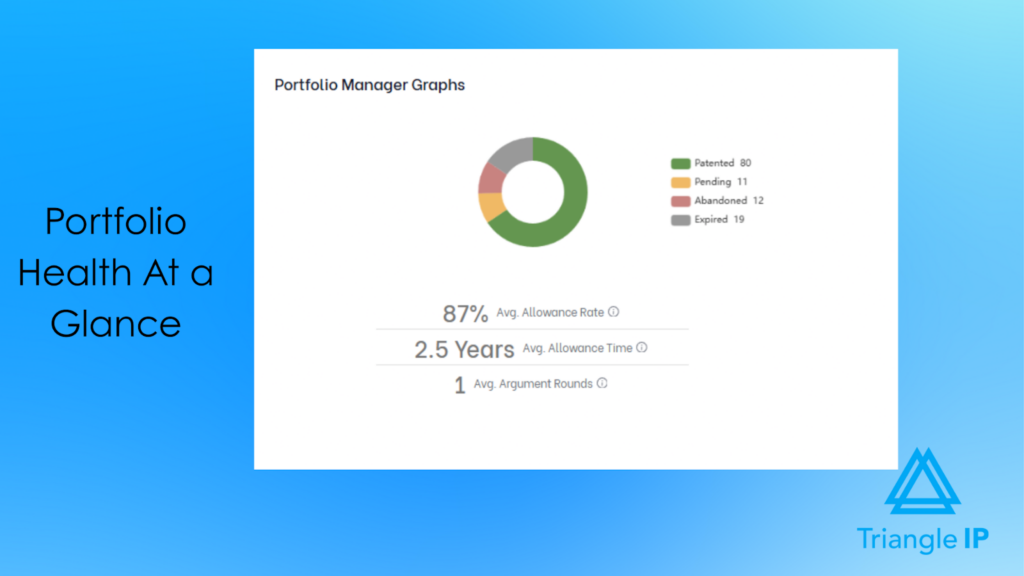
The Portfolio Manager opens with a clear visual snapshot of portfolio status: patented, pending, abandoned, and expired. This immediate clarity helps teams understand portfolio health without digging through spreadsheets or reports.
Related: Patent Application Status: 8 Best Tools Worth Considering
Prosecution Efficiency Insights
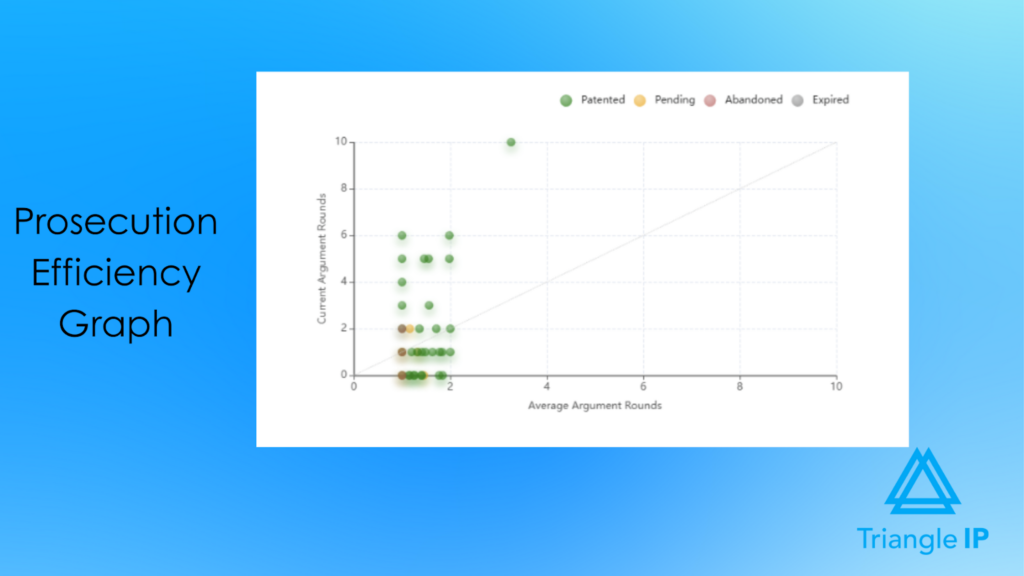
Beyond status tracking, the platform highlights prosecution efficiency using argument-round data. This makes it easy to identify filings that required excessive effort, spot patterns, and refine prosecution strategy over time.
Centralized Application Management
All applications are brought together in one view and automatically categorized as U.S., international, or drafting-stage. There are USPTO sync options to pull official status and prosecution data directly into the system, while unsynced applications are clearly stored in a separate tab.
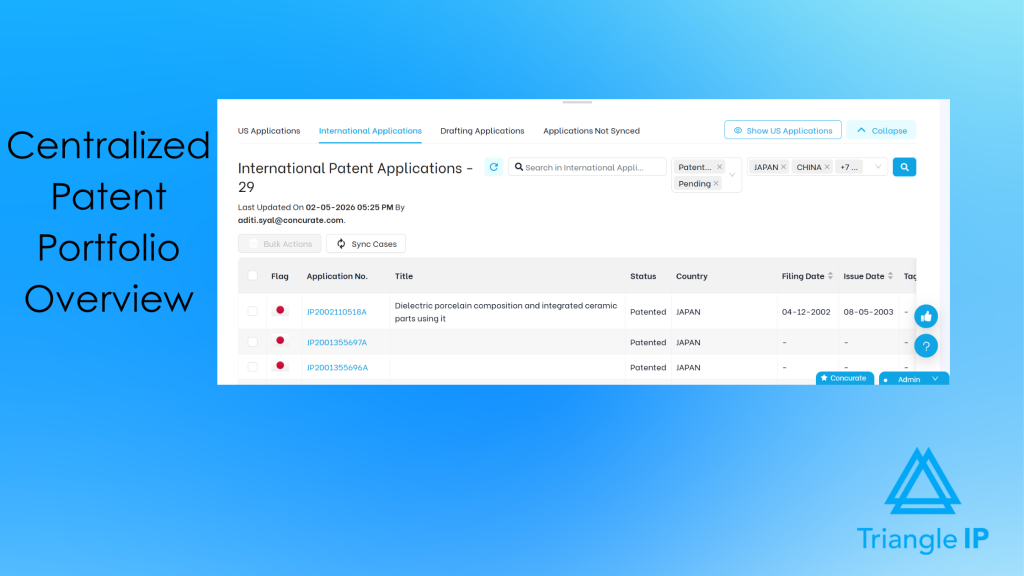
Here is the quick video on how to sync your international applications in your patent portfolio.
Bulk Import/Export Patent Applications
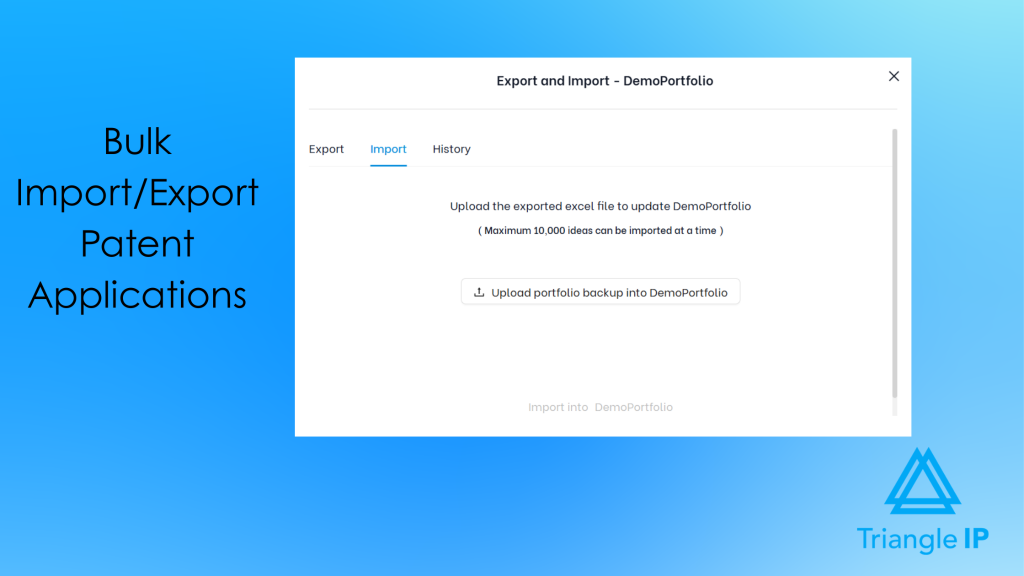
TIP Tool™’s portfolio manager module supports bulk imports of up to 10,000 ideas at a time, helping IP teams migrate or update large portfolios without entering records individually. IP Teams can also export portfolio data to Excel for offline analysis, reporting, collaboration, and maintaining a portfolio backup.
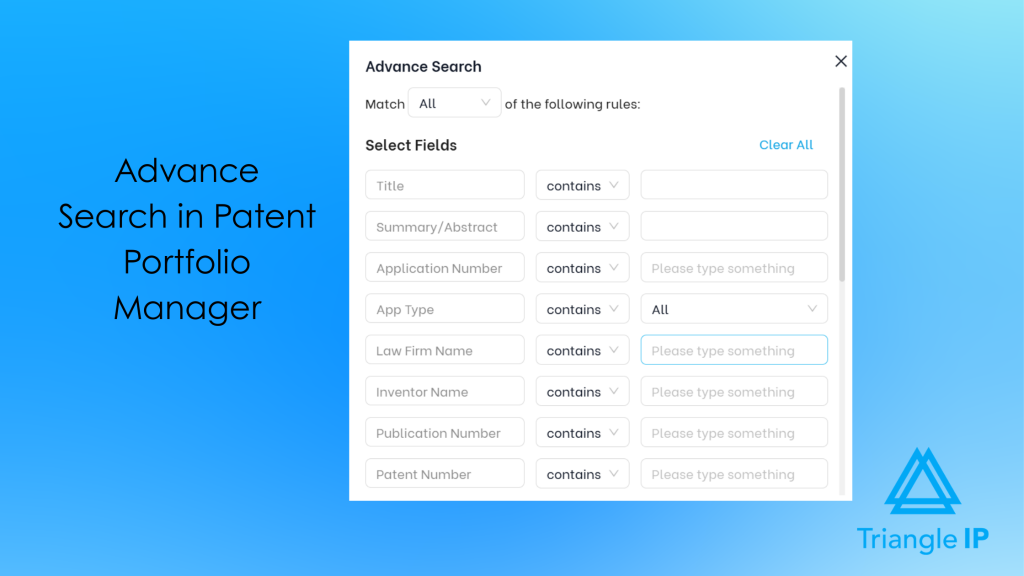
Easy Retrieval of Patent Information
Advanced search and configurable table views help teams focus quickly on what matters most. You can search a patent using: the title, summary/abstract, application number, application type, law firm name, inventor name, publication number, patent number, tags, docket number, examiner name, status, group art unit, CPC code, docket status, docket record, issue date, and filing date.
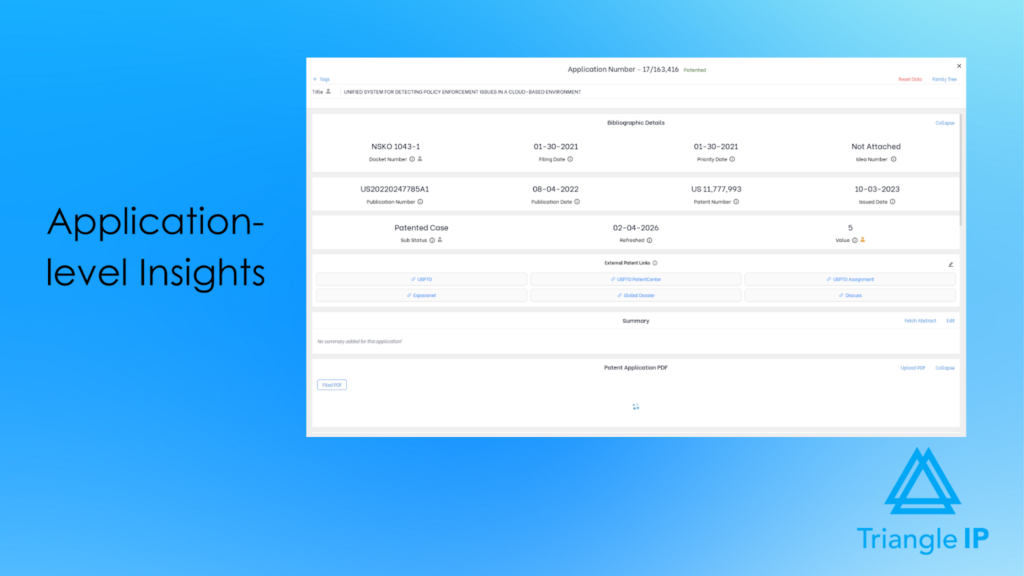
Detailed, Decision-Ready Application Records
Each application includes a structured record with bibliographic details, docket numbers, key dates, value ratings, and editable summaries capturing business relevance and strategic intent.
Visual Application Timeline with Document Access
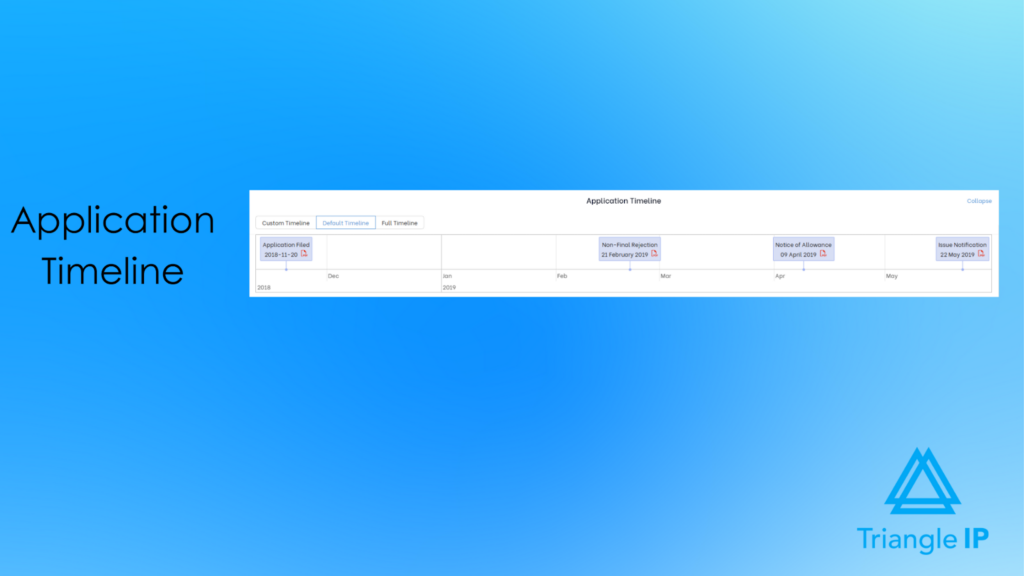
A visual timeline maps key prosecution events, filings, office actions, interviews, and allowances with one-click document access, providing full transparency without leaving the platform.
Cost Tracking and Forecasting
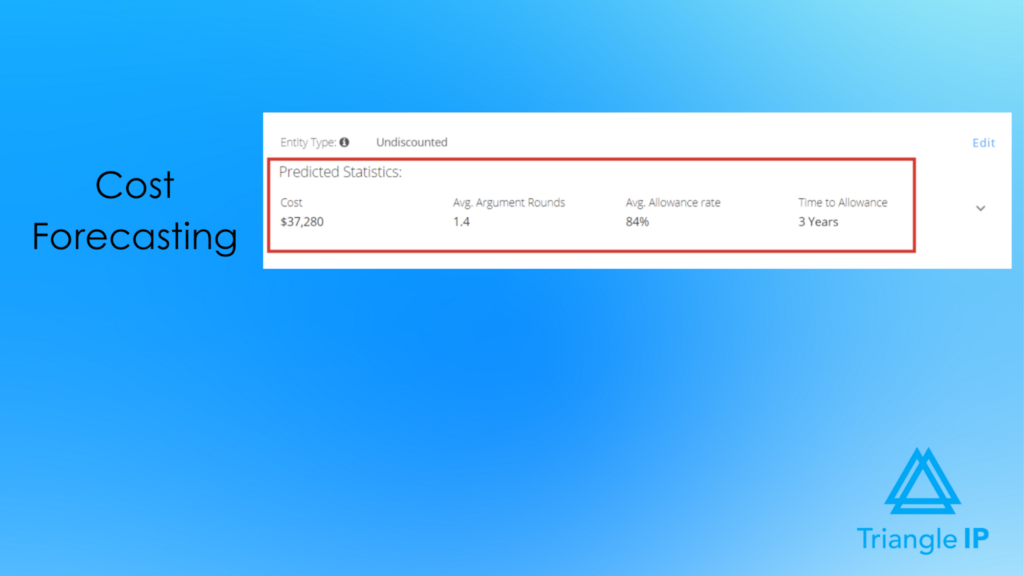
The TIP Tool™ shows both incurred and projected costs at the application level. Combined with value ratings, this helps teams decide when to continue, adjust strategy, or abandon.
Examiner and Art Unit Intelligence
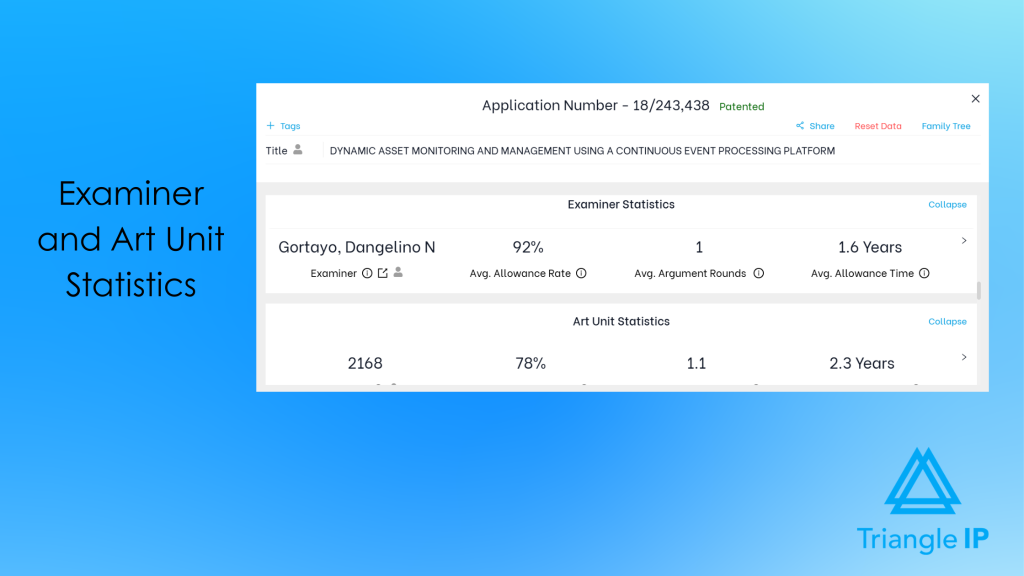
Each application record includes examiner and art unit performance data, such as allowance rates and typical prosecution effort. These insights help teams forecast timelines, anticipate challenges, and adjust strategy early rather than reacting late in the process.
Prosecutor Analysis, Examiner Analysis, and Art Unit Predictor are now also available as standalone tools alongside the TIP Tool™’s complete suite.
Patent Family and Continuity Awareness
The Portfolio Manager shows how applications connect within a patent family, including parents, continuations, divisionals, and CIPs, helping teams plan follow-on filings and avoid redundant or misaligned applications.
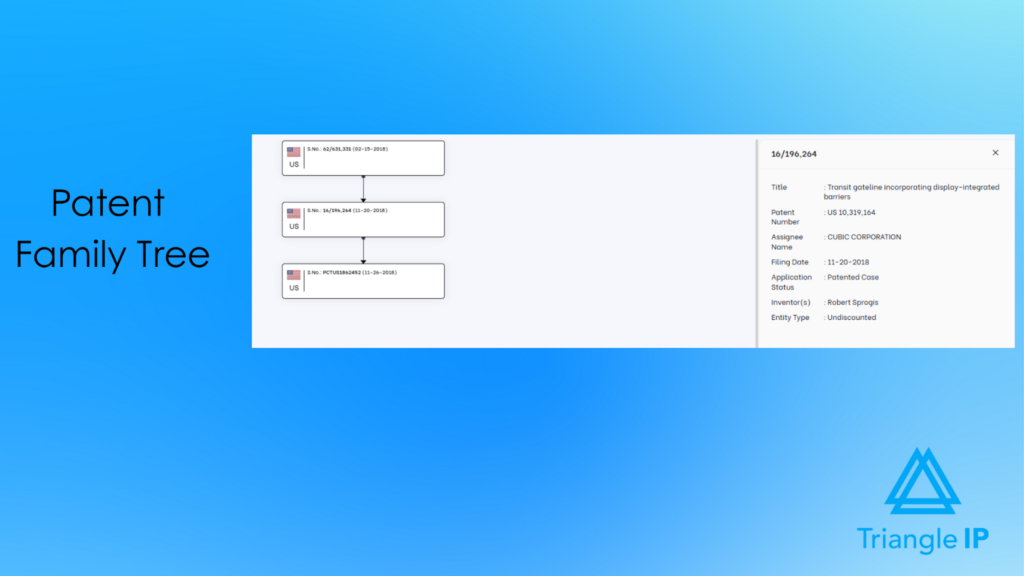
Explore the patent family tree generator here.
Watch the video below to see the TIP Tool™ Portfolio Manager in action.
Limitations
Teams new to structured IP workflows may face a brief learning curve. The TIP Tool™ offers a comprehensive knowledge base and a TIP bot to help users navigate the platform more effectively.
Pricing
Portfolio Manager is a part of the complete TIP Tool™ suite. The TIP Tool™ uses flexible pricing to accommodate teams at different stages of growth.
- Free Plan ($0 forever): A simple way to get started, with support for up to 10 users.
- Premium Plan ($50 per month): Affordable monthly pricing for growing teams that need additional users, storage, and functionality.
- Custom Plan: Designed for large enterprises with advanced requirements. Contact the team to create your plan.
Optional add-ons:
- Examiner Analysis: $5 per user per month
- Art Unit Predictor: $5 per user per month
- Patent Family Tree Generator: Included free with any personal-level tool, or available at $1 per user per month at the organization level (minimum 10 users)
- Prosecutor Analysis: $500 per user per year
For more details, visit the pricing page.
Trial & Demo Info
To see the TIP Tool™ in action, you can book an interactive demo.
Prefer to explore on your own? You can also register for a free trial and start working with a sample portfolio directly inside the TIP Tool™. This lets you click through the Portfolio Manager, dashboards, and workflows at your own pace.
2. Anaqua AQX Corporate
User Rating: 4.4/5
Best For
Corporate IP teams managing global portfolios with AI-driven insights.
Overview
Anaqua AQX Corporate is a patent portfolio management software designed to help IP teams manage patents from early innovation stages through global patenting and renewals. It centralizes patent documents, tasks, deadlines, and spending in a unified system, with a strong focus on automation, analytics, and risk reduction.

Source: Anaqua AQX Product page
Key Features For Patent Portfolio Management:
The following features highlight how Anaqua AQX Corporate streamlines complex, multi-jurisdiction patent portfolios.
AI-Powered Document Processing
Automatically processes 850+ patent office forms and correspondence using Microsoft® Azure AI Document Intelligence.
Global Patent Office Integrations
Streamlines docketing through direct integrations with USPTO, JPO, EPO, and CNIPA.
Anaqua Law Engine
Applies country-specific IP rules and triggers workflows automatically based on legal requirements.
Automated IDS Identification & Docketing
Uses AI to identify and docket Information Disclosure Statements, reducing missed deadlines.
Patent Classification & Tagging
Organizes patent records using preconfigured taxonomies and flexible tagging across the lifecycle.
Centralized Patent Records
Consolidates documents, email correspondence, and related records in a single system.
Prosecution Analytics & Reporting
Analyzes examiner, art unit, law firm, and company behavior to inform prosecution strategy.
Integrated Patent Analytics (AcclaimIP™)
Offers one-click access to analytics covering 150+ million patent documents worldwide.
Portfolio Dashboards & KPIs
Customizable dashboards track tasks, KPIs, and overall portfolio performance.
Budget Monitoring & Cost Forecasting
Tracks IP spend against budget and forecasts costs across patent portfolios.
Limitations
- Steep learning curve for new users.
- Interface complexity due to feature depth.
- Some users report slower screen transitions.
- Pricing is considered expensive by several reviewers.
Pricing
Not publicly disclosed.
Trial & Demo Info
Request a demo through the contact forms.
3. FoundationIP by Clarivate
User Rating: 4/5
Best For
IP law firms managing complex portfolios
Overview
FoundationIP is a cloud-based IP portfolio management platform that combines Clarivate IP data, automation, and reporting to improve efficiency, reduce risk, and scale with growing patents.
Source: FoundationIP page
Key Features For Patent Portfolio Management:
These features show how FoundationIP helps firms automate tasks and manage complex IP portfolios.
Cloud-Based IP Practice Management
Manages IP operations in a secure, scalable cloud environment.
Advanced Task & Docketing Management
Reduces missed deadlines with one-click docketing, dashboards, reports, and reminders.
Automated Law Updates
Applies legal rule updates and recalculations across 300+ jurisdictions, three times a year.
Clarivate IP Data Integration
Leverages Clarivate data to support informed decisions and reduce risk.
Configurable Firm Workflows
Adapts to firm structures by client, attorney, office, or team.
Reporting & Dashboards
Creates and shares role-based reports, charts, and analytics.
Patent Renewals Management
Supports renewal tracking, payment decisions, and closure workflows.
Limitations
- Implementation can be time-consuming.
- Reporting setup may require training.
- User interface can feel less intuitive.
- Pricing may be high for smaller firms.
Pricing
Not disclosed on the website
Trial & Demo Info
Demo is available upon request.
4. Equinox by Questel
User Rating: 5/5
Best For
Corporate IP teams and law firms managing complex, multi-jurisdiction patent portfolios
Overview
Equinox is an AI-powered IP management platform from Questel that helps enterprises manage their IP portfolios across the full lifecycle and align them with business strategy. It combines automation, analytics, integrations, and secure collaboration to support global IP operations.
Source: Equinox Homepage
Key Features For Patent Portfolio Management:
Here are the key features that support AI-powered, enterprise-grade IP portfolio management.
AI-Assisted IP Docketing
Uses Questel’s AI assistant, Qthena, for deadline tracking, portfolio review, analysis, and invention disclosures.
Automatic PTO Updates
Syncs and validates data with 100+ patent offices to reduce manual updates.
Reporting & Dashboards
Provides pre-built and custom reports with visual analytics for strategic decisions.
Cost Forecasting & Budgeting
Predicts future IP spend to support budgeting and portfolio planning.
Document Management & Communication
Enables in-system document creation, collaboration, storage, and email integration.
Limitations
No verified limitations have been published on major public review platforms.
Pricing
Pricing is not publicly listed.
Trial & Demo Info
Demo is available upon request, but no free trial is publicly advertised.
5. DIAMSiQ by Dennemeyer
User Rating: 4.5/5
Best For
Corporates and firms needing customizable workflows
Overview
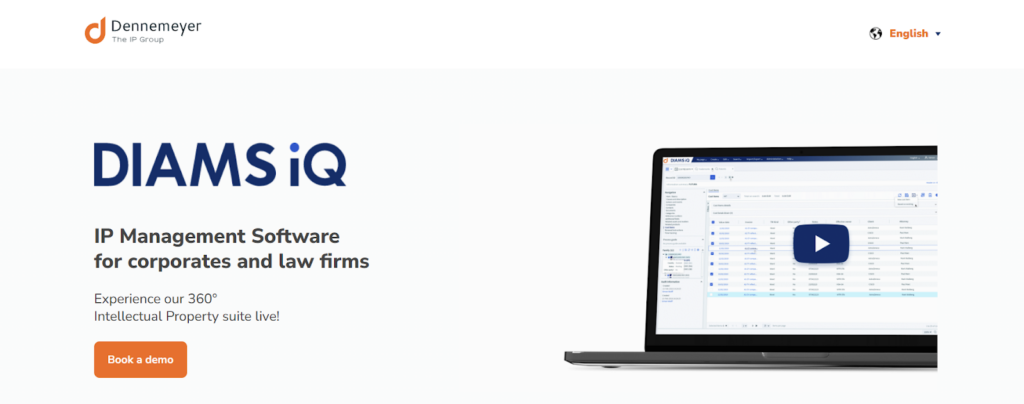
DIAMS iQ is an all-in-one intellectual property management software developed by Dennemeyer, a global IP service provider with nearly 60 years of experience.
Built by IP professionals for IP professionals, DIAMS iQ supports the entire IP lifecycle. The software streamlines digital IP management and reduces manual errors.
Source: DIAMS iQ Landing page
Key Features For Patent Portfolio Management:
Here are the core features that support global IP management and workflow automation.
Smart IP Assistance
Applies country-specific IP law and PTO data to calculate maintenance deadlines and guide asset creation.
Centralized IP Portfolio Management
Manages IP rights, costs, actions, and documents in one unified system.
Collaboration Platform
Connects R&D teams, IP teams, clients, and external agents in a secure workspace.
Analytics & Reporting
Provides dashboards and reports to support data-driven IP and business decisions.
Modular All-in-One System
Includes modules for matters, documents, contacts, correspondence, invoicing, and costs.
Customizable Workspace
Adapts to different IP team workflows and organizational needs.
Limitations
- Navigation can feel complex for some users.
Pricing
Pricing is not publicly disclosed.
Trial & Demo Info
An individual live demo is available upon request.
6. AppColl
User Rating: 4.7/5
Best For
Corporations and IP law firms looking for easy-to-use, cloud-based IP management software
Overview
AppColl is a cloud-based intellectual property management software provider offering separate solutions for corporations and law firms. Designed for simplicity and efficiency, AppColl makes collaboration easy for inventors, attorneys, and IP teams.
It reduces manual effort while improving budget predictability.

Source: AppColl Homepage
Key Features For Patent Portfolio Management:
Here are the primary features that make AppColl suitable for both corporate and legal teams.
Docketing & Matter Tracking
Automates docketing, task management, and prosecution tracking.
Financial Management & Budget Forecasting
Tracks legal spend and forecasts budgets through an integrated Finances module.
PTO & Database Integrations
Integrates with USPTO Patent Center, TSDR, and EPO Espacenet for automated updates.
Reporting & Analytics
Provides portfolio visibility, financial analysis, and decision support.
Configurable Workflows & Approvals
Customizes workflows, approvals, scoring, and thresholds.
Tandem™ Client Access
Gives corporations secure, no-cost access to portfolios managed by outside counsel.
Limitations
- Advanced customization can be difficult for non-technical users.
- The interface is functional but visually dated.
- Occasional performance slowdowns during peak usage.
Pricing
AppColl offers subscription-based pricing for corporate IP teams and law firms.
Trial & Demo Info
A live demo can be scheduled. No free trial.
7. IamIP
User Rating: 4.1/5
Best For
IP managers, R&D teams, and innovation-focused organizations
Overview
IamIP is a patent intelligence and monitoring platform designed to help teams track, analyze, and collaborate on patents filed worldwide.
The platform focuses on real-time patent portfolio monitoring, advanced search, analytics, and real-time collaboration. It enables organizations to gain fast, actionable insights into competitors, technologies, and patent landscapes.

Source: IamIP Homepage
Key Features For Patent Portfolio Management:
These features show how IamIP helps teams track, analyze, and act on global patent data.
Actionable Patent Alerts
Sends automated alerts on competitors, inventors, technologies, and legal status changes.
Advanced Patent Search
Enables powerful global patent searches with both simple and professional modes.
Collaboration & Knowledge Management
Supports centralized knowledge bases, configurable workflows, and expert collaboration.
Patent Analytics & Visualizations
Offers 25+ visualization models to analyze competitors, technologies, and markets.
AI Tagger
Automatically tags patent documents using internal taxonomies.
AI Summarizer
Generates concise summaries to speed up patent review.
AI Categorizer
Identifies the most relevant patents within monitoring results.
AI Claim Clarifier
Explains patent claims using definitions from the patent description.
Customizable Workflows & User Roles
Provides role-based access control and workflow customization.
Limitations
- Reporting and analytics are considered limited by some users.
- Export options could be improved.
- Country coverage for searchable full text and legal status may vary.
Pricing
IamIP offers tiered subscription plans based on usage, features, and user access. Pricing is quote-based for most plans, with flexibility for different team sizes and needs.
Trial & Demo Info
Demo is available upon request.
8. Inteum Minuet
User Rating: 4.4/5
Best For
Technology transfer offices, research institutions, universities, and enterprises
Overview
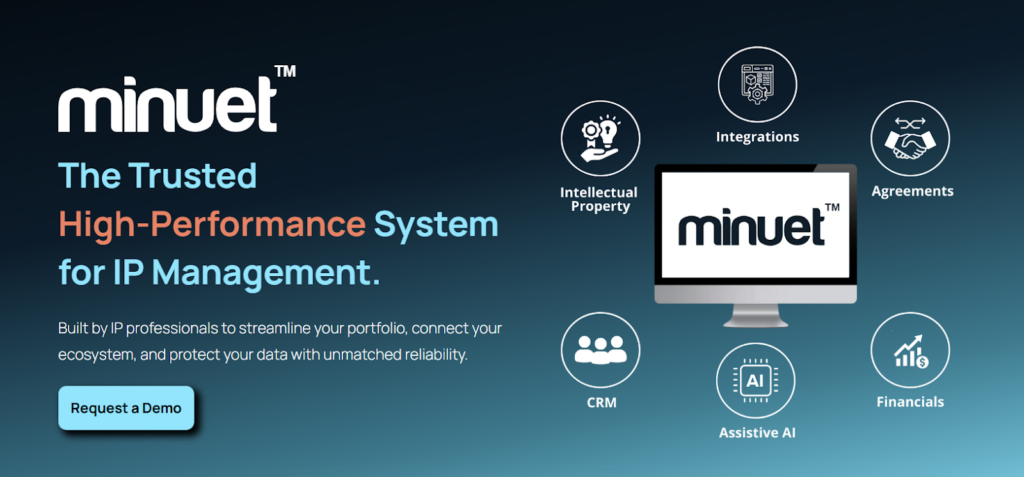
Inteum Minuet is an enterprise IP management platform designed by IP professionals to support the full innovation lifecycle. It helps organizations manage invention disclosures, patents, agreements, licensing, and commercialization from a single, unified system.
Source: Inteum Homepage
Key Features For Patent Portfolio Management:
The following features show how Minuet supports complex IP and technology transfer workflows.
Automated Workflows
Uses configurable automation to reduce manual work and improve transparency.
Analytics & Reporting
Provides 150+ standard reports and dashboards for portfolio insight and decision-making.
Global Compliance & Monitoring
Supports regulatory compliance (e.g., Bayh-Dole, iEdison) with validated data syncing.
Licensing & Deal Management
Tracks licensing activities, agreements, revenues, and deal workflows.
Financial Management
Monitors IP costs, fees, invoices, expenses, and royalty revenue.
AI-Powered Document Summaries
Generates concise summaries to speed up document review.
Limitations
- Analytics and reporting have a learning curve
- Advanced reports may require setup or support
- Database navigation can be challenging for new users
- Web version transition may take time for existing users
Pricing
Not disclosed on the website
Trial & Demo Info
Demo available upon request.
Feature lists only tell part of the story. What matters is how a tool performs when IP teams are managing deadlines, office actions, and tough budget decisions. To see what sets the TIP Tool™ apart, you have to see it in action through the teams using it when the stakes are real.
Why Do Winning IP Teams Choose The Portfolio Manager Module by The TIP Tool™ for Better IP Decisions?
If you’re managing a growing patent portfolio, you’ve likely felt this moment: you’re asked to make bigger filing and pruning decisions, but your system mostly shows activity. Not how examiner behavior or prosecution effort will actually play out. That’s the gap the TIP Tool™ was built to close.
One global technology company faced this challenge directly. Before TIP Tool™, prosecution outcomes were unpredictable, costs kept rising, and leadership struggled to explain why some cases moved smoothly while others stalled. After adopting the TIP Tool™, examiner behavior became visible, counsel performance measurable, and filing decisions more deliberate. This resulted in 30% higher allowance rates, 35% lower prosecution costs, and 40% more focused filings.
What makes this possible is how the TIP Tool™ connects the dots early. It begins in the Idea Manager, where innovations are captured and evaluated, and carries that context through prosecution and into long-term portfolio strategy. If you want fewer surprises and clearer decisions, the TIP Tool™ gives your patent portfolio a backbone you can rely on.
Get started now to see how it helps you manage your patent portfolio the right way.
Disclaimer: The information in this article/review is sourced from the internet and may not be entirely accurate or up-to-date. We recommend visiting the respective software websites for the most current and reliable information. The opinions expressed here are those of the author and may not reflect the views of Triangle IP. We are not liable for any consequences that may arise from relying on the information provided in this article/review.
Frequently Asked Questions
1. What is the Difference Between IP Portfolio Management and Patent Portfolio Management?
Patent portfolio management focuses specifically on patent applications, prosecution, costs, family relationships, and filing strategy. IP portfolio management is broader, covering patents, trademarks, copyrights, trade secrets, and sometimes domains and designs in a single system.
2. Is Patent Portfolio Management Software Available for Specific Industries like Financial Technology?
Patent portfolio management software works the same way regardless of industry; the core features like tracking applications, forecasting costs, and understanding examiner behavior are useful whether you’re in fintech, healthcare, manufacturing, or any other sector.
3. How Difficult Is It to Migrate Historical Patent Data From Spreadsheets or Legacy Systems Into a New Patent Portfolio Management Software Without Losing Context or Accuracy?
Migrating old patent data isn’t usually hard because of the new software. It’s hard because of the old data. Spreadsheets and legacy systems often have inconsistent formats, missing links, or unclear context. That said, modern patent portfolio tools like the TIP ToolTM make this much easier with bulk imports, field mapping, tags, and integrations with docketing systems. When these features are used, most teams can migrate data with good accuracy and minimal loss of context, usually after a one-time cleanup and review.
Related Read: The TIP Tool New Feature Update: Sync With Docketing Software
4. What Should I Look for in Automated Patent Portfolio Management?
Automation in patent portfolio management should reduce manual tracking. Look for automatic USPTO sync, examiner data updates, deadline alerts, docketing integration, and bulk import capabilities.
5. How Do I Evaluate Forecasting Features in Patent Portfolio Management Tools?
Look for tools that surface projected prosecution costs at the application level, not just portfolio-wide totals. The most useful forecasting combines historical spend, examiner allowance rates, and argument-round data to give directional estimates.
Related Read: 6 Best Patent Cost Estimator Tools That Help Enterprises Go from Guessing to Confident IP Budgeting
6. How Do Smaller or Mid-Sized IP Teams Avoid Paying for Advanced Features They May Never Fully Use?
Smaller and mid-sized IP teams can control costs by choosing tools that let them start simple and expand only when necessary. The TIP Tool™ is designed with this flexibility in mind.
With the TIP Tool™:
- Teams can start with core capabilities, such as idea capture and basic portfolio management.
- Role-based access ensures users only see and use features relevant to their work.
- Advanced tools (like Examiner Analysis or Art Unit Prediction) can be added only when needed, rather than bundled upfront.
- Clear subscription tiers and optional add-ons prevent paying for unused enterprise features.
This approach keeps costs predictable while allowing teams to grow without switching platforms later.
Related Read: Why We Set Out to Build The TIP Tool – The Best Idea and Patent Management Tool for Medium-Sized Enterprises