
| TL;DR – If you’re managing more than a handful of filings, checking patent application status manually can get frustrating fast. Yes, you can log in to the USPTO Patent Center and look up each case one by one. Or you can wait for updates from outside counsel. But neither approach scales well.In this guide, we break down how to check US patent status step by step and walk through eight tools that make patent application tracking easier. If you want a simpler, more cost-effective way to see both published and unpublished filings in one place, the TIP Tool™ is worth a look. |
We recently shared a demo of the TIP ToolTM with a prospect, an in-house Intellectual Property (IP) counsel. He is one in a five-member team of IP counsel for an innovation-driven company with 5,000+ employees. The enterprise files around 120 patent applications every quarter.
Managing that volume inside the USPTO Patent Center alone quickly becomes time-consuming. Logging in, searching each application, and reviewing prosecution updates one by one does not scale.
Now, imagine the kind of insights they need from their patent portfolio to plan quarterly IP activities. Plus, multiple inventors asking for an update on their patent cases could be a bit tricky to handle.
The prospect asked if there was an easy and cost-effective way to obtain patent application status updates from the USPTO.
So, in this article, we outline the available ways to check patent application status and compare eight leading tools that help IP teams track it more efficiently.
Before we dive in, let us look at the 3 options available today to check the patent status.
Three Ways of Checking Your Patent Application Status
- Patent Office – Laborious
- Patent Counsel – Expensive
- Automated Tracking Tools like The TIP ToolTM – Cost-Effective at Scale
#1 – Patent Office – Laborious
The USPTO previously provided patent status access through the Patent Application Information Retrieval (PAIR) system, which included separate interfaces for public and non-public applications. As part of a broader modernization effort, the USPTO has retired Public and Private PAIR entirely and consolidated all patent status and filing functions into the Patent Center.
Today, Patent Center is the single, unified interface for accessing both published and unpublished patent application data.
This consolidation simplifies access conceptually. In practice, however, using the Patent Center effectively still requires hands-on effort, especially when portfolios grow beyond a handful of applications. Navigating this system can be challenging, underscoring the need for effective patent strategies for SMEs and large companies.
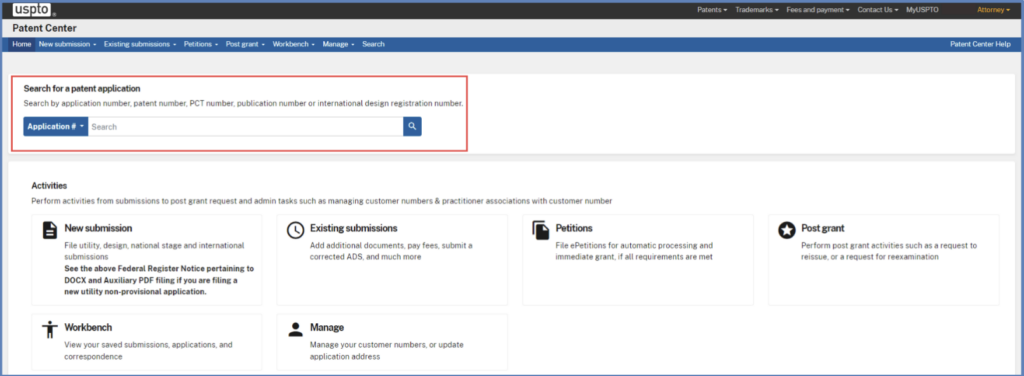
Source – Patent Center User Guide
How to Use the USPTO Patent Center to Check Patent Application Status (Step-by-Step)
Checking patent application status at USPTO is simple in theory, but it becomes slow when you have dozens or hundreds of patent applications to track.
The 3-Step Process
Step 1: Sign in to the Patent Center (required).
Access requires a registered USPTO.gov account with completed identity verification and Patent Center self-enrollment.
- Registered patent practitioners must verify their identity, then self-enroll by linking their registration or limited-recognition number and associated customer number(s).
- Independent inventors must verify their identity, then self-enroll by linking an existing customer number or creating one in the Patent Center.
After identity verification, the Patent Center prompts users to complete self-enrollment during login.
Step 2: Find your patent application.
Once signed in, you can search from the Home or Search page using an application number, attorney docket number, patent number, publication number, or PCT number. Enter the corresponding identifier to retrieve matching records.
Step 3: Open the application record.
Opening the application record allows you to view the current filing status, prosecution history, and available documents. Newly filed documents may not appear immediately after submission.
For detailed search and viewing instructions, the USPTO directs users to the Patent Center Application Search User Guide.
#2 – Patent Counsel – Expensive
Your patent counsel (attorney) likely filled and submitted your patent applications in the first place. Counsel handles correspondence between you and your local patent office and records everything in a docketing system.
The system then generates spreadsheet reports that are pretty much inaccessible, costing you hundreds (if not thousands) of dollars for your attorney to transform them into actionable insights. And in the US, the hourly billing rates for patent attorneys vary from $200-$800.
Must Read:Why Should C-Suite Executives Look Beyond Spreadsheets for Reviewing IP Updates?
#3 – Eight Top Tools for Checking Patent Application Status
As patent portfolios scale, manual status checks and spreadsheet-based reporting stop working. Several software tools now sit on top of USPTO data to automate monitoring. These tools differ sharply in cost, complexity, and intent. To make things easier for you, we have shortlisted the top eight tools that help you check the status of your patent applications.
Here is the lineup:
- The TIP ToolTM
- LexisNexis Patent Advisor
- QuickPAIR
- PatSeer Alerts Monitoring
- Questel Orbit Intelligence
- Derwent Patent Search
- PatBase
- Patsnap
Here is a quick comparison table:
| Name of the Tool | Description | Pricing |
| The TIP Tool™ | Centralized platform that syncs USPTO data for published and unpublished applications. Provides portfolio view, prosecution stage tracking, sub-status visibility, and periodic status updates. | Free plan available (up to 10 users). Premium ($50 per month) and Custom plans available. |
| LexisNexis PatentAdvisor® | Analytics-driven prosecution support tool with PAIR Watch monitoring, QuickPAIR timeline view, bulk tracking, and examiner analytics integration. | Pricing not publicly disclosed. Demo available upon request. |
| QuickPAIR | Multi-jurisdiction prosecution monitoring with curated alerts, deadline reminders, and centralized watchlists. | Pricing not publicly listed. Contact required. |
| PatSeer | Customizable alert system for legal status changes, prosecution updates, and newly published applications. | Subscription-based. Pricing available upon request. Free trial available. |
| Orbit Intelligence (Legal Status Monitor Module) | Monitors legal status changes and patent family updates across multiple jurisdictions with configurable alert frequency. | Optional module. Pricing not publicly disclosed. |
| Derwent Patent Search | Global patent intelligence platform offering legal status data, invention family grouping, and AI-powered search capabilities. | Pricing not publicly listed. Trial and demo available upon request. |
| Minesoft AI Patent Monitoring | Tracks prosecution status, legal status alerts, maintenance fees, assignments, and global monitoring with AI-based filtering. | Pricing not publicly listed. Free trial available. |
| Patsnap | Legal status filtering and event tracking platform with simple and detailed legal status search capabilities. | Pricing not publicly listed. Demo available upon request. |
Let’s now take a deep dive into how these tools help in making more informed IP decisions, starting with The TIP ToolTM.
1. The TIP ToolTM – Super Easy, Automatic, and Cost-Effective
What if you could have the status of each and every case in your patent portfolio without:
- Spending hundreds of dollars in billable hours from your patent attorney
- Spending hours deciphering reports
A simple inquiry shouldn’t come at an exorbitant cost or time commitment. Companies should be able to know their patent portfolio status whenever they need to — and the TIP Tool™ by Triangle IP gives you that autonomy at no cost.

Key Features
Below are the standout features that simplify patent application tracking within the TIP Tool™.
Bird’s Eye View
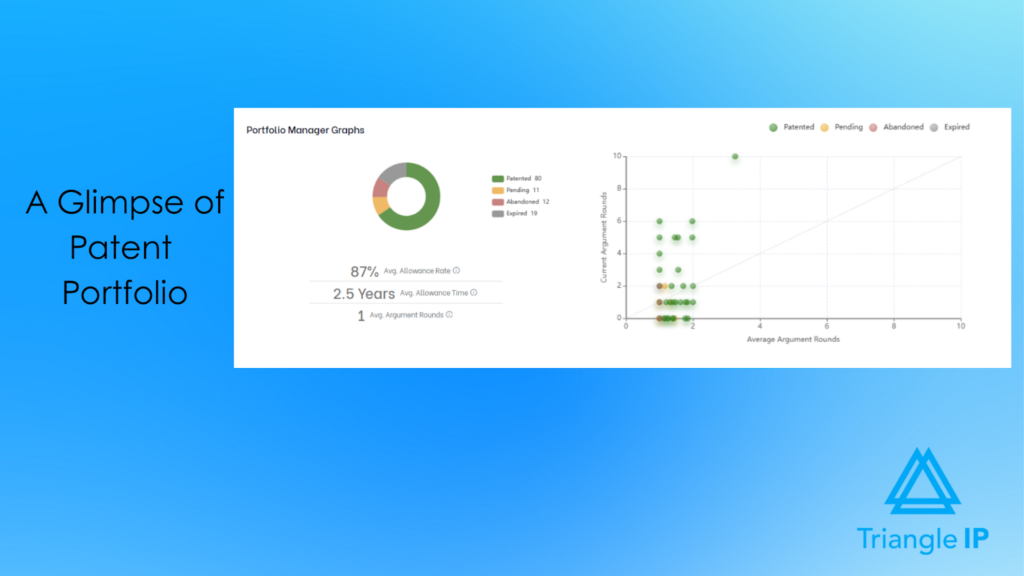
The TIP ToolTM lists all your patent cases in the portfolio tab. At the top of the page, you’ll see a general glimpse of your patent portfolio. You’ll know how many patents are approved and patented, pending, or abandoned in no time.
USPTO Public PAIR Data Sync
TIP Tool™ automatically syncs publicly available prosecution data from the USPTO. This means you can view application status, office actions, notices of allowance, publication details, and transaction history without manually searching Public PAIR for each application. It centralizes official status data into one unified interface.
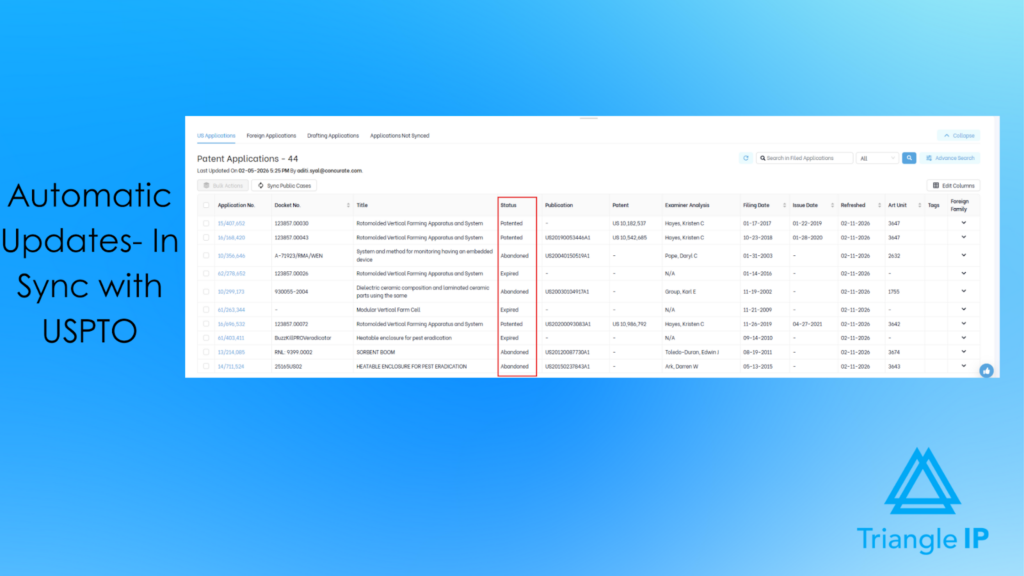
In that same portfolio tab, you’ll see a table just below the glimpse view. The table contains every patent application you’ve worked on, along with their docket numbers, tags, examiners, relevant dates, and status.
The TIP ToolTM populates the table with automatic updates from USPTO PAIR to track the progress of your patent applications. It also notifies you about any patent rejections received for your cases.
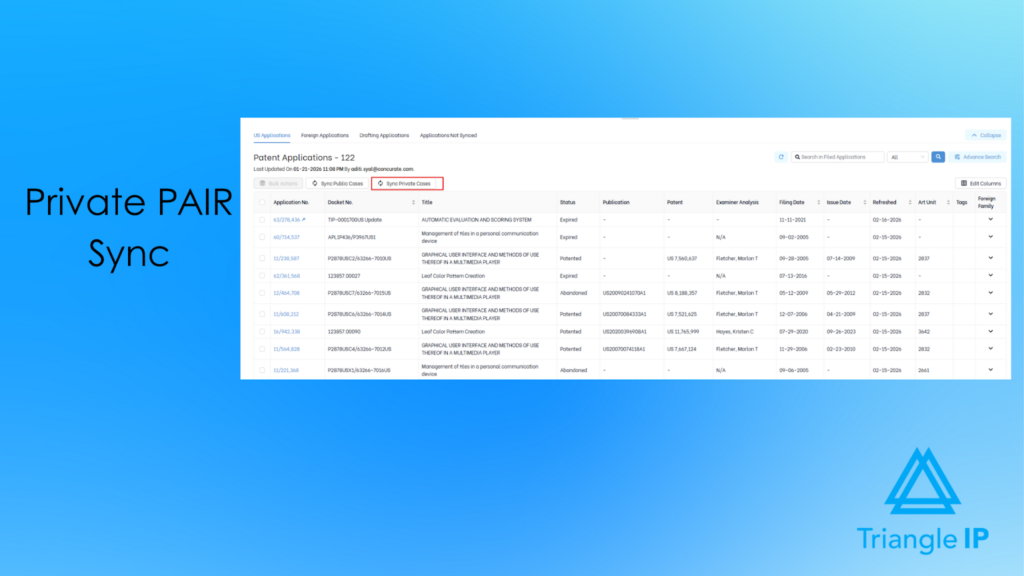
USPTO Private PAIR Integration (for Unpublished Applications)
For unpublished or restricted U.S. applications, the TIP Tool™ integrates securely using Private PAIR credentials. This allows you to track early-stage filings, examiner assignments, and confidential prosecution updates without having to log in to Private PAIR separately every time.
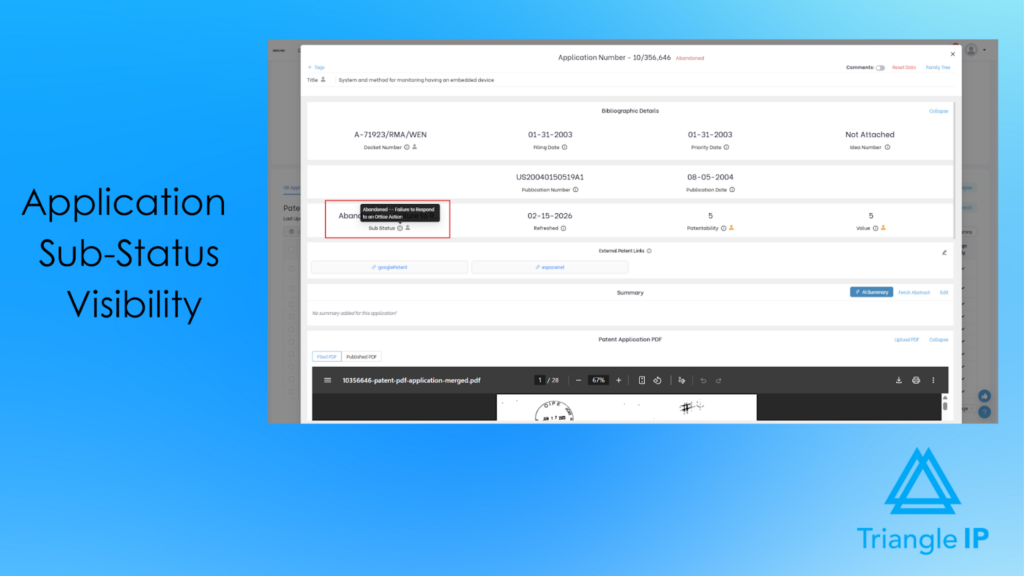
Sub-Status & Prosecution Stage Visibility
Beyond basic status labels, the TIP Tool™ shows where the application stands within prosecution. For example, Non-Final Office Action issued, Final Rejection, Request for Continued Examination (RCE) filed, or Notice of Allowance. This provides deeper clarity than simply knowing a case is “pending.”
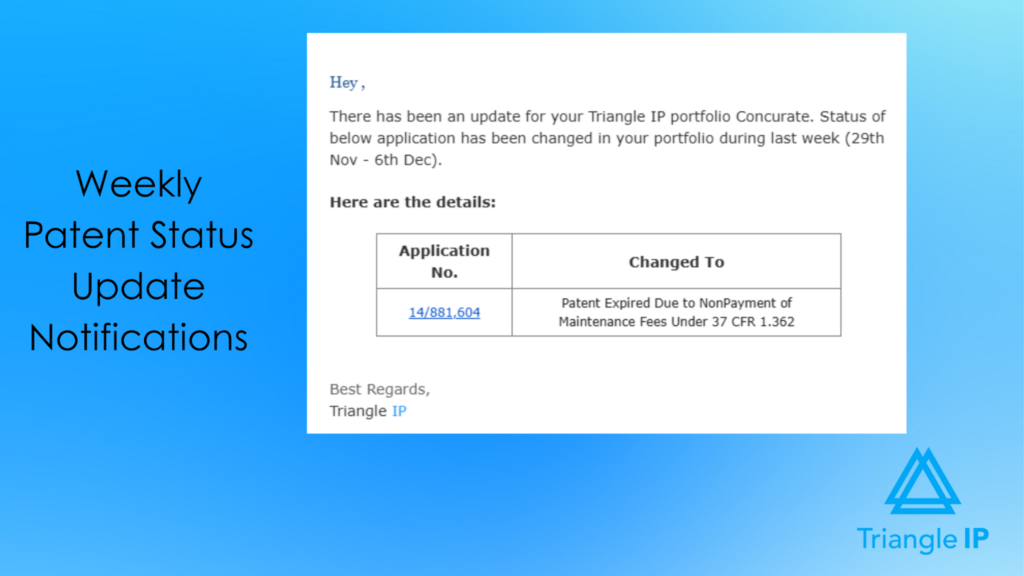
Periodic Status Update Notifications
The platform tracks prosecution status changes as they occur and provides periodic summary notifications (e.g., weekly updates) highlighting what has changed across the portfolio. This keeps users informed of developments without requiring continuous manual review, while avoiding compliance-style deadline alerts.
Pricing
The TIP Tool™ uses flexible pricing to accommodate teams at different stages of growth.
- Free Plan ($0 forever): A simple way to get started, with support for up to 10 users.
- Premium Plan ($50 per month): Affordable monthly pricing for growing teams that need additional users, storage, and functionality.
- Custom Plan: Designed for large enterprises with advanced requirements. Contact the team to create your plan.
Optional add-ons:
- Examiner Analysis: $5 per user per month
- Art Unit Predictor: $5 per user per month
- Patent Family Tree Generator: Included free with any personal-level tool, or available at $1 per user per month at the organization level (minimum 10 users)
For complete details, visit our full pricing page.
Demo & Trial Availability
To see the TIP Tool™ in action, you can book an interactive demo.
Prefer to explore it yourself?
Sign up for a free plan and start working inside the TIP Tool™ with a sample portfolio. Click through the Portfolio Manager, dashboards, and workflows at your own pace — and experience firsthand how simple patent status tracking and portfolio management can be.
2. LexisNexis Patent Advisor
LexisNexis PatentAdvisor® provides analytics-driven patent prosecution support, including automated USPTO application monitoring through PAIR Watch and visual prosecution tracking via QuickPAIR. It is designed to reduce manual PAIR searches and provide structured visibility into application status changes and prosecution history.

Source: LexisNexis Patent Advisor Solution Page
Key Features
Here’s a quick look at the features that support structured prosecution analytics within LexisNexis PatentAdvisor®.
Automated USPTO Monitoring (PAIR Watch)
Tracks changes in Public PAIR and sends alerts when updates occur in the Image File Wrapper, Continuity Data, Transaction History, or selected bibliographic fields.
Custom Alert Frequency
Allows users to choose twice daily, daily, weekly, or monthly monitoring intervals per application.
Bulk Application Tracking
Enables monitoring of one to thousands of applications, including spreadsheet uploads of up to 1,000 application numbers.
Email Alerts with Direct Document Links
Sends notifications containing direct links to newly added file wrapper documents for quick access and download.
Continuity Monitoring
Offers optional automatic tracking of parent and child continuity applications.
QuickPAIR Timeline View
Provides a visual “bird’s eye view” of prosecution history, including access to office actions and appeal documents.
File Wrapper PDF Downloads
Allows downloading selected papers or entire file wrappers as bookmarked PDFs.
Browser Extension Integration
Displays examiner analytics directly within USPTO PAIR and Patent Center via a downloadable extension.
Pricing
Pricing is not disclosed on the website.
Demo & Trial Availability
Demo available upon request. No explicit free trial information is provided.
3. QuickPAIR
QuickPAIR is a patent monitoring service powered by DexPatent that tracks changes in prosecution and legal status across multiple jurisdictions. It provides curated alerts, deadline reminders, and centralized dashboards to help IP professionals stay informed of critical patent application updates without manual tracking.
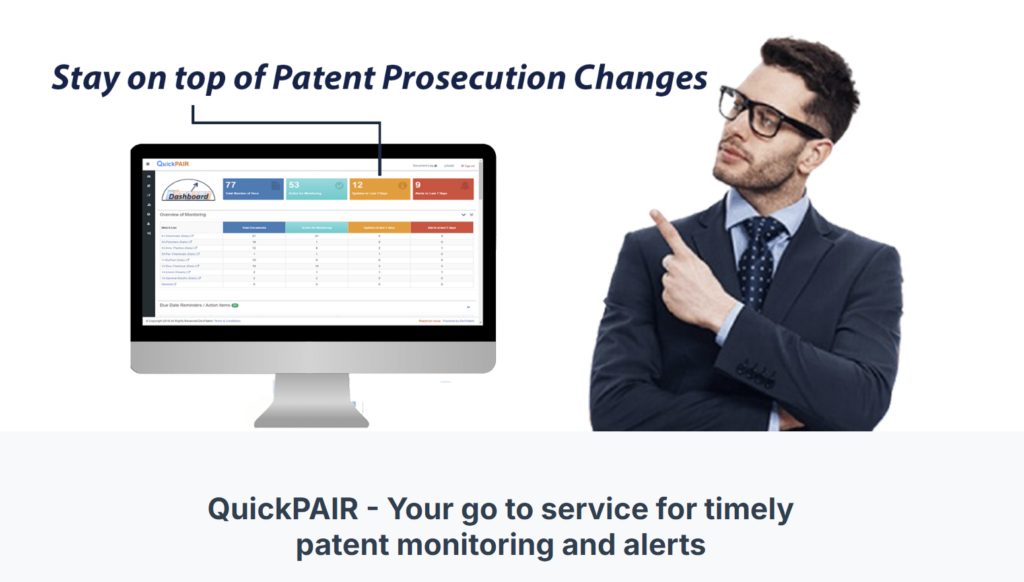
Source: QuickPAIR Homepage
Key Features
Here’s how QuickPAIR enables curated prosecution updates and legal status monitoring.
Multi-Jurisdiction Monitoring
Tracks legal status changes, image file wrappers, and document updates across the US, Europe, Australia, Canada, Korea, India, Singapore, Germany, France, and the UK.
Curated Prosecution Updates
Reviews each prosecution change and allows users to receive either all updates or only critical notifications.
Image File Wrapper Sharing
Enables secure one-click sharing of detailed file wrappers via email from the web application.
Automated Deadline Reminders
Sends alerts 30 days and 7 days before office action responses and fee payment deadlines.
Actionable Rejection Insights
Provides contextual insights such as direct links to reference documents for 102 rejections.
Centralized Watch Lists
Organizes applications into watch lists, assigns attorneys and client matters, and consolidates open tasks across patent offices.
Technology & Assignee Alerts
Monitors newly published applications in specific technology areas or tracks filings by selected assignees.
Pricing
Pricing information is not publicly listed on the QuickPAIR website.
Demo & Trial Availability
No explicit free trial information is provided on the website. Interested users are encouraged to contact QuickPAIR for further details.
4.PatSeer Alerts Monitoring
PatSeer Alerts Monitoring lets you set up customized alerts for patent activity based on defined search criteria. It delivers notifications when records match your parameters — including status changes, legal updates, and published applications. It helps you monitor prosecution and competitive patent activity without manual checks.
Source: PatSeer Homepage
Key Features
These features support ongoing monitoring of prosecution and published applications.
Legal Status Monitoring
Tracks whether patents or applications are granted, abandoned, rejected, expired, or continued.
Prosecution Status Updates
Monitors the latest prosecution developments of pending applications in selected domains.
Published Application Alerts
Notifies users when new patent applications matching defined criteria are published.
Record-Level Monitoring
Allows specific patent documents to be monitored for updates in legal status or other activity changes.
Automated Email Delivery
Sends weekly or monthly alerts summarizing matched status and prosecution changes.
Pricing
PatSeer operates on a flat-fee subscription model, with pricing available upon request for each edition (Premier, ProX, Explorer, Industrial Designs).
Demo & Trial Availability
A free trial is available upon submitting an enquiry form.
5. Orbit Intelligence
Legal Status Monitor (LSM) is an optional module within Orbit Intelligence that tracks changes in patent families and official online registers. It compares register content between alert runs and sends notifications when legal status updates or new family members are detected.

Source: Questel Homepage
Key Features
Here’s how Orbit Intelligence monitors patent family changes and register updates.
Legal Status Register Monitoring
Tracks updates in Inpadoc and national registers, including US, EP, JP, CN, DE, FR, GB, KR, and CA.
Change Detection Alerts
Compares register data between executions and highlights detected changes in reports.
Custom Alert Frequency
Alerts can run from twice weekly to once every six months.
Patent Number–Based Monitoring
Alerts are set up using application, publication, patent, US serial, or PCT numbers.
Family Member Monitoring (Inpadoc)
Monitors new family members and legal status changes through the Inpadoc register.
Automatic Family Integration (Optional)
Automatically adds newly detected family members to the respective national registers for monitoring.
Grant-Only Filter (US & EP)
Allows monitoring limited to grant events for selected US and EP applications.
Email Report Delivery
Sends email notifications with highlighted status changes and access to detailed reports.
Alert History Storage
Maintains alert results within the module for review of past updates.
Pricing
Legal Status Monitor is described as an optional module within Orbit Intelligence. Pricing details are not publicly listed.
Demo & Trial Availability
No explicit free trial information is provided. Users are directed to contact Questel for assistance or support.
6. Derwent Patent Search
Derwent Patent Search is a global patent intelligence platform that provides enhanced patent data, expert-authored invention summaries, and legal status information. It supports patentability, FTO, and validity searches, and provides access to comprehensive global patent records and litigation data.
Source: Dervent Patent Intelligence Solution Page
Key Features
Below are the features that support global patent intelligence and legal status research in Derwent.
Reliable Legal Status Data
Access legal status information to support faster and more informed FTO decisions.
DWPI Invention Families
Groups global citations and related documents under a single DWPI invention family for consolidated status review.
Correlated Litigation Data
View patent litigation activity across 140+ jurisdictions linked to search results.
Search by Patent Number or Fields
Use 300+ searchable fields to retrieve specific application or publication records.
Expert-Authored Invention Summaries
Review structured summaries describing novelty, use, and advantage to quickly understand patent scope.
AI Patent Search
Use an AI-powered search trained on DWPI data to retrieve relevant patent records efficiently.
Pricing
Pricing details are not publicly listed and are available upon contacting Clarivate.
Demo & Trial Availability
Trial and Demo are available upon request.
7. Minesoft
Minesoft’s AI Patent Monitoring & Alerts solution provides discovery and tracking to identify new filings and track prosecution and legal status changes. It integrates AI classification and workflow automation to organise alerts by business priorities across multiple jurisdictions.

Source: Minesoft Solution Page
Key Features
Here’s how Minesoft supports prosecution tracking and global legal status alerts.
Prosecution Status Tracking
Tracks prosecution updates through PAIR integration for monitored patents.
INPADOC Legal Status Alerts
Monitors legal status changes across jurisdictions using INPADOC data.
Grant & Expiry Notifications
Sends alerts when patents are granted or expire.
Maintenance Fee Deadline Alerts
Notifies users of upcoming maintenance fee deadlines.
Assignment Change Alerts
Tracks ownership or assignment updates.
Citation Tracking
Alerts users when monitored patents are cited.
Multi-Jurisdiction Coverage
Supports monitoring across global patent offices.
Tracking Monitoring
Allows users to monitor specific patents for status and legal updates.
Discovery Monitoring
Identifies newly published patents, filings, and citations matching defined criteria.
AI Classification & Filtering
Automatically categorises and routes alerts based on business taxonomy.
Pricing
Pricing details are not publicly listed. Users are encouraged to contact Minesoft for information.
Demo & Trial Availability
Free Trial option available via the website.
8. Patsnap
Patsnap enables patent application status checking through searchable legal status, simple legal status, and legal event filters. Users can refine searches using predefined status codes and view detailed legal information within individual patent records.

Source: Patsnap Homepage
Key Features
Below are the legal status and event tracking features within Patsnap.
Simple Legal Status Filter
Search patents by high-level categories such as Active, Inactive, Pending, PCT Designated Stage, or Undetermined.
Detailed Legal Status Search
Filter records using specific legal states, including Published, Examining, Granted, Rejected, Revoked, Expired, Abandoned, Withdrawn, Restored, and Non-payment.
PCT National Phase Tracking
Monitor entry status and time limits for PCT national phase filings.
Legal Event Filtering
Track events such as Transfer, License, Pledge, Opposition, Re-examination, Litigation, Invalidity proceedings, and Assignment changes.
Field-Based Query Syntax
Use structured field queries (e.g., SIMPLE_LEGAL_STATUS, LEGAL_STATUS, LEGAL_EVENT) to precisely refine search results.
Patent Legal Tab View
Access detailed legal background information directly within each patent record.
Pricing
Pricing information is not publicly listed. Users are encouraged to contact Patsnap sales for plan details.
Demo & Trial Availability
Demo is available upon request.
While there are multiple ways to check your patent application status — from manually navigating the USPTO Patent Center to relying on updates from patent counsel or using third-party monitoring tools — the real question is this: how much time, cost, and strategic visibility are you willing to sacrifice?
The TIP Tool™ removes that tradeoff. It gives you centralized, real-time access to both published and unpublished application statuses in one streamlined platform.
Track Patent Application Status Faster and More Affordably with the TIP Tool™
Checking your patent application status shouldn’t require logging into multiple systems, waiting on counsel for updates, or deciphering complex prosecution records. Yet for many IP teams, that’s still the reality.
The TIP Tool™ transforms how you monitor and manage your patent portfolio. Instead of manually tracking each case through the USPTO Patent Center, you get a centralized, real-time view of all your published and unpublished applications in one place.
You can instantly see how many cases are pending, patented, abandoned, or expired and dive deeper into the prosecution stages. Whether a Non-Final Office Action was issued, a Final Rejection received, an RCE filed, or a Notice of Allowance granted. Automatic USPTO data sync keeps your portfolio updated in real time, eliminating repetitive searches and spreadsheet tracking. It’s the fastest and most cost-effective way to monitor both published and unpublished patent applications with complete, centralized visibility.
Also, the TIP Tool™ goes beyond simple tracking. With built-in predictive insights on patentability, examiner behavior, art unit predictions, and projected costs, it helps you make informed strategic decisions.
When you manage dozens or hundreds of filings, visibility isn’t optional but essential. The TIP Tool™ eliminates guesswork, reduces friction, and puts you firmly in control of your patent lifecycle from idea to issuance.

Ready to see how it works? Explore the TIP ToolTM functionality with our interactive product demo!
Disclaimer: The information in this article/review is sourced from the internet and may not be entirely accurate or up-to-date. We recommend visiting the respective software websites for the most current and reliable information. The opinions expressed here are those of the author and may not reflect the views of Triangle IP. We are not liable for any consequences that may arise from relying on the information provided in this article/review.
FAQs
1. Why is Monitoring Patent Application Status Critical?
For enterprise IP teams, checking application status is not a clerical task. It is a risk-management function. Missed status changes can translate directly into lost rights, lost leverage, or avoidable financial exposure.
First-to-File Priority
In a first-to-file system like the U.S., “Patent Pending” establishes priority against competitors, even though it does not grant enforceable infringement rights. Failing to track status changes can mean losing awareness of where that priority stands as prosecution progresses.
Pre-Grant Royalty Risk (Provisional Rights)
Once an application is published, applicants may be entitled to reasonable royalties for infringement that occurs before the patent issues, provided the infringer had actual notice of the published application. Missing publication or status updates can mean missing potential royalty claims.
Maintenance Deadlines After Grant
Issued patents are not “set and forget.” In the U.S., maintenance fees must be paid at 3.5, 7.5, and 11.5 years after the grant. Missing these deadlines automatically changes the patent’s status to Expired, permanently eliminating enforceability.
For organizations managing large portfolios, these risks compound quickly. That is why status monitoring needs to be accurate, continuous, and scalable—not reactive or spreadsheet-driven.
Also Read: 7 Reasons Why Managing Your Intellectual Property Assets on an Excel Spreadsheet is a Bad Idea
2. What Does My Patent Application Status Mean?
When you check your application in the Patent Center, the status label can be easy to overlook and hard to interpret. Here’s what the most common patent statuses actually mean in practice.
- Pending: The application is still under examination. A decision has not been reached, or prosecution is ongoing and incomplete.
- Abandoned: The application is no longer being pursued. This usually happens due to missed deadlines, such as failing to respond to an Office Action, or by deliberate choice.
- Withdrawn: The applicant voluntarily removed the application from prosecution, often due to a change in business strategy or a low likelihood of success.
- Revoked: The patent was invalidated after grant, typically through court proceedings or post-grant challenges.
- Expired (Fee-Related): The patent lapsed because required maintenance fees were not paid. In the U.S., maintenance fees are due at 3.5, 7.5, and 11.5 years after the grant.
Also Read: Nine Top Patent Tracking Software Picks to Prevent Missed Deadlines and Portfolio Blind Spots