We’ve put an end to the dummy data previously shown within some of the tools covered by TIP Tool™. Now, you can perform free searches using real patent data, explore the tools, and subscribe when you need more.
We’ve also introduced Search Token Limits for selected tools, so you know how many searches you can perform each month.
And because every search counts, we’ve added Usage Stat, a new indicator that shows how many searches you’ve used and how many remain.
For organizations, tokens are shared without fixed individual limits. Anyone who needs more searches can use most of the tokens, while others use the remaining ones.
Let’s see which tools now have search token limits and how many searches you get.
Which Tools Have Search Token Limits, and How Many Searches Do You Get?
Search token limits now apply to five tools within TIP Tool™: Examiner Analysis, Prosecutor Analysis, Predictor, Family Tree, and Patent Lookup.
Here’s how many searches you get during your free trial and with a subscription.
| Tools | Trial Lookups | Free Lookups | Premium | |
| Personal Purchase | Organization Level Purchase | |||
| Examiner Analysis | 1 | 0 | 10 | 1 |
| Prosecutor Analysis | 1 | 0 | 10 | 1 |
| Predictor | 1 | 0 | 10 | 1 |
| Family Tree | 1 | 0 | 10 | 1 |
| Patent Lookup | 1 | 1 | NA | 10 |
Note: All search limits given given on calendar-month basis. If you need customized search limits for your organization or personal use, you can contact the support team anytime to discuss your requirements and explore a personalized plan.
Now moving on, let’s understand how these search tokens work when multiple people in an organization use the same tool.
How Are Search Tokens Shared Within an Organization?
When an organization purchases any standalone tool, each purchased seat adds 10 search tokens per month to a shared pool for that tool.
For example, purchasing 5 Examiner Analysis seats gives your organization 50 searches per month.
These tokens aren’t divided equally among users. If one team member needs 35 searches for a priority project, they can use them, while others can use the remaining 15.
This way, your team can use the available searches based on actual needs, without fixed individual limits.
But how do you know how many searches are still available? That’s why a usage limit indicator is a must.
Track Your Remaining Searches with Usage Stat
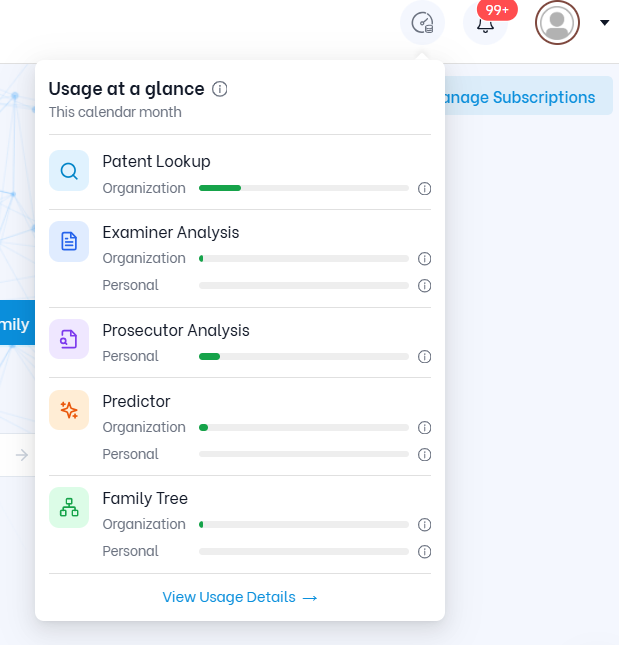
Click the Usage Stat indicator in the top-right corner of TIP Tool™ to open Usage at a glance.
Here, you can see how many searches you’ve used and how many remain for each of the five tools in the current month. Organization and personal usage are shown separately, where applicable.
Need more details? Click View Usage Details for a closer look.
This helps you plan your searches and prioritize the patents or applications that matter most.
Now that you know how to make the most of your searches, why not explore the plan that best fits your needs or try out the tools?
Whether you’re working individually or with a team, find the TIP Tool™ plan that matches your patenting needs.