| TL;DR – The USPTO routes patent applications to examiners using CPC codes. Predicting yours before filing matters because low-allowance classifications can mean longer, costlier prosecution. Yet most CPC prediction tools focus on prior art search. This guide covers tools like Triangle IP’s Predictor within the TIP Tool™, which predict likely CPC codes and identify words influencing classification. These insights help you set an early prosecution strategy by refining your draft to potentially steer away from low-allowance codes toward those with better odds of patent approval. |
When patent prosecution takes longer than expected, attorneys often review examiner track records and plan examiner interviews. But what if you could anticipate which group of examiners might handle your application before filing?
There’s a way; just follow the USPTO’s method. The USPTO assigns CPC codes to each application and uses them, among other factors, to route it to examiners.
Now, many tools can predict these CPC codes, but not all are suitable for confidential drafts. For example, EPO’s CPC Text Categoriser warns users not to submit unpublished subject matter.
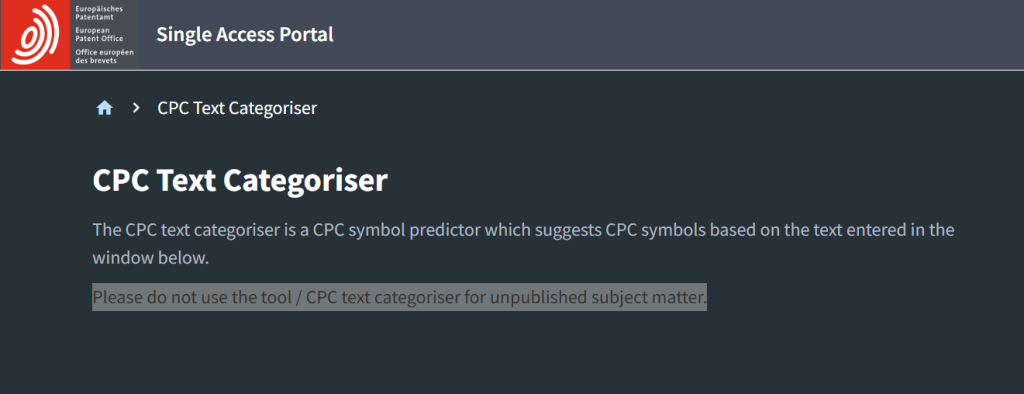
Source: epo/cpc-text-categoriser
And many are marketed for prior art search. This guide, however, focuses on tools that don’t just predict likely CPC codes but also show the influential terms behind them. That way, you can consider refocusing your draft toward more favorable classifications. We built the Predictor in the TIP Tool™ for exactly this purpose. Below, we’ll compare it with other options to help you make an informed decision before investing in one.
Let’s start with our selection criteria.
Criteria We Used to Make Our Shortlist of CPC Prediction Tools
We evaluated CPC prediction tools on five factors to see how useful they are for patent attorneys and innovation managers working with inventions before filing.
1. Use Cases
We looked at what users could do with the predictions.
- Could a patent attorney see a draft’s likely CPC codes and adjust the claims?
- Could an innovation manager spot inventions that need more time and money to prosecute, before setting a filing budget?
2. Ease of Use
We looked at how simply users could get predictions.
- Could they paste an invention summary or draft claims, or upload a file?
- How much setup did each tool require?
- Could users run another prediction without redoing the setup?
3. Data Security and Privacy
We looked at how each tool handles unfiled, confidential inventions.
- How did it store and protect that information?
- Did it use that information to train AI models?
4. Integration With Patent Workflows
Some users only need CPC predictions, while others prefer one tool that fits their workflow without moving data between systems.
- Was CPC prediction a standalone offering?
- Or was it part of a larger platform, from invention disclosures and drafting to prosecution analysis and portfolio tracking?
5. Cost
Tools with a free plan or trial got extra consideration, so users could test before paying.
- Was prediction free or offered through a subscription?
After evaluating tools against these five criteria, we found four options worth comparing. Triangle IP’s Predictor was the only one that met all five. The other three are lighter options, worth exploring if you mainly want to predict CPC codes from an invention summary or draft.
We’ll explain what each tool can and can’t do in the detailed reviews. But first, here’s a quick side-by-side comparison.
4 CPC Prediction Tools for US Patent Applications: Quick Comparison
The table below shows how the four tools compare on the jobs that matter most, from predicting CPC codes and refining claims to checking allowance odds before filing.
| Predictor within the TIP Tool™ | SciSpace Patent Classification Assistant | Patent Classification Explorer | PQAI CPC Lookup | |
| Built for | Inventors, patent attorneys, and IP managers planning filing and prosecution strategy | Patent analysts and IP counsel, for prior art search and filing prep | Anyone looking up or finding codes | Inventors getting ready for a prior art search |
| What you enter | Text or a .txt file (50 to 10,000 words) | Abstract, claims or description, or a DOCX/PDF | A short description (up to 500 characters) | A sentence or phrase |
| Where your draft may land | Full CPC codes (e.g. G06Q10/107), plus art units | CPC and IPC codes | IPC, CPC or both; you pick class, subclass or subgroup | 50 IPC/CPC codes |
| Prediction confidence | 1 to 5 stars | Primary and secondary picks | Not stated | Not stated |
| What’s pulling it there | Key terms from your text, linked to codes | A reason for each code, tied to your wording | A short explanation for each code | Code definitions only |
| Allowance rate per code | Yes | Not stated | Not stated | Not stated |
| Significant Terms | Word cloud showing terms associated with CPC code | Not found | Not found | Not found |
| Check a rewrite | Yes, run multiple predictions but in a separate tab. | Run again only | Run again only (20 a day) | Run again only |
| Time to get results | A few seconds | 2 to 4 minutes | A few seconds | A few seconds |
| Invention data safety | SOC 2 Type II; encrypted US hosting | SOC 2 badge shown | Notice to leave out confidential details | Doesn’t store or log queries |
| Price | Free 1-month Trial; $5/month | Monthly free 100 credits | Free | Free web lookup; paid API access |
Now let’s take a closer look at each tool.
Yes, the first one is ours. But we didn’t put it first just because we built it. We put it there because it’s the only one that met all five criteria from the pre-filing use cases to data security we discussed above.
1. Predictor Within the TIP Tool™: Refine Claims to Improve Your Chances of Faster, Less Costly Patent Prosecution
The Predictor in the TIP Tool™ originally helped attorneys estimate which art unit might handle their application. As the USPTO moved to CPC-based routing, we added CPC prediction so attorneys could assess where their drafts might land before filing.
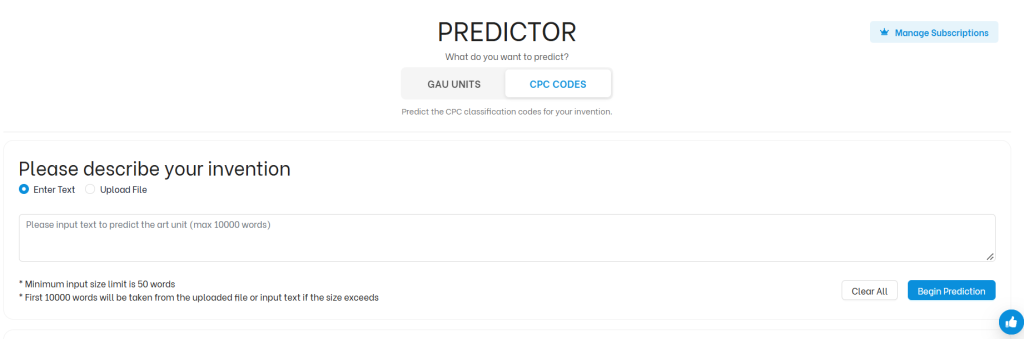
Different CPC classifications have different historical allowance rates. Rather than finding out after filing that an application has landed in a tougher area, attorneys can check first. They can see each likely code with its allowance rate and the words influencing it, then refocus their claims before they file.
Must Read: Patent Prosecution Strategy Often Starts Too Late. Triangle IP is Moving it to the Drafting Stage.
Key Features and Benefits of the Predictor Within the TIP Tool™
Here’s what the Predictor shows you, and how each part helps you shape a stronger application before you file.
- CPC Prediction From a Short Summary or a Full Draft
You don’t need a finished application. Innovation managers can check an idea before funding it. Attorneys can check a draft before filing, while it’s still easy to change.
- CPC Codes Paired With the Terms Driving Them
You see which terms in your text point to each code. If one is pulling you toward a low-allowance code, you know what to rework. Triangle IP founder Thomas Franklin says this helps “people know the kind of words that are getting them in a bad area.”
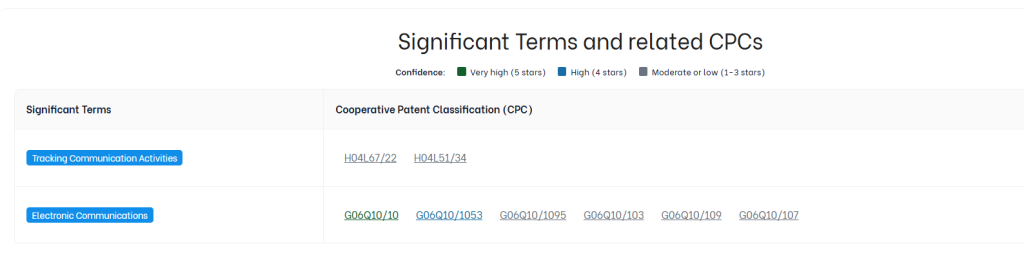
- CPC Code Search for Finding Related Terms
If a code has better odds, you can look it up and see the terms tied to it. Then you can describe the stronger side of your invention in that language.
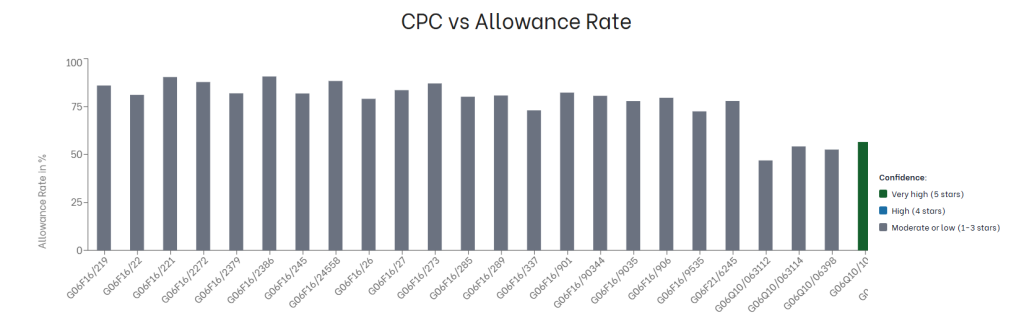
- Allowance Rates and Confidence Scores for Each Code
The stars show which codes you’re most likely to get. The historical allowance rate shows whether those codes are good places to land.
Pros
- It’s built into the TIP Tool™, so you can predict from the first idea and see how codes shift as drafts grow.
- The same run predicts art units alongside CPC codes, in a separate tab.
Must Read: How to Optimize Patent Prosecution Strategy with the Art Unit Predictor?
- A visual chart plots each code’s allowance rate, so low-allowance codes stand out at a glance.
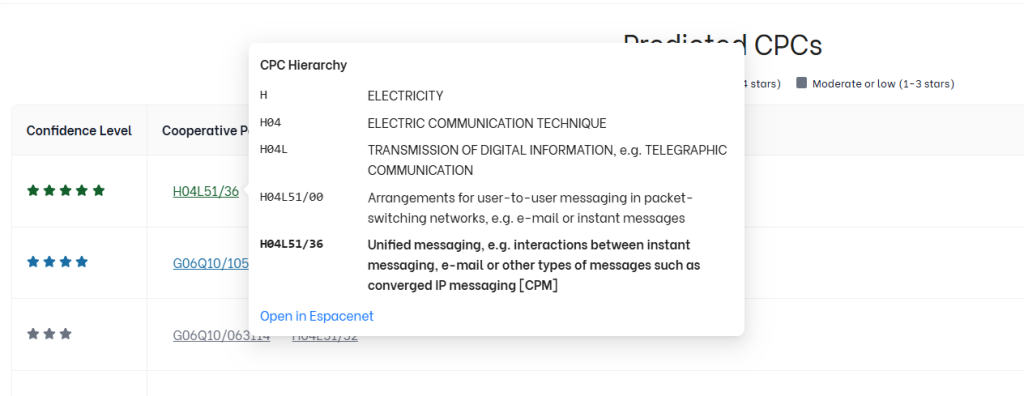
- Each code comes with a clear explanation, plus an Espacenet link for more detail.
Cons
- It’s built for US filings, so it doesn’t suggest IPC codes.
- Uploads take text files only, so a Word or PDF draft needs converting first, or you can paste the text in.
Data Security
Pre-filing drafts are confidential, so where they go matters.
- Our internal controls are independently audited under SOC 2 Type II.
- Your data is stored encrypted on AWS servers in the US.
- Portfolio data is encrypted so even our own developers can’t access it.
Pricing
The Predictor costs $5 a month, and you can try it for free for the first month. It’s also available as part of the wider TIP Tool™ plans.
2. SciSpace’s Patent Classification Assistant
SciSpace is an AI research platform with an Agent Gallery for different tasks, including patent searching and classification. We chose its Patent Classification Assistant because it takes your invention description or claims and suggests CPC and IPC codes, rather than requiring you to search for classifications yourself.
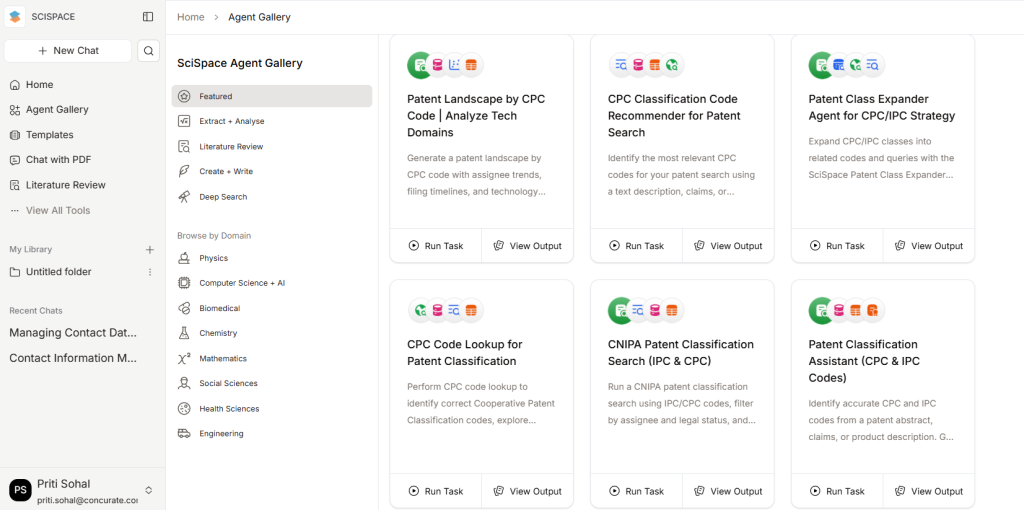
Source: scispace.com/agents
Key Features and Benefits of SciSpace’s Patent Classification Assistant
Here’s what the Assistant shows you, and how each part helps before you file.
- Primary and Secondary CPC Suggestions
You can see which code best fits your invention, and which others may also apply.
- Explanations for Each CPC Code
The reasoning points back to your description or claims, so you know why each code was picked.
- Related Codes and Patent Examples
In our test, it also cited existing patents that use these codes. That gave us a way to check the suggestions, though not proof of accuracy.
Pros
- Provides CPC/IPC definitions, classification details, and CSV exports.
- Other SciSpace agents support prior-art searches and patent landscape analysis.
Cons
- No documented historical allowance rates for predicted CPC codes.
- Each prediction took 2–4 minutes in our test as multiple prompts were running in the background. But this can slow down repeated checks.
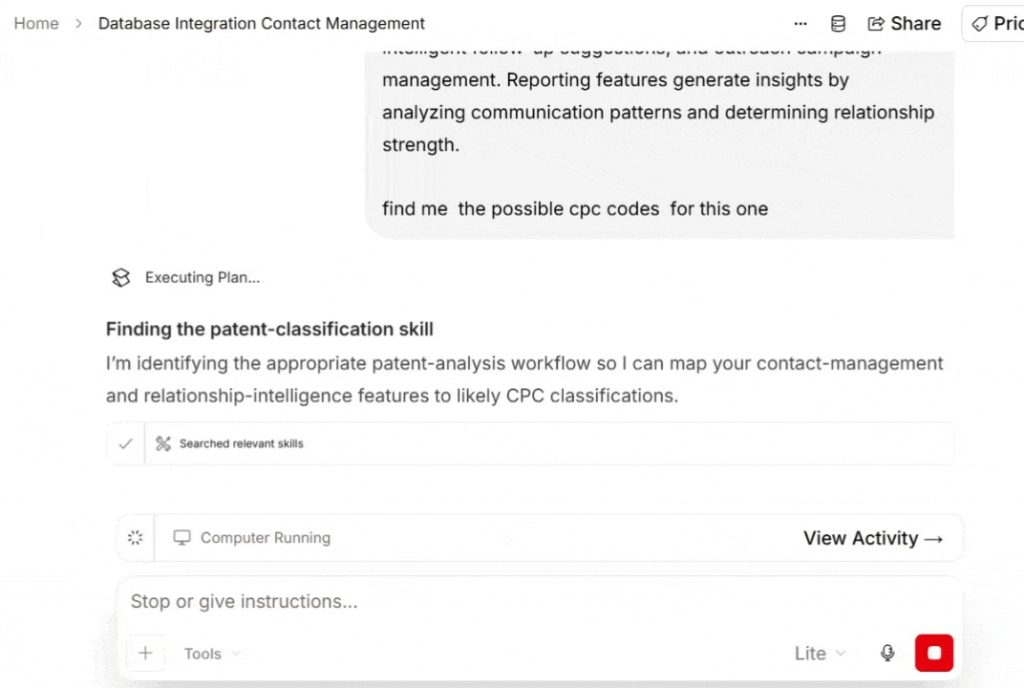
Source: scispace.com/chat
Data Security
SciSpace reports SOC 2 Type II compliance and encrypted document storage. However, we couldn’t verify whether text submitted to this particular agent is stored anywhere or maybe used for AI training.
Pricing
SciSpace offers 100 free monthly credits. Premium costs $12/month annually or $20/month monthly, with 1,200 credits. Advanced starts at $70/month annually. Enterprise pricing is available on request.
3. Patent Classification Explorer
Patent Classification Explorer is a free IPC/CPC browsing tool by mtc.berlin. It uses classification data from WIPO for IPC codes and the EPO/USPTO for CPC codes. Its AI Classify feature suggests classifications from a short invention description, making it useful for exploring possible codes before you’ve written detailed claims.
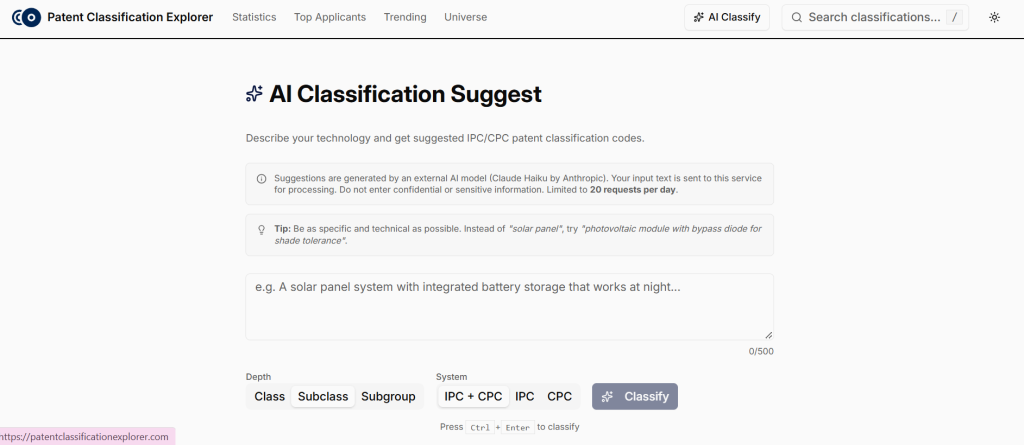
Source: patentclassificationexplorer/classify
Key Features and Benefits of Patent Classification Explorer
Here’s what the AI Classify page gives you, and how it helps before you file.
- Codes at the Depth You Choose
Choose class, subclass, or subgroup-level suggestions. Broader codes show the general technology area, while subgroups narrow it down.
- Explanations for Suggested Codes
The site says its AI Classify feature provides matching codes with explanations, helping you assess why a classification may fit your description.
- Choose CPC, IPC, or Both
Select CPC-only results for a US-focused classification check, or include IPC codes when exploring both systems.
Pros
- Offers separate code pages with classification definitions and hierarchy details.
- Free to use without an account.
Cons
- The 500-character limit prevents users from submitting full patent drafts.
- Limited to 20 classification requests per day.
- No publicly documented prediction confidence scores or historical CPC allowance rates.
- Explicitly warns against entering confidential or sensitive information.
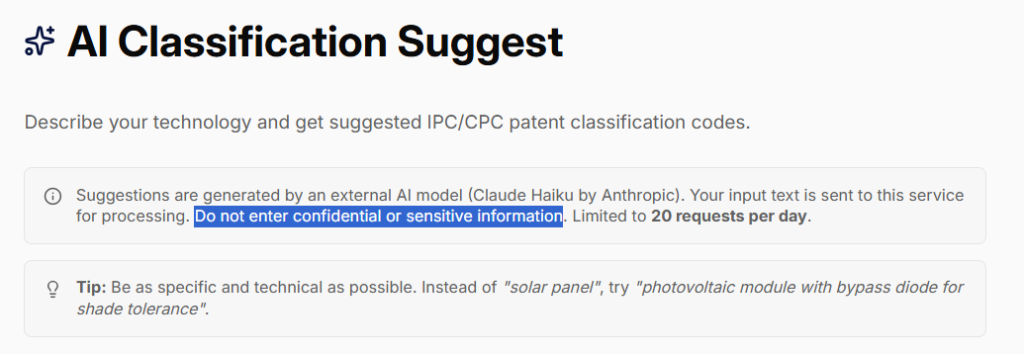
Source: patentclassificationexplorer/classify
Data Security
Text you enter on the Classify page is sent to Anthropic’s Claude Haiku model to generate suggestions. The site’s privacy policy says Anthropic doesn’t use that text for model training, and no personal data is needed. Even so, the page asks users not to enter confidential or sensitive information. For an unfiled invention, that means describing the idea in general terms.
Pricing
Free to use.
4. PQAI CPC Lookup
PQAI is an open-source patent search initiative started by AT&T and the Georgia IP Alliance. Its CPC Lookup takes a short technology description and suggests 50 relevant IPC/CPC codes. While primarily designed for prior-art searching, it can also help you explore which technology areas your invention may fall under.
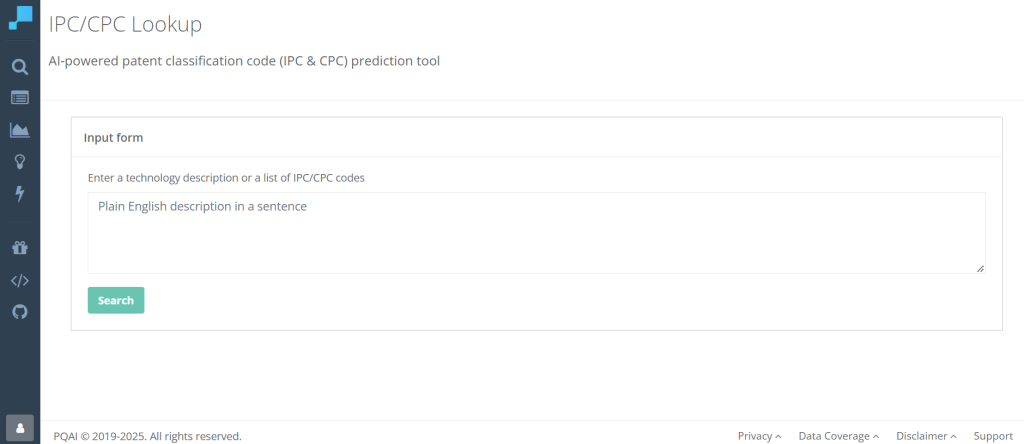
Source: https://search.projectpq.ai/cpcs
Key Features and Benefits of PQAI CPC Lookup
Here’s what the lookup gives you:
- 50 CPC/IPC Suggestions From One Description
Enter a sentence or phrase to get 50 matching classification codes. This helps you explore technology areas you might otherwise miss.
- Short and Detailed Code Descriptions
Switch between brief labels and full definitions to check whether each code actually fits your invention.
Pros
- The lookup page says you can use it without creating an account.
- PQAI also has a free Group Art Unit Predictor, built for inventors and patent attorneys. Pairing it with the CPC list gives a rough idea of the art unit that might examine your application.
Must Read: Top 5 Benefits of Using a Patent Art Unit Predictor in Your Patent Prosecution Strategy
Cons
- The codes come without a confidence score or a historical allowance rate. So you can’t tell which one your draft is most likely to get.
- A long list helps a prior art search cast a wide net. It’s less helpful when you want to narrow down where one draft will land.
- To check a rewrite, you run it again and compare two long lists yourself.
Data Security
PQAI states that it doesn’t store search queries or use them to train AI models. Queries are encrypted in transit and deleted after processing.
Pricing
CPC prediction is part of PQAI’s free plan. API access, which includes CPC and art unit predictions, comes with PQAI+ at $20 a month or $216 a year.
Each of these four tools can help you identify CPC codes relevant to your invention. But knowing the likely codes is only the first step. The bigger goal is to use those insights to make better filing decisions, improve your chances of allowance, and potentially shorten prosecution. That’s the problem Triangle IP built its Predictor to help address.
File Strategically and Get More Patents Allowed Faster With Predictor by Triangle IP
When you’re managing dozens of inventions, the goal isn’t just to file more patents. It’s to get more of them allowed, faster, without stretching your prosecution budget.
With the Predictor inside TIP Tool™, you can spot inventions headed toward low-allowance classifications before filing. That gives you and your attorney a chance to refine supported claims, reassess the predictions, or direct your budget toward more promising inventions.
And because the Predictor is part of TIP Tool™, you can repeat these checks as ideas develop into patent drafts, without switching platforms.
It’s also available as a standalone tool if CPC prediction is all you need.
Try the Predictor Free on your next idea or draft.
Or book a demo to see how the full TIP Tool™ suite fits into your invention-to-patent workflow.
Frequently Asked Questions About CPC Code Prediction
1. Will My Patent Application Receive the Exact CPC Codes Predicted by the Tool?
Not necessarily. CPC prediction tools estimate which codes may apply based on your invention description or claims. The USPTO assigns the actual classifications after filing, and they may differ from the predictions.
Use the predicted codes to plan your filing strategy, not as a guarantee of where your application will land.
2. When Should I Run a CPC Prediction?
Ideally, before you finalize your patent claims, while there’s still room to refine the draft.
You can start with an invention disclosure to identify potential classification concerns. Run the prediction again after adding technical details, during claim drafting, and before filing to check whether the likely CPC codes have changed.
3. Can One Patent Application Receive Multiple CPC Codes?
Yes. The USPTO can assign multiple CPC codes when an application covers different technical aspects.
That’s why you may see several codes in a prediction. Don’t focus only on the first one. Review which codes relate to the claimed invention and what they could mean for examination.