| TL;DR – Most enterprises aren’t short on ideas. They’re overwhelmed by chaos. Emails, spreadsheets, and scattered tools bury high-value concepts long before they can become products or patents. This guide cuts through that noise with a clear, side-by-side look at the 15 best idea & innovation management software for 2026. It highlights which tools truly improve idea capture, evaluation, and decision-making. And why the TIP Tool™ stands out for teams that want a structured, patent-aligned path from idea to measurable outcomes. |
The road from ideas to patents is long. However, most enterprises stumble far earlier than they expect. Not because they lack ideas, but because those ideas drown in chaos. They sit in email threads, get buried in spreadsheets, or wait endlessly for review. As a result, no one knows which concepts deserve attention, and potential breakthroughs fade before anyone realizes their value.
This is where Idea & innovation management software changes this story. Instead of fragmentation, it brings ideas into one place. From there, teams can evaluate them clearly, align stakeholders, and move the strongest concepts toward products, processes, or defensible IP assets.
In this blog, we compare the top 15 idea & innovation management software shaping 2026, including the TIP Tool™ by Triangle IP, Brightidea, and IdeaScale. Before we explore them, let’s look at how to choose the right platform.
What to Look for in the Right Idea & Innovation Management Software
Kevin G. Rivette and David Kline, authors of Rembrandts in the Attic, explain that intellectual property does not create value simply by existing. Value comes from how it is managed and put to use. As they note, “a patent does not itself create revenue until it is licensed, sold, or successfully asserted in litigation.”
Reaching that point requires clear processes. Organizations need practical ways to assess their assets, make decisions, and act on them. Without this structure, even strong ideas often sit unused.
Idea & innovation management software can support that process, but only if it fits how your team actually works. A tool that lacks alignment or adds extra steps quickly becomes “just another login.”
That’s why, before choosing a platform, it’s important to understand if it will help your team capture ideas effectively, evaluate them consistently, and advance the right ones with less friction.
To make that assessment, start by asking these guiding questions:
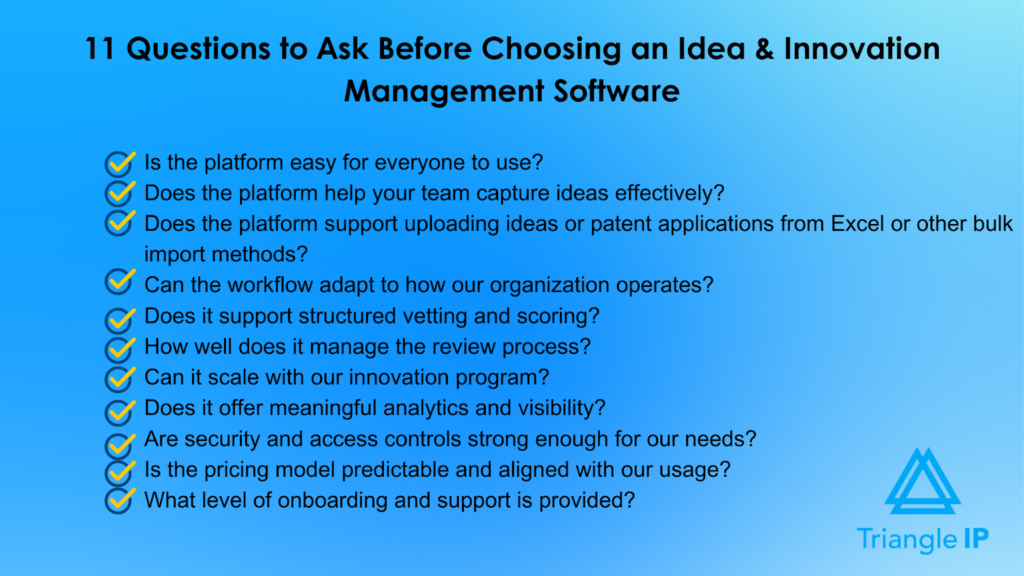
1. Is the Idea & Innovation Management Software Easy for Everyone to Use?
A tool only works if people actually use it. Look for an interface that feels intuitive for inventors, managers, and reviewers.
2. Does the Platform Help Your Team Capture Ideas Effectively?
Effective innovation starts with frictionless, consistent idea intake, so the platform should make submission simple for all contributors.
3. Does the Idea & Innovation Management Software Support Uploading Ideas or Patent Applications from Excel or Other Bulk Import Methods?
Large organizations often need to migrate historical ideas or application data. Check whether the platform allows bulk uploads and mapping for a smooth, accurate transition.
4. Can the Workflow Adapt to How Our Organization Operates?
Your process may evolve over time. Make sure the tool supports customizable stages, flexible routing, and tailored fields.
5. Does It Support Structured Vetting and Scoring?
Objective evaluation matters. Ask whether the tool allows consistent scoring for value, feasibility, and patentability, and whether reviewers can collaborate easily.
6. How Well Does the Idea & Innovation Management Software Manage the Review Process?
Clarity is key. The platform should show who is responsible for each review, what feedback has been provided, and what the next step is.
7. Can It Scale With Our Innovation Program?
As idea volume grows, so should the system’s capacity to handle more users, portfolios, and data without slowing down.
8. Does It Offer Meaningful Analytics and Visibility?
Dashboards, workflow insights, and pipeline summaries help teams prioritize ideas and make informed decisions.
9. Are Security and Access Controls Strong Enough for Our Needs?
Innovation data is sensitive. Confirm the platform uses role-based permissions and secure data handling.
10. Is the Pricing Model Predictable and Aligned With Our Usage?
Make sure costs remain manageable as your team expands or your pipeline matures.
11. What Level of Onboarding and Support is Provided?
Strong training and guidance can make the difference between adoption and abandonment.
At the end of the day, the “right” idea & innovation management software is the one your team will actually use without groaning, workarounds, or extra spreadsheets on the side. Once you know what really matters, the next question is: Which platforms actually deliver on this in the real world?
So, let’s dive into it.
15 Best Idea & Innovation Management Software Options for Turning Ideas Into IP & Impact in 2026
Innovation software is no longer a niche category. The global idea & innovation management software market is projected to surpass USD 2.92 billion by 2030. It is driven by enterprises looking to systemize how they capture, vet, and scale ideas. As programs mature, teams need tools that reduce friction, improve transparency, and help them prioritize high-value opportunities. And not just collect suggestions.
To help you navigate that landscape, we zoom into 15 leading tools that help organizations move from “lots of ideas” to real, measurable outcomes:
- The TIP Tool™
- Brightidea
- IdeaScale
- HYPE Innovation
- Miro
- Qmarkets
- Wazoku
- ITONICS
- InnovationCast
- Braineet
- Ideanote
- Ideawake
- Nosco
- Sideways 6
- Aha! Ideas
Let’s begin with the one purpose-built for IP-driven teams: The TIP Tool™.
1. The TIP Tool™
The TIP Tool™ by Triangle IP is an end-to-end idea & innovation management software that brings structure and accountability to the entire journey from idea capture to informed IP decisions. It centralizes innovation activity so enterprises can move ideas forward with consistency instead of relying on scattered tools that dilute momentum and obscure ownership.
Developed by patent attorney Thomas Franklin, the platform reflects a real understanding of how innovation breaks down—ideas get buried, reviews stall, and teams lose visibility. The TIP Tool™ counters this by giving organizations a dependable system that keeps ideas accessible. It keeps decision-making transparent and ensures progress stays continuous across every stage of innovation.

Key Benefits and Supporting Features of the TIP Tool™
In practice, successful innovation requires more than capturing ideas. It demands consistent follow-through, informed decision-making, and organized portfolio oversight. The TIP Tool™ supports this entire journey in one unified system. Below are the core benefits it delivers across your innovation lifecycle:
Capture More High-Value Ideas Without Slowing Inventors Down
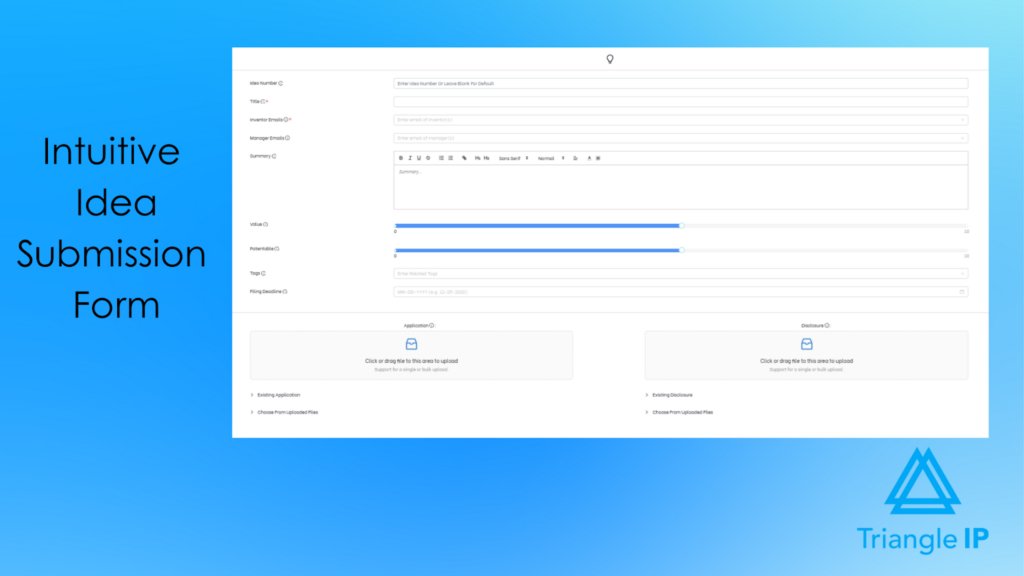
The TIP ToolTM ‘s idea manager streamlines the entire idea submission process, making it easy for inventors to record innovations in a consistent format. To start, the idea form captures details such as titles, summaries, inventor details, documents, scores, deadlines, and manager assignments. Meanwhile, users can save ideas as drafts while refining content. Once submitted, each idea automatically receives a unique identifier for clean tracking.
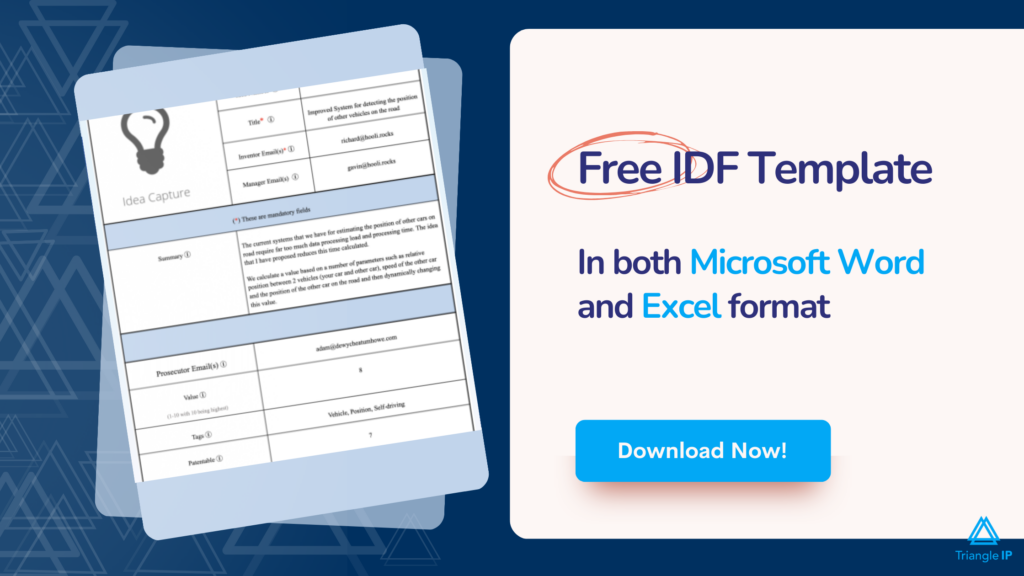
A well-structured invention disclosure makes evaluation faster and more consistent. The invention disclosure form template below shows exactly what information inventors should capture from the start.
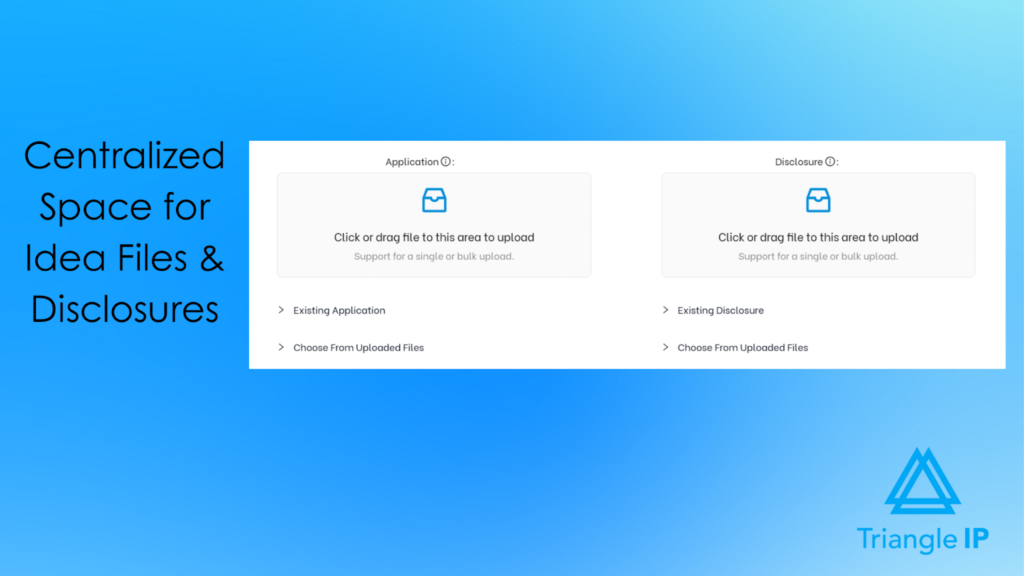
Manage Documents Easily With One Centralized Source of Truth
All disclosures, diagrams, videos, drafts, and supporting files remain linked to the idea as it moves through stages. Teams always work from the same, most updated set of documents, preventing duplication and scattered file storage.
Advance Ideas Through a Clear, Structured Innovation Pipeline
Once submitted, ideas move through a predictable sequence of workflow stages: Capture, Search, Internal Vetting, Patent Drafting, Reviewing, and Filing. Each stage is clearly defined, which helps teams evaluate ideas methodically and maintain visibility throughout the innovation lifecycle. This structure ensures ideas mature into strong filing candidates without getting stuck or overlooked.

Customize Innovation Operations to Match Your Organization
The TIP ToolTM adapts to any internal workflow. Admins can tailor the idea form with custom fields, create multiple portfolios for different units, define how ideas map to filings, and set detailed role permissions. This flexibility allows enterprises, universities, and legal teams to shape the TIP ToolTM around their existing processes rather than restructuring their workflows to accommodate the software.
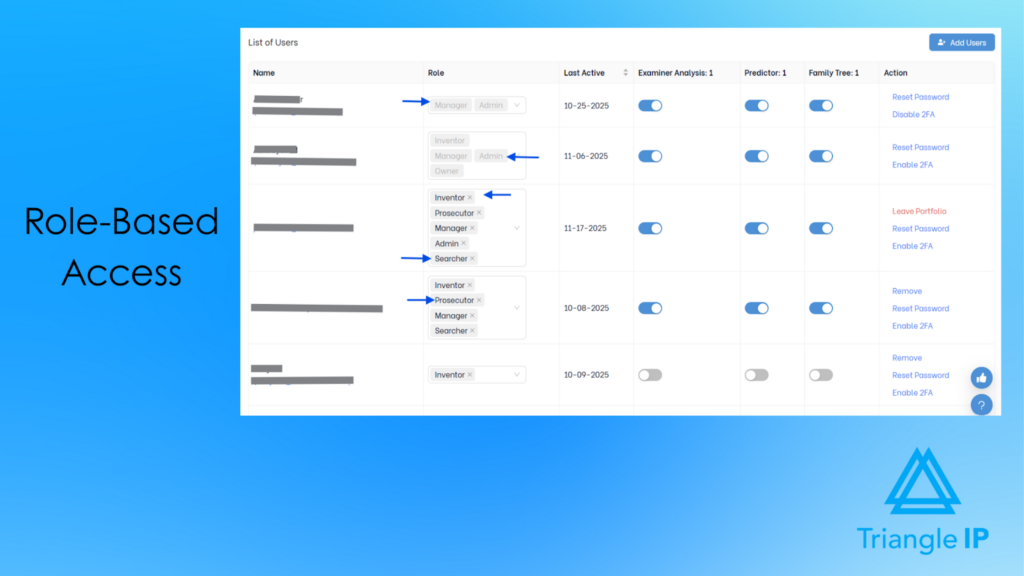
Enable Smooth Collaboration Across Inventors, Managers, and Attorneys
The TIP Tool™ supports seamless collaboration between internal teams and external partners. Role-based access ensures each participant sees and edits only what’s relevant. Secure onboarding makes it easy for outside counsel or partner institutions to participate.
Shared drafts, attachments, and centralized updates keep information in one place. This reduces back-and-forth and keeps R&D teams and legal contributors aligned.

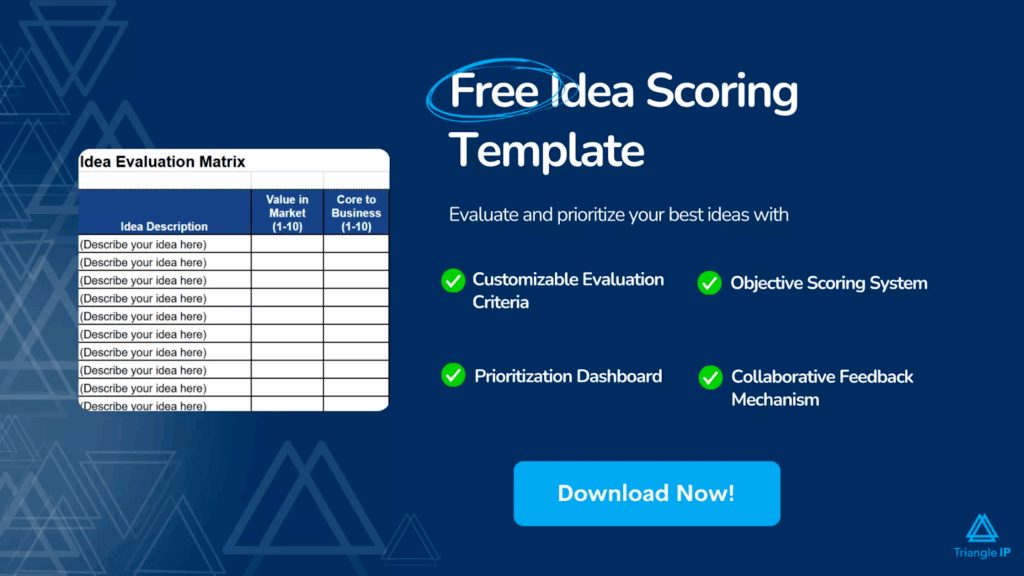
Collaboration works best when evaluation is consistent. The idea evaluation matrix below helps teams align on value, patentability, and priorities.
Keep Large Innovation Pipelines Organized Across Teams and Technologies
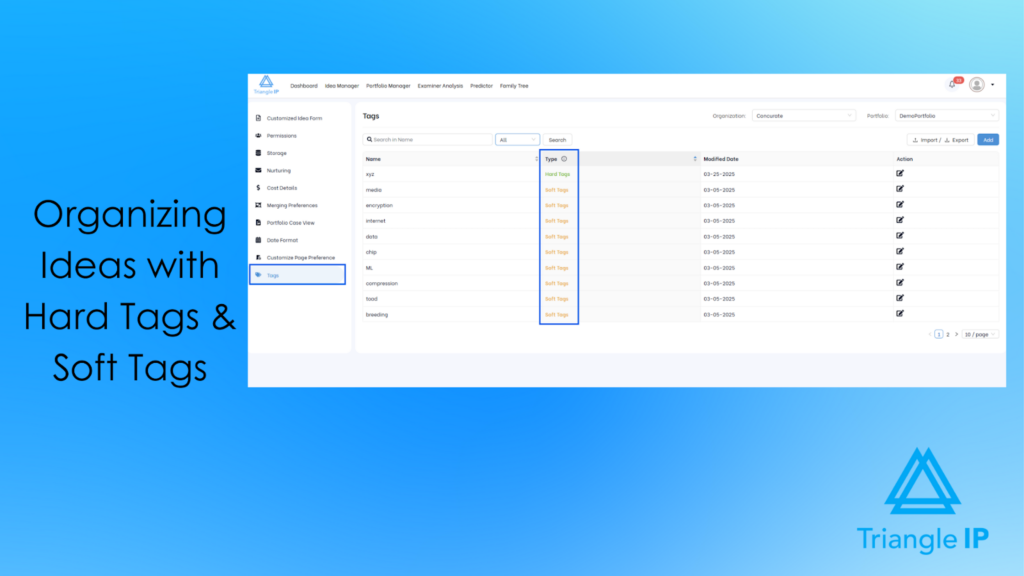
With the TIP ToolTM, scaling innovation management remains effortless—even when ideas number in the thousands. The platform uses a dual tagging system combining admin-governed Hard Tags with user-created Soft Tags, enabling rich categorization across technologies, business units, product lines, collaborators, and markets. Tags flow across Idea Manager and Portfolio Manager, and bulk import/export ensures taxonomies remain consistent over time.
Prioritize Ideas Using Strategic and Patentability Insights
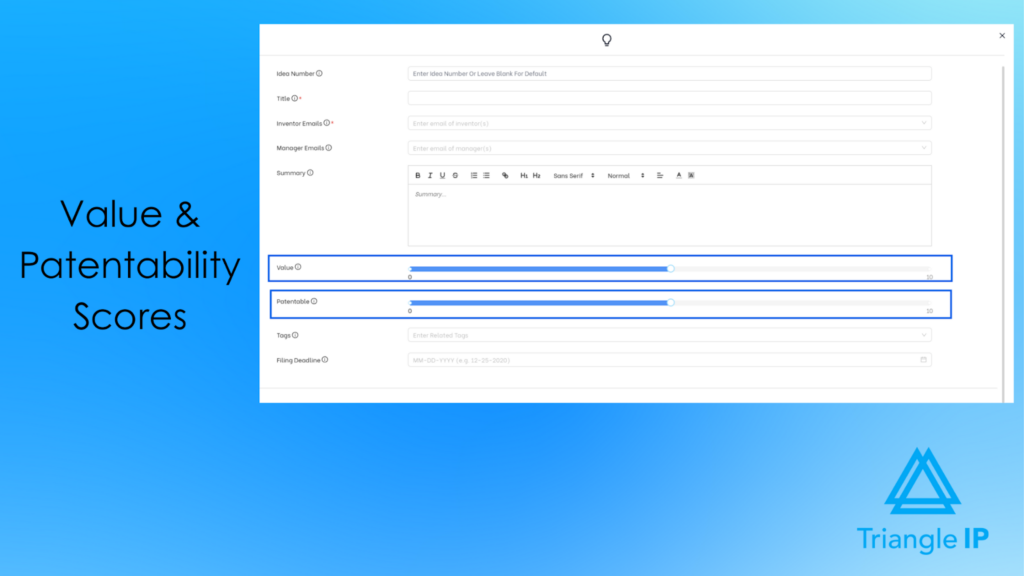
The TIP ToolTM supports informed decision-making by combining business value assessments with early patentability insights. Each idea can be evaluated using a Value Score to capture strategic or commercial importance. A predictive Patentability Score then estimates the likelihood of securing a patent based on USPTO trends, art unit patterns, and examiner behavior. In addition, cost projections across drafting, filing, and prosecution give decision-makers a clear view of both short- and long-term investment needs. Dashboards present these insights visually, making overall pipeline health easy to evaluate.
Consistent prioritization requires a clear scoring framework. The idea scoring template below offers a structured starting point.
Strengthen Drafts and Filing Strategy With Early Art Unit Prediction
Before filing, the Art Unit Predictor within the tool analyzes invention descriptions to determine which USPTO art units are most likely to be assigned. It highlights influential keywords and shows allowance rates for predicted art units, along with visual comparisons. This early intelligence helps teams refine applications to improve the chances of landing in favorable art units, ultimately improving allowance outcomes.

Improve Prosecution Outcomes With Examiner-Level Insights
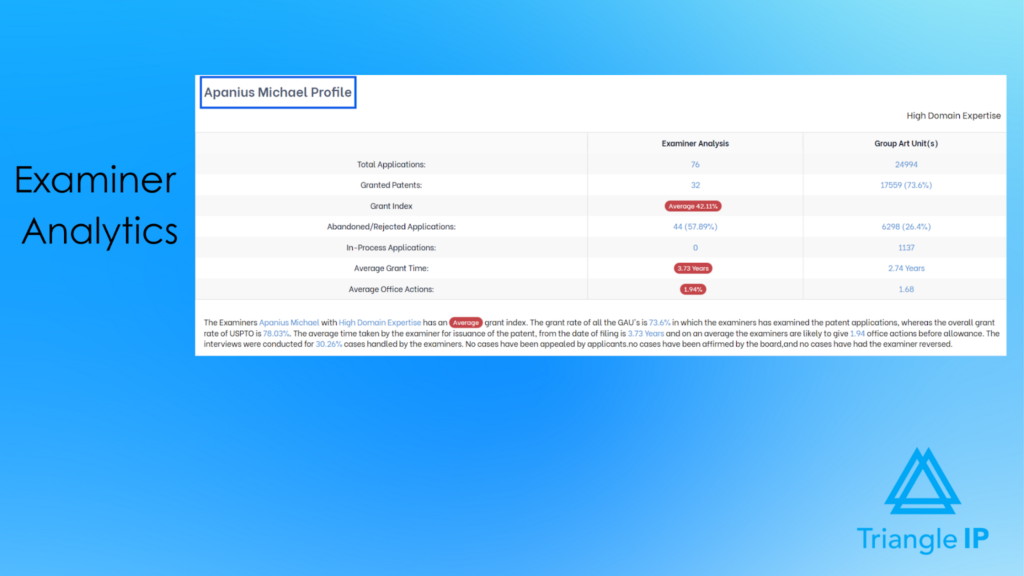
Within the tool, examiner analysis gives legal teams a deeper view into examiner behavior, making it easier to plan effective prosecution strategies. Users can review allowance rates, argument cycles, grant times, RCE outcomes, and abandonment trends for specific examiners. A dynamic decision tree maps common prosecution pathways, helping teams anticipate how a case might unfold and choose the right strategy to move forward efficiently.
Manage Patent Portfolios With Complete Transparency
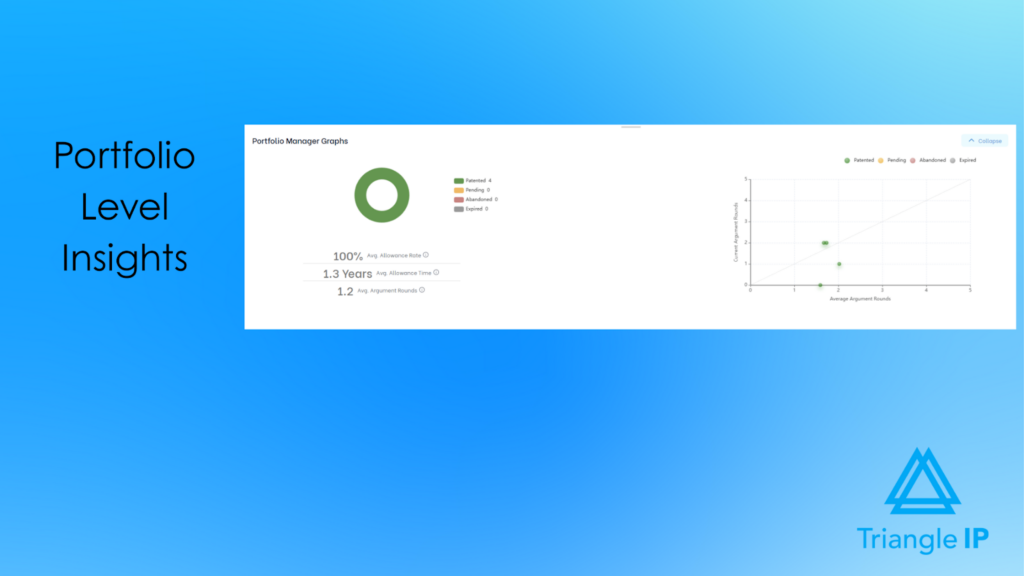
Portfolio Manager provides full visibility into every patent application across its lifecycle. High-level graphs show granted, pending, and abandoned cases, while a prosecution scatter plot highlights outliers that require attention. Each application includes structured metadata—status, filing information, value ratings, examiner data, continuity information, costs, and attached documents. Customizable columns and advanced search enable tailored portfolio analysis and reporting.
Understand Patent Relationships Instantly With Family Tree Visualization
The TIP ToolTM makes complex patent relationships simple to understand through its Family Tree visualization. Users can switch between Gantt, Modern, and Classic views to see priority chains, continuation and divisional paths, pending and issued assets, and international expansion strategies at a glance. This clarity helps teams plan continuations, evaluate portfolio gaps, and make better filing decisions across global markets.
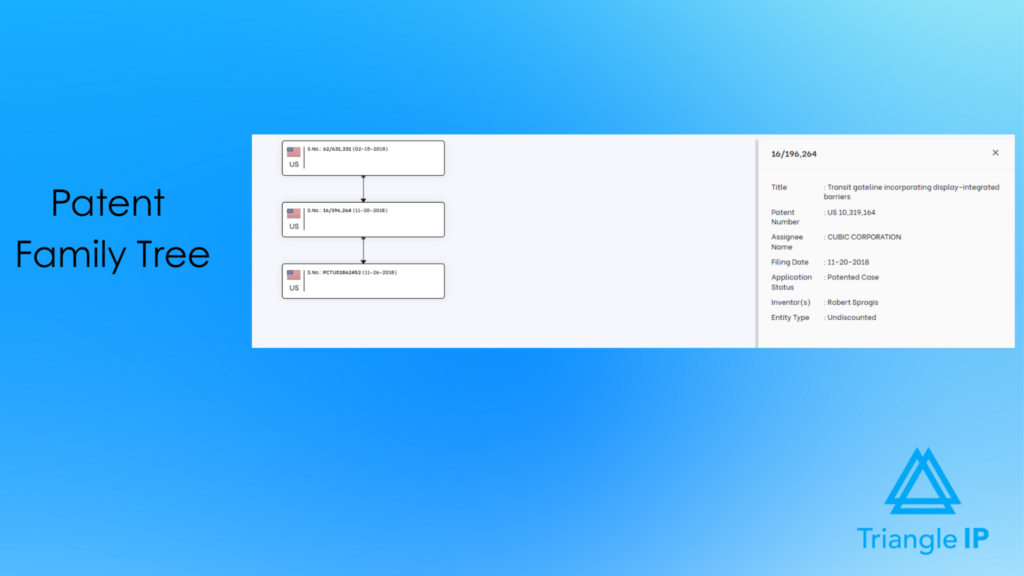
For users who only need this specific capability, the TIP ToolTMalso offers a stand-alone Patent Family Tree Generator starting at as low as $1 per month.
Understand Prosecution History at a Glance
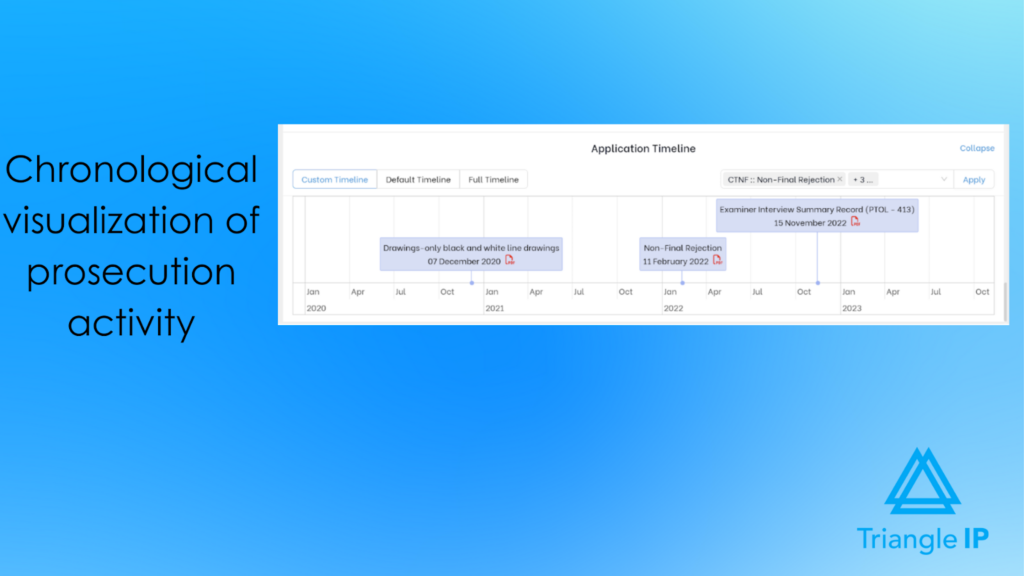
The Application Timeline visualizes the entire prosecution journey in chronological order. It includes office actions, interviews, amendments, allowances, and issuance, complete with document links and zoom controls. Users can switch between default, full, or customized event views, offering clarity during reviews, audits, or strategic planning.
Eliminate Manual Data Entry With Seamless Docketing and USPTO Sync
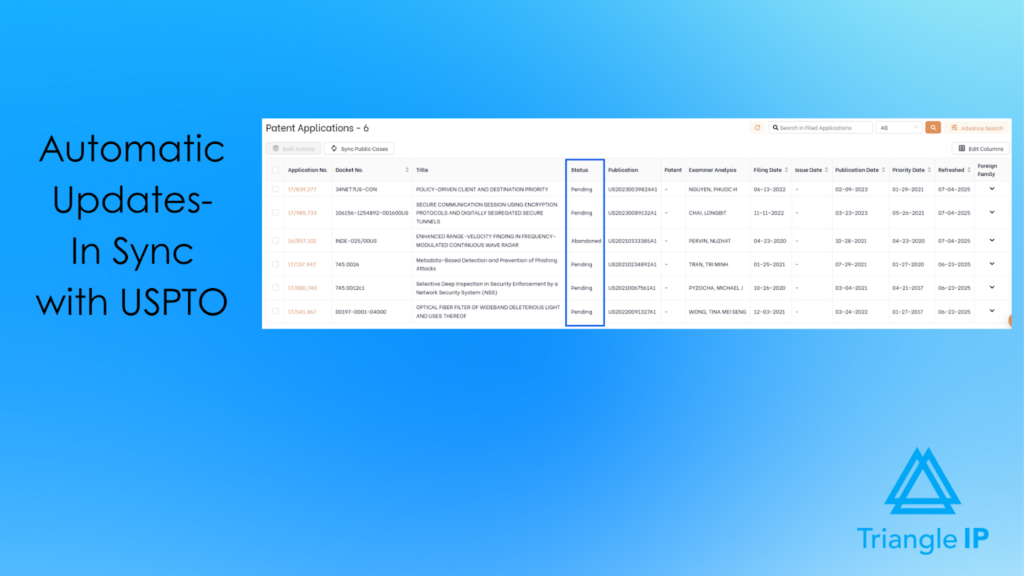
The TIP ToolTM removes manual updates by syncing directly with major IP docketing systems. Teams can forward exported spreadsheets to a system-generated email address for automatic ingestion with accurate field mapping and add/update options. Logs and status tracking keep the process transparent. The tool also syncs with the USPTO to automatically update application statuses and bibliographic data, ensuring records stay current without administrative effort.
Protect Sensitive Innovation Data With Enterprise-Grade Security
All documents and portfolio data are encrypted and stored on secure U.S.-based servers. Passwords and payment details are never stored, and even the Triangle IP team cannot access your portfolio. This ensures confidential disclosures and strategic documents remain safe throughout the innovation lifecycle.
Best For
Innovation-led enterprises, in-house IP teams, inventors, and patent counsel who need a structured, patent-aligned idea-to-filing workflow.
Data Privacy
Privacy and security are built into the TIP Tool™. Passwords and credit card details are never stored, and all payments are securely processed through Stripe. All portfolio data is encrypted, preventing access even by Triangle IP developers. The data is stored on encrypted AWS servers in the United States for secure disclosure uploads.
User Rating
The TIP Tool™ is loved by users, earning an impressive 5 rating on G2.
Pros
- Easy to adopt: Intuitive interface; non-IP teams get up and running quickly.
- Secure, centralized innovation storage: Password-free login, Stripe payment processing, and encrypted AWS servers provide a safe, compliant space for disclosures.
- Responsive team: Fast support and frequent product updates.
- Affordable: Accessible pricing with a genuinely useful free tier.
Cons
Occasional learning curve for structured IP workflows: Users unfamiliar with formal IP processes may need time and documentation to get fully comfortable.
Pricing
The TIP Tool™ offers flexible pricing designed for teams of all sizes:
- Free Plan: Ideal for getting started with up to 10 users.
- Premium Plan: Affordable monthly pricing for growing teams that need more users and storage.
- Custom Plan: Tailored options for large enterprises with advanced requirements. Contact the team to create your plan.
You can also purchase stand-alone add-on tools like Examiner Analysis, Art Unit Predictor, or the Patent Family Tree Generator.
For complete details, visit our full pricing page.
Demo and Trial Availability
Demo of the TIP Tool™ is available upon request. You can also sign up for a free trial.
2. Brightidea
Brightidea is a leading enterprise-level idea & innovation management software built to help organizations capture, evaluate, and develop their best ideas at scale. Designed for global teams, it streamlines every stage of the innovation lifecycle—from crowdsourcing and hackathons to experimentation, incubation, and full-scale transformation initiatives. With its highly configurable Innovation Cloud®, Brightidea enables companies to break down silos, engage employees worldwide, and run diverse innovation programs on a single platform.
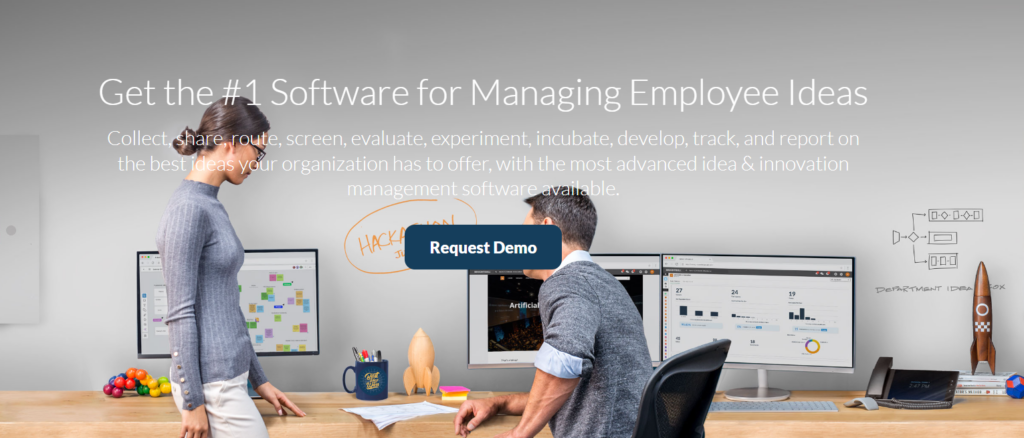
Source: Brightidea Homepage
Key Benefits and Features
- Complete Innovation Lifecycle Support: Brightidea manages everything from idea capture to evaluation, incubation, and large-scale transformation on a single platform.
- Simple and Continuous Idea Collection: Employees can submit ideas anytime through web portals, mobile apps, email, or paper scans. Ideas are automatically routed to the right workflow.
- Strong Team Collaboration: Digital whiteboards, real-time editing, voting, and structured templates help teams brainstorm, refine, and develop ideas together.
- Structured Evaluation and Prioritization: Stage-gate workflows, scoring tools, and pipeline views make it easy to assess ideas and choose the ones with the highest potential.
- Scalable Programs for Any Team: Brightidea supports suggestion boxes, departmental innovation, hackathons, accelerators, and enterprise-wide programs with multi-pipeline management.
- Clear Analytics and ROI Tracking: Dashboards show engagement, progress, business impact, and portfolio performance, helping leaders measure results and make informed decisions.
- External Innovation Support: Teams can scout startups, evaluate emerging technologies, and collaborate with external partners within one ecosystem.
- Enterprise-level Security and Reliability: SOC 2 Type II certification and strong access controls ensure data security for large organizations.
Best For
Organizations running ongoing employee idea programs.
Data Privacy
Enterprise-grade security with SSO, access controls, and SOC 2 compliance.
User Rating
It has a rating of 4.3/5 on G2.
Pros
- Easy to set up idea portals and initiatives.
- Strong customization of workflows, landing pages, and idea relationships (merge/link/parent–child).
- Powerful for hackathons, challenges, and large-scale ideation.
- Very good customer support and onboarding help.
- Works well in large enterprises; supports SSO and integrations/APIs.
Cons
- Reporting is clunky; it often needs multiple exports and external BI tools.
- UI/UX feels dated and unintuitive in places, especially for casual users.
- Steep learning curve on the admin side.
- The mobile app is buggy and underpowered.
- Some customizations need HTML/CSS; widgets/templates aren’t flexible enough.
- Admin licensing/pricing can limit scale.
Pricing
Pricing isn’t publicly disclosed on the official site.
Demo and Trial Availability
You can request a live demo on the Brightidea website to see its workflows, idea processes, and reporting dashboards in action.
If you want to try the platform yourself, Brightidea also offers free trials for its Whiteboard and IdeaBox tools.
Check how Brightidea compares to other platforms in our Brightidea alternatives guide.
3. IdeaScale
IdeaScale is a comprehensive idea & innovation management software designed to help organizations collect, evaluate, and implement ideas at scale. It provides a centralized hub where employees, customers, or community members can submit ideas, collaborate on improvements, and help shape high-impact initiatives. Known for its simplicity and flexibility, IdeaScale supports the full innovation lifecycle with tools for ideation, whiteboarding, prioritization, and project execution.
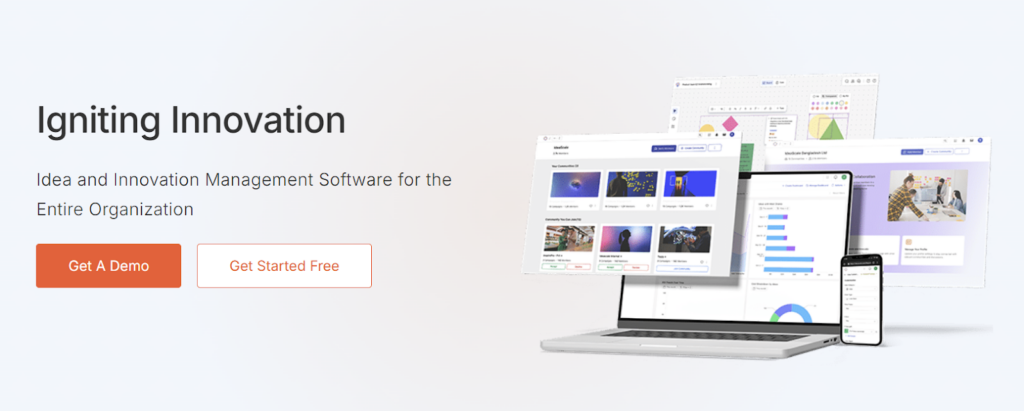
Source: Ideascale Homepage
Key Benefits and Features
- Simple Idea Collection at Scale: Centralizes ideas from employees or communities through an easy submission process with text, multimedia, and social inputs.
- Customizable Innovation Workflows: Supports design thinking, Lean, or any custom process with configurable stages, criteria, and decision paths.
- Strong Collaboration Tools: Enables voting, commenting, refinement, and visual co-creation through the IdeaScale Whiteboard.
- AI-Driven Prioritization: Uses AI to surface high-potential ideas and highlight trends that support better decision-making.
- Clear Portfolio Visibility: Provides campaign and idea portfolio views to track progress, bottlenecks, and overall innovation activity.
- Seamless Integrations: Works with tools like Slack, Trello, Yammer, and internal systems through API and single sign-on.
- Actionable Analytics and ROI Tracking: Offers dashboards that show engagement, outcomes, and business impact for data-backed innovation decisions.
- Enterprise-Ready and Global: Mobile-responsive, multilingual, secure, and built to support large, distributed organizations.
Best For
Enterprises/government teams running open or community-driven innovation.
Data Privacy
Security suitable for public-sector and large-scale community programs; supports SSO and data governance
User Rating
It has a 4.5/5 rating on G2.
Pros
- Easy for users to submit and engage with ideas.
- Highly customizable workflows.
- Strong and responsive customer support.
- Feature-rich platform for crowdsourcing and collaboration.
- Scales well for large, global organizations.
- Good value compared to competitors.
Cons
- The admin interface can be complex to learn.
- Reporting and analytics need improvement.
- Occasional technical issues.
- Some configuration options are limited.
- Requires time and training to use effectively.
Pricing
IdeaScale tailors its pricing to fit the specific features, scope, and needs of your company.
Demo and Trial Availability
You can request a live demo directly from IdeaScale’s website, and new users can also access a free trial upon sign-up.
Check out how IdeaScale compares to other platforms in our IdeaScale alternatives blog.
4. HYPE Innovation
HYPE Innovation is an enterprise-grade innovation management platform that integrates strategy, ideation, and execution in a single system. Designed for organizations that want to align innovation with business goals, HYPE helps teams capture ideas, scout technologies, build external partnerships, and turn insights into measurable results. Its AI-powered capabilities support trend analysis, startup scouting, ideation campaigns, and portfolio management, ensuring innovation efforts stay focused and impactful.
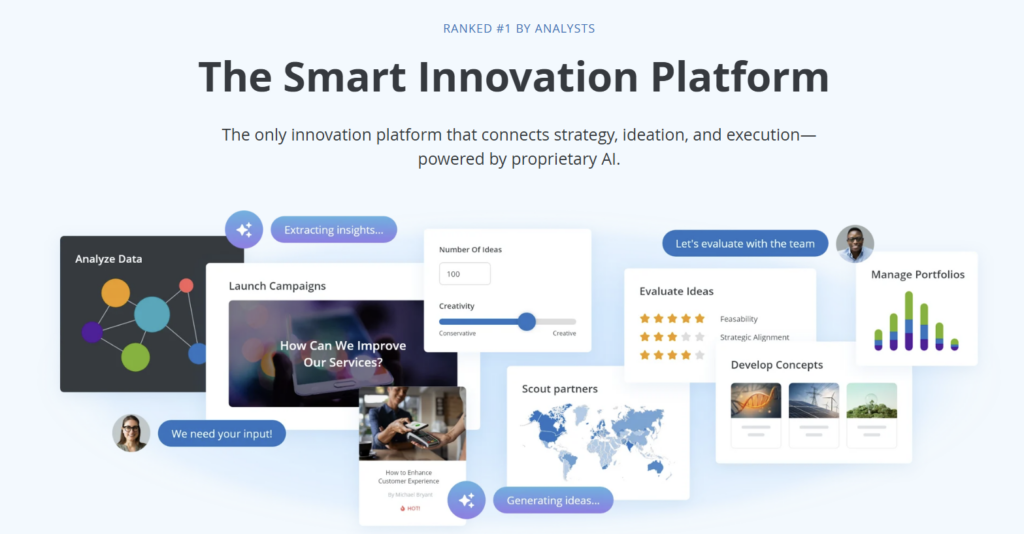
Source: HYPE Innovation Homepage
Key Benefits and Features
- Aligns Innovation with Strategy: Connects ideation, trend insights, portfolios, and execution workflows to business goals so teams focus on high-value opportunities.
- Identifies High-Potential Ideas Faster: AI highlights relevant trends, evaluates technologies, and surfaces promising concepts for smarter decision-making.
- Scales Ideation Across the Enterprise: Supports global idea campaigns, structured evaluations, and cross-functional collaboration in a unified platform.
- Strengthens External Innovation Efforts: Built-in tools for startup scouting, technology evaluation, partner management, and co-innovation programs.
- Creates a Seamless End-to-End Workflow: Integrated modules link strategy, idea pipelines, project execution, and portfolio tracking without manual handoffs.
- Improves Visibility and ROI Measurement: Real-time dashboards show engagement levels, project progress, and financial impact to justify innovation investment.
- Meets Enterprise Security and Complexity Needs: Secure, configurable, and scalable platform designed for large organizations and aligned with ISO 56000 standards.
Best For
Large organizations managing structured, enterprise-wide ideation.
Data Privacy
ISO-aligned data practices, configurable permissions, and enterprise security.
User Rating
It has a 4.8/5 on G2.
Pros
- Very user-friendly and intuitive for both employees and administrators.
- Highly customizable workflows that adapt to complex innovation processes.
- Excellent customer support and consulting, often described as a true partner.
- Strong collaboration features for cross-functional and open innovation programs.
- Scales well for large enterprises with global, multi-team participation.
- Fast setup for idea campaigns and flexible configuration options.
Cons
- Platform setup and configuration can be complex without technical support.
- Some features require assistance from the HYPE team to modify.
- Pricing is based on physical user numbers, which some find limiting.
- ROI tracking and impact measurement could be more advanced.
- Occasional usability challenges due to extensive customization options.
- Some stage-gate workflows may require custom development.
Pricing
Not disclosed on their website.
Demo and Trial Availability
HYPE offers a demo upon request, but a free trial is not available.
5. Miro
Miro is an AI-powered innovation workspace that helps teams turn ideas into outcomes faster. It brings brainstorming, planning, and execution into one secure platform. The intelligent canvas, automated workflows, and 250+ integrations improve alignment and collaboration. Teams deliver better products with greater speed and clarity.
Source: Miro Homepage
Key Benefits and Features
- Accelerates innovation: AI tools, instant clustering, and smart suggestions help teams move from ideas to structured plans faster.
- Improves collaboration: The intelligent infinite canvas, real-time co-editing, and shared docs, tables, and diagrams keep everyone aligned.
- Streamlines workflows: Blueprints, templates, and automated processes create repeatable, scalable workflows that reduce manual effort.
- Strengthens product delivery: Integrated product-acceleration tools connect research, planning, design, and execution in one workspace.
- Enhances visibility and alignment: Roadmaps, diagrams, and connected boards make priorities clear across teams.
- Fits into existing ecosystems: 250+ integrations with tools like Jira, Slack, and Figma keep work connected and reduce context switching.
- Supports enterprise needs: Robust security, governance controls, and performance at scale make it reliable for large organizations.
Best For
Teams that need a visual space for brainstorming and organizing ideas.
Data Privacy
Robust enterprise security with SSO, SCIM, and compliance controls.
User Rating
It has a rating of 4.7/5 on G2.
Pros
- Easy, intuitive collaboration with smooth real-time co-editing and a flexible visual canvas.
- Wide range of use cases, including workshops, mapping, prototyping, and teaching.
- Strong template library that speeds up planning and ideation.
Cons
- Large boards can lag and become hard to navigate.
- Advanced features take time to learn and can feel overwhelming.
- Search and filtering are limited on complex boards.
- The free plan is restrictive with limited board access.
Pricing
Miro offers four plans: Free (3 editable boards), Starter ($8/member/month), Business ($16/member/month), and Enterprise (custom pricing).
Demo and Trial Availability
It offers a free plan to try the platform and the option to book a demo for a guided tour of its features.
6. Qmarkets
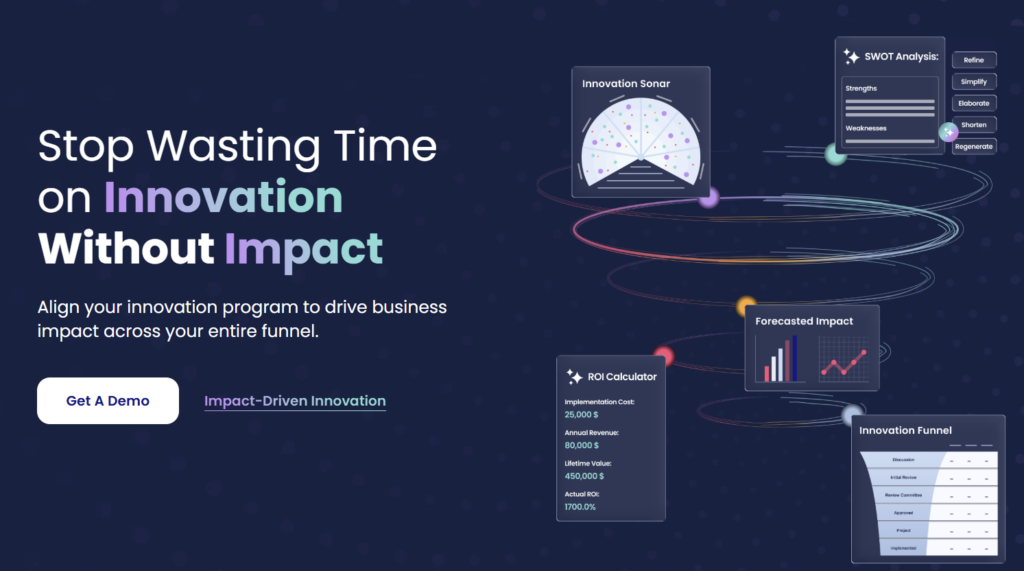
Qmarkets is an AI-powered idea & innovation management software that helps enterprises collect better ideas, validate them quickly, and turn them into high-impact projects. It supports the full innovation lifecycle, improving alignment, decision-making, and ROI. Trusted by global organizations, Qmarkets enables teams to scale innovation efforts with structure, speed, and measurable results.
Source: Qmarkets Homepage
Key Benefits and Features
- Drives High-Impact Innovation: AI helps teams submit better ideas, validate them quickly, and build strong business cases so only high-value opportunities move forward.
- Aligns Ideas with Strategic Priorities: Challenge-based campaigns and configurable workflows ensure submissions directly support business needs and long-term goals.
- Scales Ideation Across the Enterprise: Provides a collaborative workspace for employees, partners, and customers to contribute, refine, and evaluate ideas at any scale.
- Accelerates Evaluation and Decision-Making: Smart validation tools, automated scoring, expert reviews, and structured stage-gate workflows streamline the entire review process.
- Strengthens Innovation Portfolio Management: Centralized dashboards help teams prioritize ideas, manage pipelines, and track performance across all innovation initiatives.
- Supports Continuous Improvement and Problem-Solving: Users can crowdsource solutions for complex challenges and identify potential risks early through structured feedback and collaboration.
- Delivers Clear and Measurable ROI: Analytics and reporting highlight outcomes, financial impact, engagement levels, and long-term value created by innovation efforts.
- Built for Enterprise Flexibility and Growth: Modular architecture, SSO, configurable roles, and expert customer success support ensure the platform adapts as innovation programs scale.
Best For
Mid-to-large enterprises needing scalable, structured ideation pipelines.
Data Privacy
Enterprise security framework with SSO and configurable access permissions.
User Rating
It has a rating of 4.5/5 on G2.
Pros
- Highly customizable workflows and campaigns.
- Strong automation for emails, stage-gates, and routing.
- Easy for employees to submit and follow ideas.
- Very responsive, supportive customer success team.
- Robust feature set for enterprise-scale innovation.
Cons
- Setup and admin configuration can be complex and time-consuming.
- Some changes still need support intervention.
- The UI and admin areas are not always intuitive.
- Multilingual setup and translations may require extra effort.
Pricing
Qmarkets offers custom, quote-based annual plans.
Demo and Trial Availability
A demo is available upon request, but free trial details are not mentioned on the website.
7. Wazoku
Wazoku is an innovation delivery platform that helps organizations turn ideas, challenges, and partnerships into measurable value. Its value-driven approach, powered by the xV scoring algorithm, allows teams to predict impact upfront, prioritize high-value opportunities, and eliminate low-ROI initiatives early. With global solver networks, ecosystem intelligence, and AI-assisted decision-making, Wazoku enables enterprises to move beyond idea collection and consistently deliver innovation outcomes at scale.

Source: Wazoku Homepage
Key Benefits and Features
- Identify high-value ideas faster: AI-powered enrichment, structured submissions, and automated clustering help surface impactful ideas early.
- Solve strategic problems with focus: Challenge Driven Innovation™ ensures teams work on clearly defined, high-priority business challenges.
- Evaluate and prioritize with confidence: Custom scoring, lifecycle tracking, and smart filtering streamline decision-making.
- Move from ideas to execution quickly: Project tracking, resource allocation, and progress reporting support fast, scalable implementation.
- Boost collaboration across the organization: Targeted communities, commenting, and transparent workflows engage employees, partners, and experts.
- Protect sensitive innovation data: Enterprise-grade security, SSO, and compliance controls safeguard IP.
- Measure impact and stay aligned to strategy: Analytics, portfolio management, and the R.I.S.E framework track ROI and strategic contribution.
Best For
Large organizations running challenges and continuous improvement programs.
Data Privacy
Enterprise-ready security, access controls, and compliance for global teams.
User Rating
It has a rating of 4.4/5 on G2.
Pros
- Easy to set up and use for idea collection and challenges.
- Strong and responsive customer support.
- Good workflow and platform customization options.
- Encourages collaboration and transparent idea tracking.
Cons
- UI and navigation can feel unintuitive.
- Limited flexibility in advanced customization and integrations.
- Reporting and dashboards need improvement.
- Some actions require support instead of self-service.
Pricing
Wazoku offers tailored pricing packages based on your organization’s needs and scale.
Demo and Trial Availability
A demo is available upon request, but a free trial is not offered.
8. ITONICS
ITONICS is an end-to-end innovation platform that brings foresight, idea management, and portfolio management together in one “innovation OS.” It helps teams scan trends and technologies, run structured idea campaigns, and manage innovation portfolios so investments stay aligned with strategy and ROI. With dedicated modules for Foresight, Ideation, and Portfolio, ITONICS lets you centralize innovation activities, break down silos, and connect trends, ideas, and projects in a single system.

Source: ITONICS Homepage
Key Benefits and Features
- Unified innovation workspace: Centralizes trends, ideas, portfolios, and workflows so teams collaborate in one place.
- Faster opportunity discovery: AI-assisted scouting highlights relevant trends, technologies, and risks quickly.
- Higher-quality ideas: Structured campaigns, clear workflows, and AI checks for duplicates, and adds evidence to improve idea quality.
- Stronger cross-team collaboration: Comments, expert involvement, communities, and gamification boost engagement and refinement.
- Visibility into ROI and priorities: Dashboards, roadmaps, and portfolio views help teams track impact and choose the right investments.
- Enterprise scalability: Customizable workflows, permissions, and integrations support large, distributed teams.
- Data-driven decisions: Analytics and AI insights guide prioritization and keep activities aligned with strategy.
Best For
Enterprises managing global innovation portfolios and trend-driven initiatives.
Data Privacy
Enterprise security with SSO, permission controls, and strong governance features.
User Rating
It has a rating of 4.4/5 on G2.
Pros
- Powerful visualizations (radars, matrices, boards).
- Highly configurable to different innovation processes.
- Excellent customer support and onboarding.
- Great for foresight and portfolio management.
- Centralizes all innovation data in one system.
Cons
- Steep learning curve for new users.
- Setup can be complex and time-consuming.
- Occasional bugs and stability issues.
- Limited language options.
- Roadmap and integrations could be stronger.
Pricing
ITONICS offers flexible plans for different team sizes:
- Team: Core templates, radars, and email support for small teams.
- Professional: Adds custom workflows, dashboards, AI features, and SSO for larger teams.
- Enterprise: Full-scale capabilities with API access, advanced integrations, MFA, and 24/7 support.
- Educator: Free 6-month access for professors and researchers.
Demo and Trial Availability
A demo is available, and new users can access a 30-day free trial.
9. InnovationCast
InnovationCast is an idea & innovation management software designed to help organizations capture, develop, and implement ideas with speed and clarity. Built around a proven process of Discover, Capture, Select, Incubate, and Accelerate, it gives teams a structured yet flexible system to turn insights into real business outcomes. The platform simplifies workflows, boosts engagement, and unifies innovation activities in one intuitive space, replacing scattered tools and manual work.
Source: InnovationCast Homepage
Key Benefits and Features
- Spot opportunities early: InnovationCast helps teams uncover trends and insights by enabling collaborative scouting, organizing signals in channels, filtering noise collectively, automating searches, and visualizing findings clearly.
- Generate higher-quality ideas: Challenge campaigns, custom forms, always-on idea capture, shared ownership of categories, and feedback-driven refinement ensure ideas are more relevant and better developed.
- Make confident decisions: Tailored evaluation criteria, simple multi-stage workflows, diverse assessor input, and transparent prioritization help teams choose the ideas with the strongest potential.
- Reduce risk with fast validation: Discovery workspaces, assumption mapping, guided experiments, risk checks, and centralized learning allow teams to test uncertain ideas quickly and cheaply.
- Accelerate execution and portfolio impact: Evidence-based planning, milestone tracking, informed kill-or-invest calls, balanced portfolio views, and ROI monitoring help organizations scale the ideas that deliver real value.
Best For
Innovation leaders running challenge-based and end-to-end workflows.
Data Privacy
Secure cloud infrastructure with controlled access across roles.
User Rating
It has a 5/5 rating on Software Advice.
Pros
- Easy, intuitive interface that encourages participation.
- Full innovation lifecycle support from scouting to execution.
- Strong collaboration that helps ideas evolve.
- Smooth integration and excellent customer support.
Cons
- Limited mentions of feature gaps; some users wanted more advanced capabilities.
Pricing
InnovationCast offers flexible plans:
Starter: From $1,199/month.
Standard: From $2,499/month.
Plus: From $3,499/month.
Enterprise: From $5,999/month.
Demo and Trial Availability
A demo is available upon request, but a free trial is not offered.
10. Braineet
Braineet is an enterprise idea & innovation management software that centralizes idea pipelines, streamlines stage-gate processes, and delivers real-time reporting for data-driven decisions. With an intuitive UX and strong governance features, it helps organizations scale innovation, improve collaboration, and turn projects into predictable, measurable growth.

Source: Braineet Homepage
Key Benefits and Features
- Source innovation from anywhere: Centralize ideas from employees, customers, and partners with easy capture forms and a unified idea pipeline that keeps submissions organized and accessible.
- Improve idea quality through collaboration: Shared workspaces, comments, and feedback tools help teams co-create, strengthen concepts, and refine ideas before they move forward.
- Prioritize high-value opportunities: Evaluation workflows, scoring criteria, and stakeholder input ensure the most promising and strategically aligned ideas rise to the top.
- Turn ideas into executable projects: Clear stage-gate processes guide teams through development, standardize data collection, and speed up execution from concept to delivery.
- Maintain real-time visibility and governance: Dashboards and portfolio reporting provide a complete view of progress, value, and performance, helping leaders make informed decisions.
- Scale innovation predictably across teams: A simple, modern UX paired with customizable workflows and strong governance makes participation easy and ensures consistency across the organization.
Best For
Enterprises managing company-wide idea pipelines in one system.
Data Privacy
Enterprise-grade security with permission-based access and encrypted environments.
User Rating
It has a rating of 4.5 /5 on Gartner Peer Insights.
Pros
- Highly effective for structuring and managing innovation portfolios.
- Clear processes and methodologies that guide teams efficiently.
- Easy-to-use, flexible platform that adapts to organizational needs.
- Excellent, responsive customer support and proactive feature development.
- Strong collaboration features that help track progress and demonstrate value to leadership.
Cons
Users report no major drawbacks; minor limitations mostly relate to needing more time to explore all features.
Pricing
Pricing is not disclosed on the website.
Demo and Trial Availability
It offers a free demo, but a free trial is not available.
11. Ideanote
Ideanote is an AI-native idea & innovation management software that helps organizations collect, develop, and automate innovation at scale. It centralizes idea intake, builds intelligent workflows, delivers real-time insights, and streamlines the full innovation pipeline, giving teams a flexible, secure, and enterprise-ready system to turn ideas into measurable impact.
Source: Ideanote Homepage
Key Benefits and Features
- Centralize all ideas in one place: A unified workspace collects ideas from employees, customers, and partners, keeping everything organized and searchable.
- Advance ideas with a clear, customizable process: Custom forms, flexible funnels, drag-and-drop phases, and automations guide ideas from submission to action.
- Prioritize smarter with collaborative evaluation: Comments, voting, ratings, and AI tools like similarity detection and auto-tagging help teams identify high-value ideas quickly.
- Speed up work with automation and AI: Automated routing, notifications, and AI-powered summaries, scoring, and merging reduce manual effort.
- Boost engagement across the organization: Leaderboards, feedback loops, and progress visibility motivate contributors and build an innovation culture.
- Scale securely at the enterprise level: SOC2 compliance, SSO, SCIM, APIs, and integrations with tools like Teams and Slack support large, distributed teams.
- Measure impact with real-time insights: Dashboards, ROI analytics, and exportable reports reveal performance and help optimize innovation outcomes.
Best For
Teams that want simple, structured idea capture and evaluation.
Data Privacy
SOC2-level security, SSO, and scalable access controls.
User Rating
It has a rating of 4.7/5 on G2.
Pros
- Intuitive, clean interface that boosts engagement.
- Excellent, responsive customer support.
- Centralized idea hub with strong collaboration tools.
- Helpful analytics and reporting for decision-making.
- Easy setup, customizable workflows, multi-language support.
- Good value compared to competitors.
Cons
- May feel too simple for complex needs.
- Pricing can be high for small teams.
- Some feature gaps (API docs, admin controls).
- Occasional privacy/display concerns in public missions.
- The platform is still evolving in speed and refinements.
Pricing
Ideanote offers three plans:
Free: For up to 10 users.
Scale: From $6 per user per month.
Ultimate: From $899 per month for 100 users.
Demo and Trial Availability
Ideanote offers a free trial for the Free and Scale plans. Organizations interested in advanced features can book a live demo, which is also included with the Ultimate plan.
12. Ideawake
Ideawake is a highly configurable, AI-powered idea & innovation management software. It helps organizations capture, evaluate, and implement ideas at scale. The platform is designed to increase ROI from crowdsourcing while reducing the time required to manage ideas. Teams can run targeted idea collection, collaborate in real time, and evaluate submissions using structured workflows. Built-in impact measurement ties ideas to outcomes, bringing everything together in one easy-to-use system.

Source: Ideawake Homepage
Key Benefits and Features
- Capture better ideas, faster: Targeted challenges, customizable forms, and duplicate-idea detection help collect relevant, high-quality submissions from across your ecosystem.
- Improve ideas through collaboration: Real-time chat, comments, voting, and automated notifications make it easy for teams to refine and elevate ideas together.
- Evaluate and prioritize with clarity: Custom scorecards, review groups, and ROI comparison tools streamline decision-making and highlight high-impact opportunities.
- Move ideas to action smoothly: Custom workflows, ownership assignment, and integrations with tools like JIRA and Asana speed up implementation.
- Measure impact with real-time insights: ROI analytics, engagement metrics, and custom reporting give instant visibility into pipeline health and program outcomes.
- Drive higher participation: Gamification, leaderboards, and flexible incentives boost engagement and help build a stronger innovation culture.
Best For
Companies running ROI-focused idea challenges and improvement programs.
Data Privacy
Secure cloud environment with role-based permissions and governance.
User Rating
It has a rating of 4.6/5 on G2.
Pros
- Intuitive, user-friendly interface with minimal training needed for end users.
- Flexible, highly customizable submission forms, workflows, and pipelines.
- Strong customer support team (responsive, hands-on, open to enhancements).
- Good fit for company-wide innovation challenges and continuous improvement.
- Clear dashboards and KPIs to track idea progress and program impact.
- Helps strengthen innovation culture and engage employees at scale.
Cons
- Reporting and analytics can be harder to navigate and customize to specific needs.
- Limited Excel-like filtering and advanced idea tracking in the UI.
- A high volume of ideas can feel overwhelming without stronger prioritization tools.
- Customization depth introduces some learning curve and setup complexity.
- Occasional minor bugs or feature gaps (typically addressed in later releases).
Pricing
Ideawake offers flexible plans to fit any organization’s size and goals:
- Flex: $500/month for small teams.
- Business: $300–$2,250/month for mid-sized companies.
- Enterprise: Custom pricing for large-scale programs.
Demo and Trial Availability
Ideawake offers a 30-minute demo, and new users can access a free trial upon sign-up.
13. Nosco
Nosco is a combined innovation platform and consultancy that helps companies spot and accelerate new business and innovation opportunities. Organizations can use the software to run innovation initiatives and continuous improvement programs. In addition, Nosco’s experienced consultants support teams with strategy, venture development, roadmapping, and open innovation. Together, they aim to make innovation “everybody’s business” and create lasting impact.

Source: Nosco Homepage
Key Benefits and Features
- Boosts high-quality idea generation: Supports idea campaigns, innovation challenges, and open innovation initiatives to capture targeted, high-value ideas from employees, partners, and external communities.
- Strengthens collaboration across the organisation: Enables real-time knowledge sharing and cross-department collaboration so teams can co-create, refine, and develop ideas together.
- Accelerates innovation workflows: Offers quick setup, intuitive navigation, and customizable no-code workflows that help teams move ideas from submission to evaluation and incubation faster.
- Improves decision-making and prioritization: Provides structured evaluation tools and management features to score ideas, assign owners, and advance the most promising opportunities.
- Drives continuous improvement at scale: Allows companies to run ongoing improvement programs where everyone can contribute suggestions to optimise processes, reduce costs, and enhance operations.
- Increases visibility and impact tracking: Built-in analytics give leaders a clear overview of initiative performance, idea quality, participation, and overall innovation impact.
- Integrates with existing tools: Seamless integrations help teams collaborate in familiar environments and streamline innovation workflows across systems.
Best For
Organizations running fast-launch idea campaigns and employee innovation.
Data Privacy
Secure infrastructure with admin-controlled access and permissions.
User Rating
It has a rating of 4.3/5 on G2.
Pros
- Easy-to-use interface with clear, visual boards.
- Helpful templates and workflows for structured idea campaigns.
- Smooth voting features that surface strong ideas quickly.
Cons
- Limited real-time collaboration; no automated discussion or chat.
- Some interactions feel slow or cumbersome during idea expansion.
- Usability can feel overwhelming when customizing workflows.
Pricing
Paid plans include:
- Pro (€5/user/month): For teams up to 100 users, with unlimited ideas, channels, admins, dashboards, and branding.
- Business (from €5,000/year): For 100–500 users, adding custom domains and integrations.
- Enterprise (from €10,000/year): For 500+ users, with custom contracts and activity-based pricing.
Demo and Trial Availability
Nosco offers a free 90-day trial for up to 10 users and the option to book a demo for a guided platform walkthrough.
14. Sideways 6
Sideways 6 is an AI-powered idea & innovation management software that helps companies capture, evaluate, and implement employee ideas directly inside tools they already use—like Microsoft Teams and intranets. It boosts engagement across frontline and desk-based teams, cuts admin with automation, and drives measurable impact with faster idea delivery, cost savings, and higher participation.
Source: Sideways 6 Homepage
Key Benefits and Features
- Capture ideas from anywhere: Sideways 6 lets employees submit ideas directly through Microsoft Teams, Viva Engage, Workplace by Meta, or your intranet. As a result, contribution fits naturally into existing workflows.
- Manage ideas at scale with ease: Thousands of ideas can be qualified, categorized, and progressed through customizable pipelines, helping teams stay organized without adding manual admin.
- Identify the highest-value ideas faster: Crowd voting and expert evaluations combine with automation to shortlist top ideas quickly and objectively.
- Turn ideas into delivered outcomes: Teams can convert ideas into projects, track progress, and manage implementation from one place for faster time-to-impact.
- Keep employees engaged throughout the journey: Automated updates, milestone celebrations, and transparent status tracking ensure everyone feels informed and connected to the innovation process.
- Measure ROI and innovation performance: Analytics highlight trends, engagement, and business impact, enabling teams to prove value through custom reporting.
- Protect sensitive information with enterprise-grade security: Sideways 6 exceeds industry standards for data protection, ensuring all idea submissions and program activity remain secure.
Best For
Enterprises capturing ideas directly via Microsoft Teams or Viva Engage.
Data Privacy
Enterprise-level security leveraging Microsoft ecosystem compliance and access controls.
User Rating
It has a rating of 4.4/5 on G2.
Pros
- Easy to use with smooth Teams integration.
- Excellent customer support and onboarding.
- Boosts engagement and encourages participation.
- Customizable workflows for different business needs.
- Helpful analytics for tracking idea impact.
Cons
- Search and filtering limitations in large pipelines.
- Backend can feel complex for occasional admins.
- Some UX issues, like login friction or duplicate ideas.
- Limited self-serve access to certain engagement data.
Pricing
Lite Plan: Free for up to 10 users; $3/month or $30/year per user for 11–500 users.
Enterprise Plan: Custom pricing for unlimited users.
Demo and Trial Availability
A demo is available, and the Lite plan offers a 14-day free trial.
15. Aha! Ideas
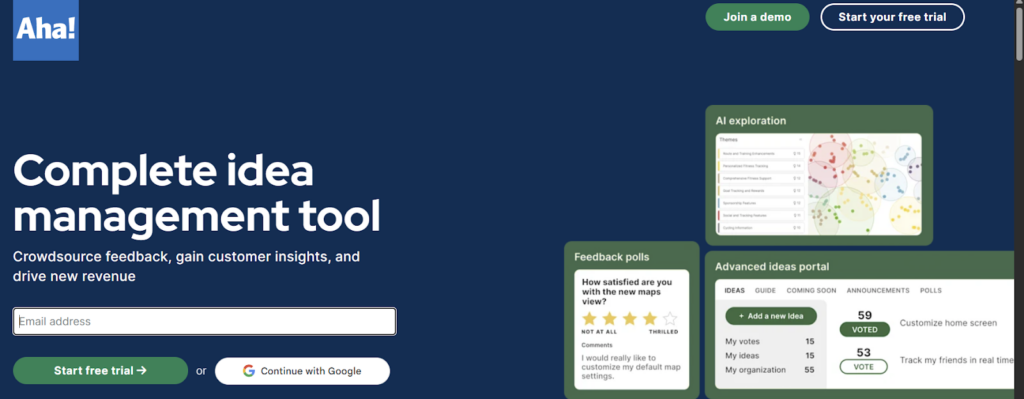
Aha! Ideas helps teams capture, organize, and prioritize feedback from customers, partners, and employees. With idea portals, CRM integrations, AI-powered discovery, scoring, and automated updates, it streamlines the entire idea lifecycle. Teams gain clearer insight into customer needs, identify high-value opportunities, and confidently advance the ideas that drive product growth.
Source: Aha! Homepage
Key Benefits and Features
- Capture deeper customer insight: Aha! Ideas centralizes input from portals, in-app feedback, and internal systems. This way, teams get a clearer picture of what users truly need.
- Prioritize the most valuable ideas: Scoring, trend detection, and customer-level context help teams compare impact and confidently choose ideas that drive the greatest business value.
- Speed up evaluation and reduce manual work: AI groups similar ideas, surfaces key themes, and highlights patterns, allowing teams to focus on decisions instead of sorting.
- Increase customer engagement and trust: Automated updates and transparent progress tracking show contributors how their ideas move forward, encouraging continued participation.
- Improve product decisions with evidence-backed insights: Consolidated feedback, analytics, and segmentation enable teams to validate assumptions and align roadmap choices with real user demand.
Best For
Product teams prioritizing feedback-driven ideas for roadmap planning.
Data Privacy
Secure product workspace with SSO, role-based controls, and encrypted data storage.
User Rating
It has a rating of 4.4 /5 on G2.
Pros
- Flexible and customizable for complex product workflows and integrations.
- End-to-end product and idea management in one unified platform.
- Excellent customer support with fast, knowledgeable guidance.
- Strong insights and reporting for roadmap visibility and decision-making.
Cons
- Steep learning curve due to extensive features.
- Integration setup can be tedious and detail-heavy.
- Some UX limitations in navigation, filtering, and search.
- Advanced training can be expensive.
Pricing
Not disclosed on the website
Demo and Trial Availability
You can schedule a live demo and also start a free trial.
Now let’s zoom in. Many platforms promise to ‘streamline innovation,’ but IP-driven teams quickly learn that only a few can handle the discipline, traceability, and decision-making their work demands. That’s why, serious innovators gravitate toward the TIP Tool™.
Why the TIP Tool™ Outshines Other Idea & Innovation Management Software
Let’s be honest: teams don’t adopt the TIP Tool™ because it’s “another innovation platform.” Rather, they adopt it because it removes the exact friction points that quietly erode innovation outcomes. In practice, a global tech company learned this firsthand. They realized they had no reliable way to predict which ideas would survive prosecution, how much each filing might cost, or whether their counsel and examiners were likely to lead them to success.
After deploying the TIP Tool™, uncertainty gave way to clarity. Examiner trends, counsel performance insights, and early cost-and-allowance predictions offered a data-backed view of their entire pipeline. Suddenly, they knew which ideas deserved investment, which filings carried risk, and where to direct their budget for maximum return.
The impact was dramatic: smarter filings, reduced prosecution spend, and materially higher allowance rates.
For teams seeking this level of control, the TIP Tool™ unifies the entire journey, from idea capture to confident IP decisions, into one streamlined system.

Get started with a free trial and explore the full workflow end-to-end.
Disclaimer: The information in this article/review is sourced from the internet and may not be entirely accurate or up-to-date. We recommend visiting the respective software websites for the most current and reliable information. The opinions expressed here are those of the author and may not reflect the views of Triangle IP. We are not liable for any consequences that may arise from relying on the information provided in this article/review.
FAQs
1. How Do Organizations Know When They’ve Outgrown Basic Idea Collection Tools?
Organizations begin to outgrow basic idea collection tools when idea volume increases, more stakeholders become involved, or decision-making grows more complex.
Common signals include:
- Ideas are scattered across spreadsheets, emails, or forms with no clear ownership.
- There’s no structured review, scoring, or prioritization process.
- Leaders lack visibility into which ideas are progressing, stalled, or abandoned.
- External collaborators (legal teams, universities, partners) cannot participate securely.
- Ideas are captured, but few convert into filings or strategic outcomes.
At this stage, organizations need a system that supports structured workflows, evaluation, collaboration, and lifecycle tracking, not just idea intake.
2. Who Typically Owns Idea & Innovation Management Software Inside an Enterprise?
Ownership of idea and innovation management software varies based on how an organization structures its innovation and intellectual property (IP) processes. In most enterprises, responsibility typically falls to one of the following teams:
- IP or Legal Teams – when the primary goal is managing invention disclosures, improving patent readiness, and strengthening portfolio outcomes.
- R&D or Engineering Leadership – when idea capture begins at the technical or product development level.
- Innovation or Strategy Teams – when innovation initiatives are closely aligned with long-term business strategy and commercialization efforts.
- Joint Ownership (IP + R&D) – in more mature organizations where innovation, technical development, and IP decisions require close collaboration.
Regardless of where ownership sits, successful enterprise deployments ensure cross-functional access. This allows inventors, managers, and legal counsel to collaborate within a single, shared innovation management system.
3. Can Idea & Innovation Management Software Support Both Internal and External Contributors?
Yes. Modern idea and innovation management platforms are designed to support controlled collaboration across organizational boundaries.
They typically enable:
- Secure access for external contributors such as law firms, universities, or partners.
- Role-based permissions so users only see what they are authorized to see.
- Structured workflows that allow external input without losing internal control.
- Centralized communication instead of fragmented email exchanges.
This makes it possible to manage joint inventions, outside counsel collaboration, and distributed innovation programs without compromising security or governance.
Related Reading: From Ideas to Patents: The 17 Best Innovation Management Software Solutions for 2025
4. How Long Does It Typically Take to See Value After Implementing an Idea & Innovation Management Platform?
Most organizations begin seeing value quickly, but the nature of that value deepens as adoption matures.
Early Value (First Few Weeks):
Within the first 2–4 weeks, teams typically experience cleaner and more consistent idea capture. Visibility into active ideas improves immediately, and administrative friction caused by emails, spreadsheets, or disconnected tools is reduced.
Operational Value (1–3 Months):
As more ideas flow through the system, organizations see better prioritization and review decisions. Ideas move faster from submission to action, and collaboration between inventors, managers, and legal teams becomes more structured and predictable.
Strategic Value (3–6+ Months):
Over time, the platform begins to deliver higher-impact outcomes. Teams make stronger filing and investment decisions, gain portfolio-level insights, and align innovation efforts more closely with business strategy and budgets.
The fastest and most sustained value is realized when the platform replaces fragmented workflows. It becomes the single source of truth for managing ideas, decisions, and outcomes across the innovation lifecycle.