| TL;DR – AQX Corporate is a powerful IP management platform. But many innovation-driven companies end up using only a small portion of its features. They still deal with the complexity and cost of a large enterprise system. That is why many in-house IP teams start looking for AQX Corporate alternatives that are easier to use and better aligned with innovation workflows. In this guide, we explore several such options. We also explain why TIP Tool by Triangle IP can be a strong choice for modern in-house IP teams. |
Patent management software exists to bring structure to complex IP operations.
One of the most widely adopted software in this space is AQX Corporate by Anaqua, used by many large corporations and global enterprises.
To organizations operating at that scale, AQX provides the control and administrative rigor needed to track filings, manage prosecution workflows including prosecutor analysis, and maintain oversight across global IP programs.
But not every organization operates at that level of complexity.
That’s why when innovation-driven companies evaluate how they manage their innovations, many IP leaders begin asking a practical question:
Is AQX Corporate the right fit for our organization, or would a simpler alternative better support our needs?
In this blog, let’s find the answer.
Why In-House IP Teams Start Looking for AQX Corporate Alternatives
Most in-house IP teams do not start evaluating AQX Corporate alternatives because the platform lacks capability. The conversation usually begins when the decision shifts from features to fit.
Anaqua positions AQX Corporate as a centralized platform for managing patents and trademarks across the full lifecycle. It combines portfolio management, collaboration workflows, and product-centered IP visibility designed for enterprise environments. In other words, it is built for organizations running large, coordinated IP programs.
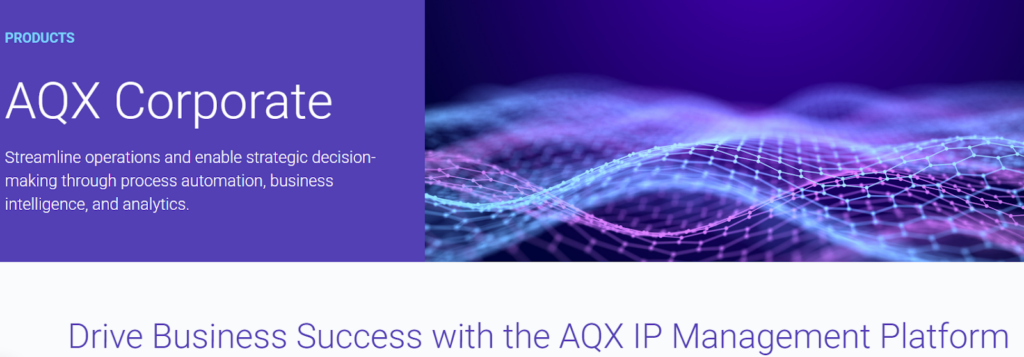
Source: aqx-corporate-homepage
That positioning makes AQX Corporate a powerful platform. But it also raises a practical question for many IP leaders:
Does our team actually need an enterprise-scale system to manage our innovations?
This question has become more common as legal departments face increasing pressure to justify both IP spend and technology investments.
Industry data reflects this shift. According to Gartner, only 23% of legal departmentsscored highly on digital readiness, suggesting many organizations still struggle to realize the full value of their legal technology investments.
At the same time, the 2025 ACC Chief Legal Officers Survey highlights the pressures legal teams are operating under:
- Operational efficiency is the top strategic priority (35%)
- Technology implementation ranks second (14%)
- 41% of legal departments received cost-cutting mandates in the past year
For enterprise IP leaders, this creates a new reality. Technology decisions are no longer judged only by capability. They are judged by how efficiently the system supports the team’s day-to-day work.
This is where practical concerns begin to emerge like
- Training requirements for inventors and legal staff
- Configuration complexity during implementation
- The ongoing effort required to maintain workflows and data
- Technology costs relative to the size of the IP program
These concerns appear consistently in practitioner discussions and user reviews for AQX Corporate.
But none of this means AQX Corporate is unsuitable. The real question is when enterprise IP teams genuinely need that level of platform depth and when they do not. Let’s find out.
When AQX Corporate Still Makes Sense For Enterprise IP Teams
Before ruling it out, it is worth understanding the type of enterprise environment AQX Corporate is actually built to support. It’s a good fit, if:
- The company is very large and managing a high-volume global IP portfolio
If the organization handles a substantial number of patents, trademarks, jurisdictions, and stakeholders, a heavyweight platform can help maintain order and consistency. - The IP team needs strong administrative control
AQX Corporate is a better fit when the main priority is keeping IP operations centralized, compliant, and well organized. - There are complex workflows across teams, regions, or business units
For enterprises with layered approvals, multiple internal users, and extensive outside counsel coordination, a more structured platform may be necessary. - Automated docketing and process management are major priorities
If the team is dealing with large volumes of deadlines, documents, and daily administrative tasks, AQX Corporate’s workflow and docketing capabilities can be valuable. - The organization needs more discipline in a sprawling ideation process
If ideas are coming from multiple teams across the business, AQX Corporate can help centralize innovation workflows and create a more structured path from ideation to IP protection. - The organization wants one system to manage the full IP lifecycle
It can make sense for enterprises looking for broad coverage across innovation management, patents, trademarks, and related portfolio operations. - Product-to-IP mapping is important
For companies that want to track how patent assets align with product lines or business units, AQX Corporate may offer useful operational visibility. - Leadership needs portfolio visibility from multiple business perspectives
If the enterprise needs to classify, organize, and review its portfolio in ways that support business planning, AQX Corporate can help provide that broader operational view. - The team already has the resources to support a complex platform
A system like AQX Corporate is more likely to work well when the enterprise has the internal maturity, process discipline, and administrative support to manage it effectively.
When AQX Corporate Might Not Be the Right Fit For Enterprise IP Teams
Making an informed software decision means looking at both sides of the equation. That includes being clear about where AQX Corporate may not be the best fit. Here’s when:
- When your IP operation is not complex enough to justify a heavyweight platform
AQX Corporate is positioned as a centralized, full-lifecycle platform with portfolio oversight, analytics, and product-centered IP management. That makes it a strong fit for broader, more complex environments but potentially more systems than some teams need. - When budget pressure makes a high-cost platform harder to justify
Public AQX reviews describe the product as expensive, which makes cost a legitimate fit issue for teams trying to manage IP efficiently without a large platform investment. - When your team values ease of use, faster onboarding, and a more modern interface
G2 review content points to training burden, interface complexity, and dated screens as real concerns for some users. That supports the case for teams that prefer simpler, more intuitive tools. - When your team does not want the maintenance burden of on-premise software
G2 review text explicitly notes that AQX’s on-premise deployment can require extra maintenance and VPN access, which may be a drawback for teams that want lower IT overhead.
Once the fit question becomes clear, the conversation naturally shifts from what AQX Corporate alternative should look like.
That’s what we cover next: the key factors to look for in AQX Corporate alternatives.
Buyer’s Checklist: What Enterprise IP Teams Should Evaluate in AQX Corporate Alternatives
In innovation-driven companies, IP counsel must balance multiple priorities. They are responsible for
- Capturing new inventions,
- Guiding patent filing decisions,
- Coordinating with outside counsel, and
- Maintaining visibility into the company’s growing portfolio.
For that reason, enterprise buyers typically evaluate IP management solutions across several practical dimensions that determine whether the system will truly support the team’s work after implementation.
1. IP Workflow Coverage
Does the platform support core IP activities?
- Invention disclosure capture
- Patent matter tracking and prosecution visibility
- Portfolio management and reporting
- Collaboration with outside counsel
2. Ease of Implementation
How quickly can the system be deployed and adopted?
- Simple setup and onboarding
- Minimal configuration requirements
- Intuitive workflows for inventors and legal teams
3. Data Migration & Onboarding
Can the platform support a smooth transition?
- Import of existing patent portfolio data
- Secure migration of documents and records
- Structured onboarding support
4. Pricing & Total Cost of Ownership
Does the platform deliver value relative to cost?
- Transparent pricing model
- Low operational overhead
- Reasonable implementation costs
5. Integration with Patent Workflows
Does the system fit into existing IP processes?
- Patent database access
- Compatibility with docketing workflows
- Portfolio data import/export capabilities
6. Security and Data Protection
How well does the platform safeguard sensitive IP data?
- Role-based access control
- Secure storage and encryption
- Compliance with enterprise security standards
7. Scalability for Growing Portfolios
Can the platform grow with the organization?
- Support for expanding patent portfolios
- Global prosecution tracking
- Collaboration across teams and business units
8. Workflow Flexibility
Can the system adapt to internal IP processes?
- Configurable invention review workflows
- Flexible reporting and portfolio views
9. Outside Counsel Collaboration
Does the platform simplify coordination with external attorneys?
- Document sharing and communication tools
- Matter updates and prosecution tracking
10. Market Feedback
What do other users say?
- Independent reviews (e.g., G2)
- Customer adoption and satisfaction
11. Knowledge Base & Documentation
Are learning resources available?
- Self-service documentation
- Training materials and guides
12. Customer Support
Is the vendor reliable?
- Responsive support team
- Active product development and updates
Now let’s dig deeper and see which AQX Corporate alternatives actually offer these capabilities and meet the needs of enterprise IP teams.
Four Best AQX Corporate Alternatives for Enterprise IP Teams
By this point, the question is no longer whether AQX Corporate is capable, it’s whether it aligns with how your IP team actually operates day to day.
That’s where the right alternative can make a noticeable difference. Not by adding more features, but by removing friction from how ideas are captured, evaluated, and moved forward.
Here are four AQX Corporate alternatives that enterprise IP teams often explore when they want a simpler, more practical approach:
- The TIP ToolTM (Triangle IP)
- IPfolio (Clarivate)
- AppColl Corporate (AppColl, Inc.)
- Equinox Corporate (Equinox)
Each of these tools solves the problem differently and depending on how your team works, one of them may feel significantly more aligned than the others.
Let’s break them down one by one.
1. The TIP ToolTM (Triangle IP)
The TIP Tool™ by Triangle IP is an intuitive innovation and patent management software designed to streamline the capture of innovations and manage the entire intellectual property (IP) lifecycle.
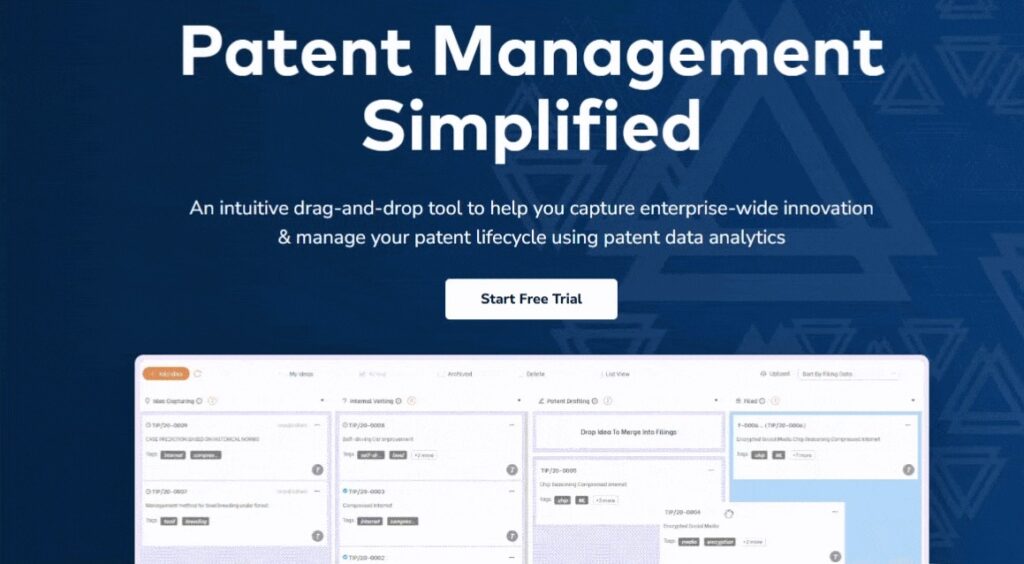
Created by Thomas Franklin, a patent attorney with over 25 years of experience, the platform aims to replace scattered emails, spreadsheets, and disconnected systems with a centralized, organized workspace. It utilizes a simple drag-and-drop interface to bring transparency, collaboration, and data-driven analytics to the patent mining process.
Best For
The platform is highly versatile and is best suited for startups, medium to large enterprises, universities, individual inventors, and patent practitioners.
It is specifically highlighted as being user-friendly for innovation managers who may come from non-IP backgrounds, allowing them to effectively manage a patent pipeline.
Features and Benefits
The TIP Tool™ brings together idea management, patent workflow, and prosecution intelligence in one platform. This gives IP teams a more connected way to move from raw ideas to filing and portfolio decisions with clarity, speed, and better visibility.
Let’s look at these three categories to see what features they include and how they help IP teams in innovation-driven companies.
1. Idea Management
This category covers how the TIP Tool™ helps teams capture, organize, and develop ideas before they move toward filing.
- Intuitive idea capture
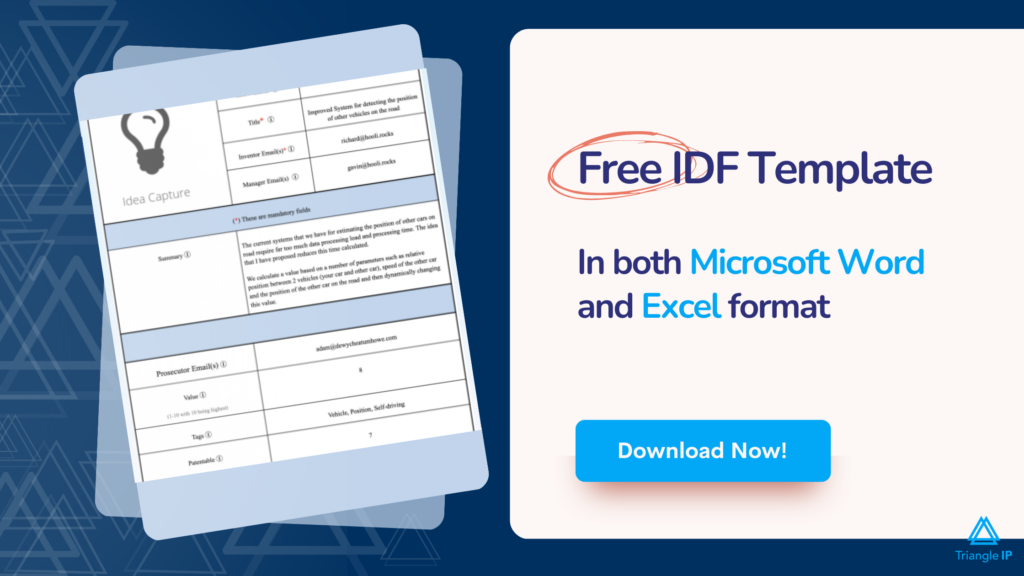
The platform uses a short invention disclosure form with fields like title, summary, inventors, attachments, value, and patentability. Idea numbers can also be auto-generated.
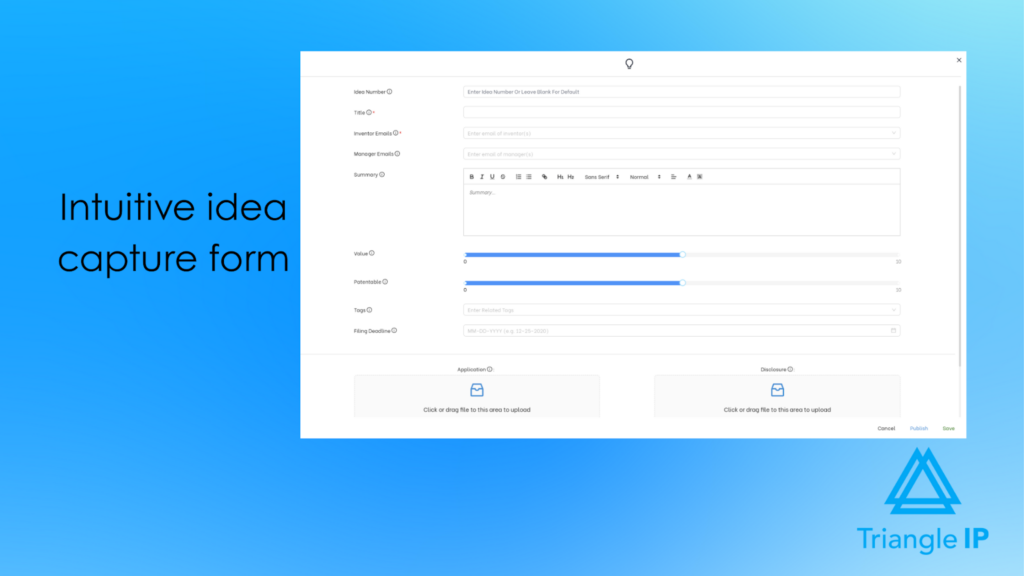
Benefit: Makes it easier for inventors to submit ideas, which helps IP teams capture more innovations earlier.
- Domain-based onboarding
Admins can whitelist approved domains so users from trusted organizations can be added more easily.
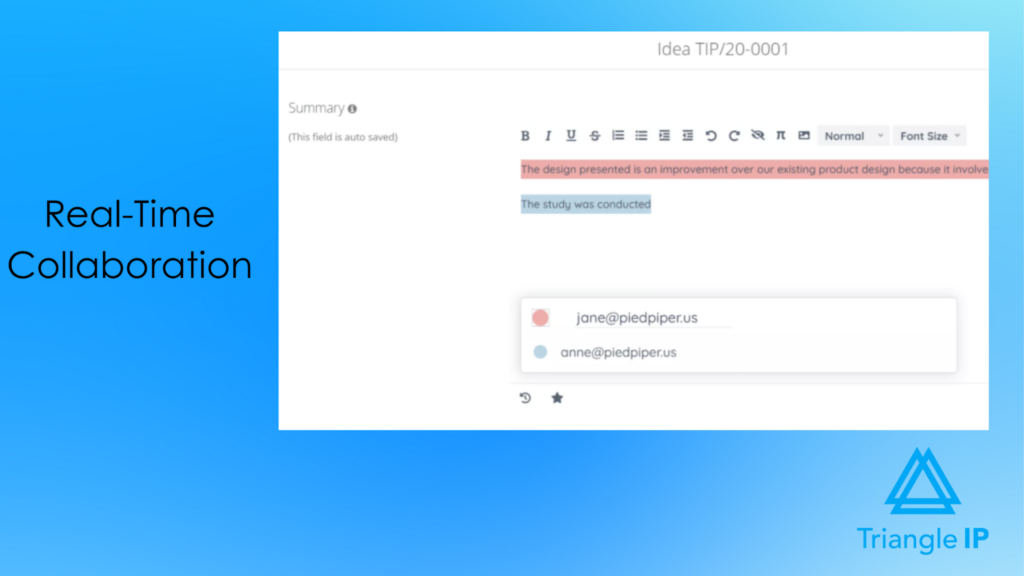
Benefit: Helps innovation-driven companies onboard internal teams, outside counsel, and collaborators with less friction. - Real-time collaboration
Once an idea is published, inventors, managers, and other stakeholders can collaborate on it inside the platform.
Benefit: Helps IP teams collect better inputs early and reduce back-and-forth across emails and documents.
- Tags for idea organization
The platform supports both admin-managed hard tags and user-created soft tags to organize ideas by product line, technology, region, or other business categories.
Benefit: Helps teams review and prioritize large volumes of ideas more efficiently.
- Centralized idea records and attachments
Supporting documents, disclosures, and related files stay connected to the idea record.
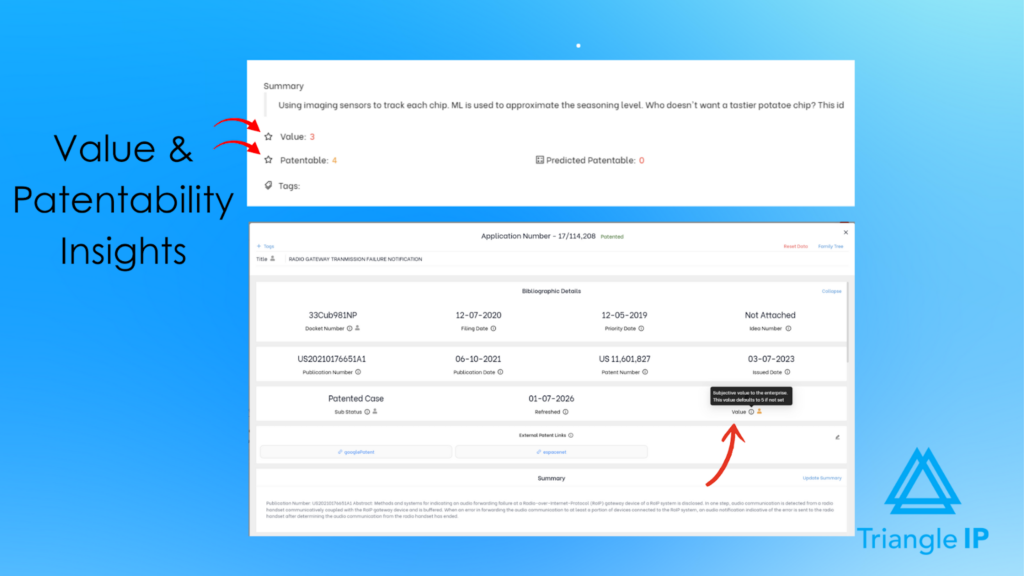
Benefit: Gives IP teams one place to review the full context of an invention. - Value and patentability scoring
Ideas can be scored for business value, and patentability can be estimated and updated.
Benefit: Helps innovation-driven companies focus filing efforts on ideas that are more strategically important and more likely to succeed.
2. Patent Workflow Management
This category covers how the TIP Tool™ helps teams move ideas through review, drafting, filing, and related patent work in a more structured way.
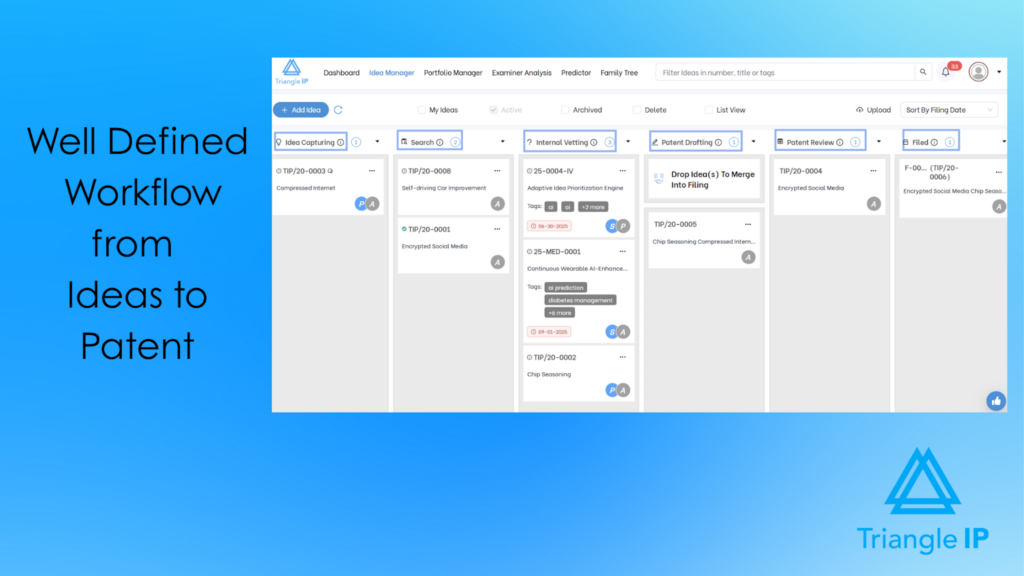
- Defined workflow stages
Ideas move through stages such as Idea Capture, Internal Vetting, Patent Drafting, and Filing.
Benefit: Gives IP teams a clear view of where each idea stands and what needs attention next.
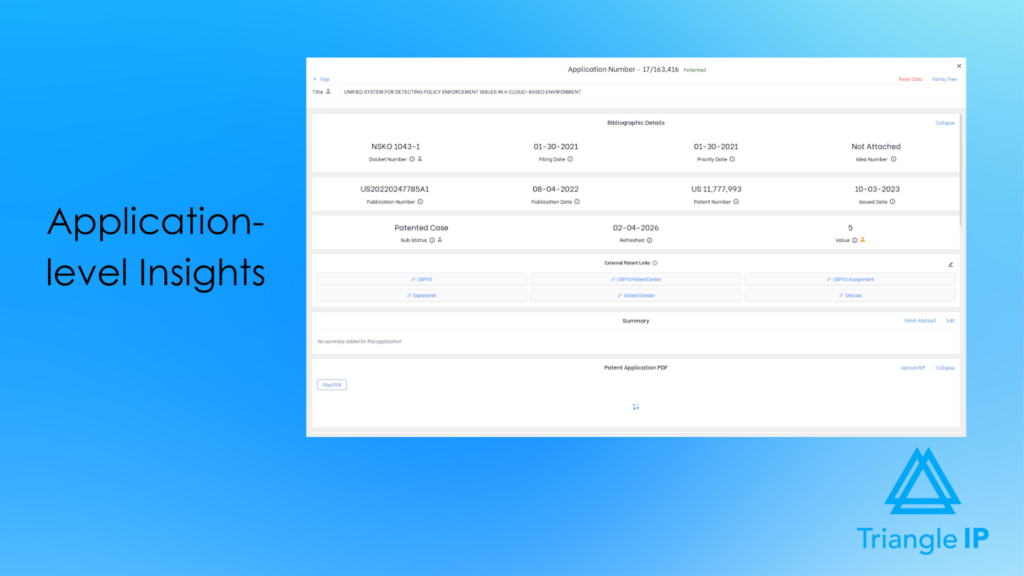
- Portfolio and application tracking
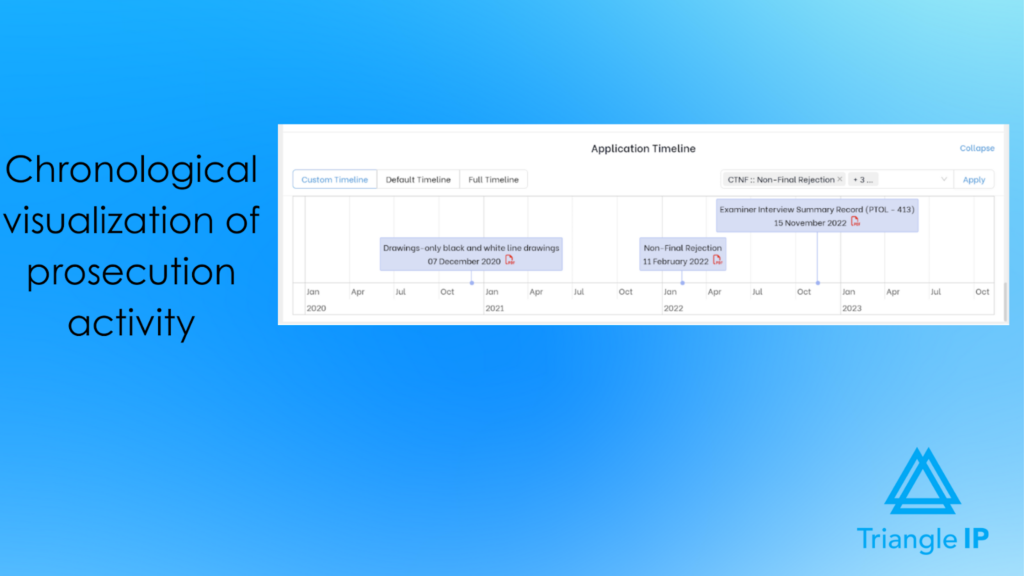
Teams can view applications, statuses, bibliographic details, timelines, and related prosecution information inside Portfolio Manager.
Benefit: Helps IP teams manage active matters in a more organized and visible way.
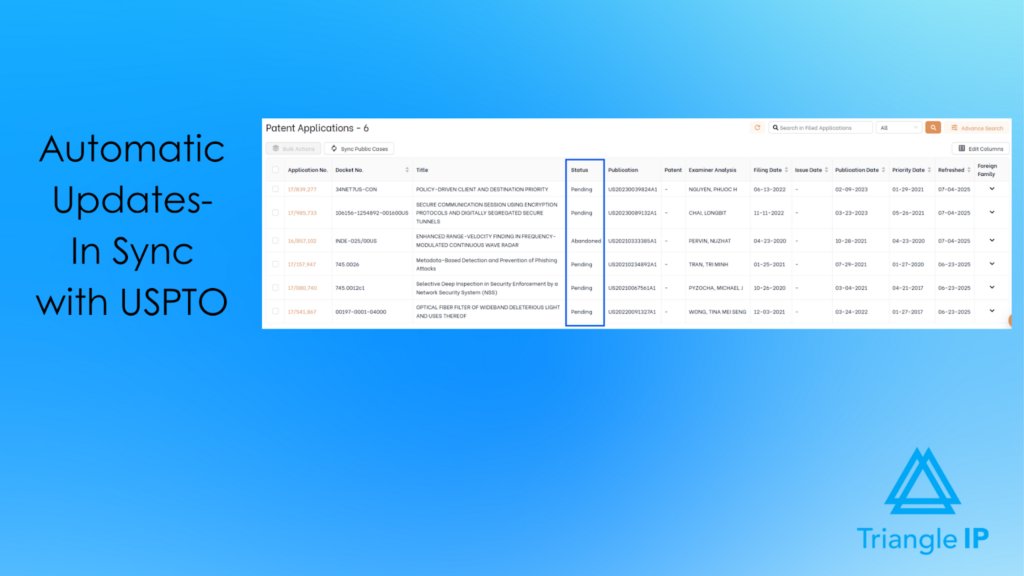
- USPTO data sync
The platform supports syncing application data from USPTO systems.
Benefit: Helps keep patent records updated without relying only on manual tracking.
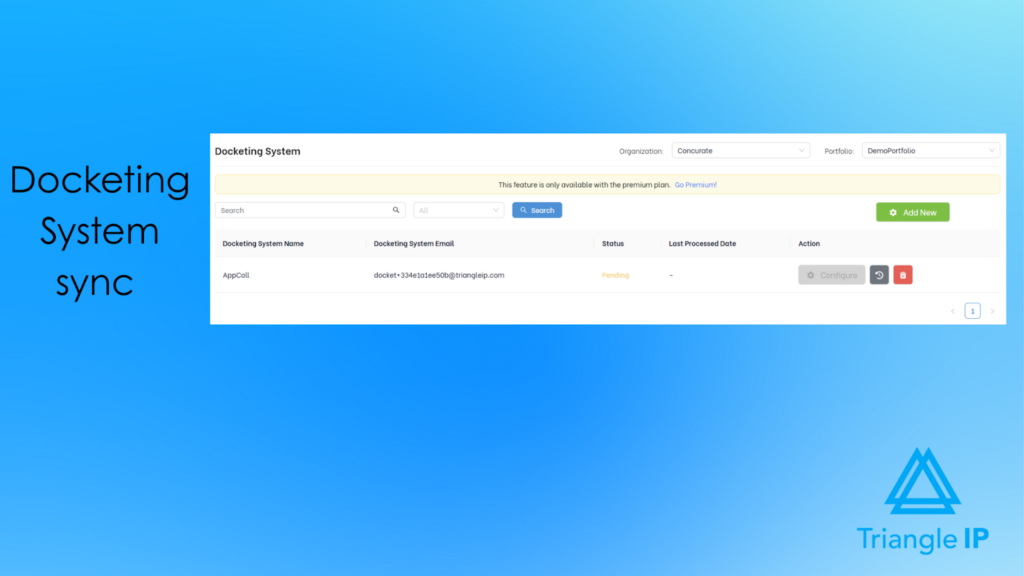
- Docketing system sync
The platform can import data from docketing systems such as AppColl and Foundation IP.
Benefit: Helps companies bring operational patent data into one place for easier review and coordination.
- Patent family and related application visibility
The platform helps teams review related filings and portfolio relationships.
Benefit: Helps IP teams plan continuations, foreign filings, and broader portfolio development more clearly.
Must Read: Weak Patent Management Could Jeopardize Your Business — Here’s How to Avoid Costly Mistakes
3. Prosecution Intelligence
This category covers how the TIP Tool™ helps IP teams make better decisions using predictive insights and portfolio-level visibility.
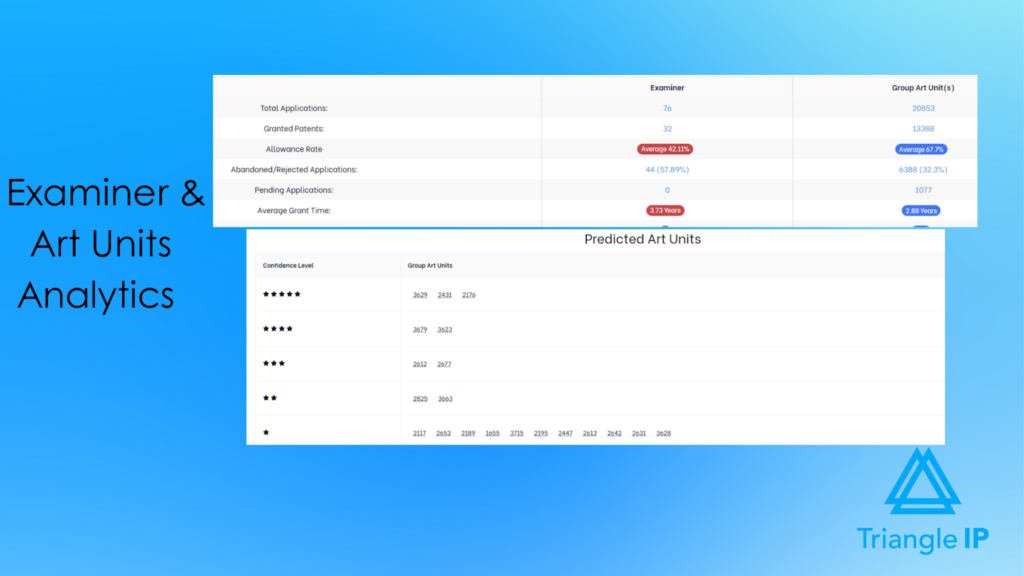
- Art unit prediction before filing
The platform predicts likely USPTO art units based on the invention text or draft.
Benefit: Helps IP teams make better drafting decisions before filing by understanding where an application may land. - Examiner analytics
Once an examiner is assigned, the platform shows insights such as allowance rates, office action behavior, RCE trends, and time-to-grant patterns.
Benefit: Helps IP teams plan prosecution strategy with better visibility into examiner statistics and behavior.
- Patentability prediction
Patentability scores are supported by art unit and examiner-level data.
Benefit: Helps teams compare opportunities and make more informed filing and prosecution decisions.
- Cost prediction
The platform estimates prosecution-related costs and can factor in government and prosecutor charges.
Benefit: Helps innovation-driven companies plan budgets and make more informed ROI decisions across the portfolio.
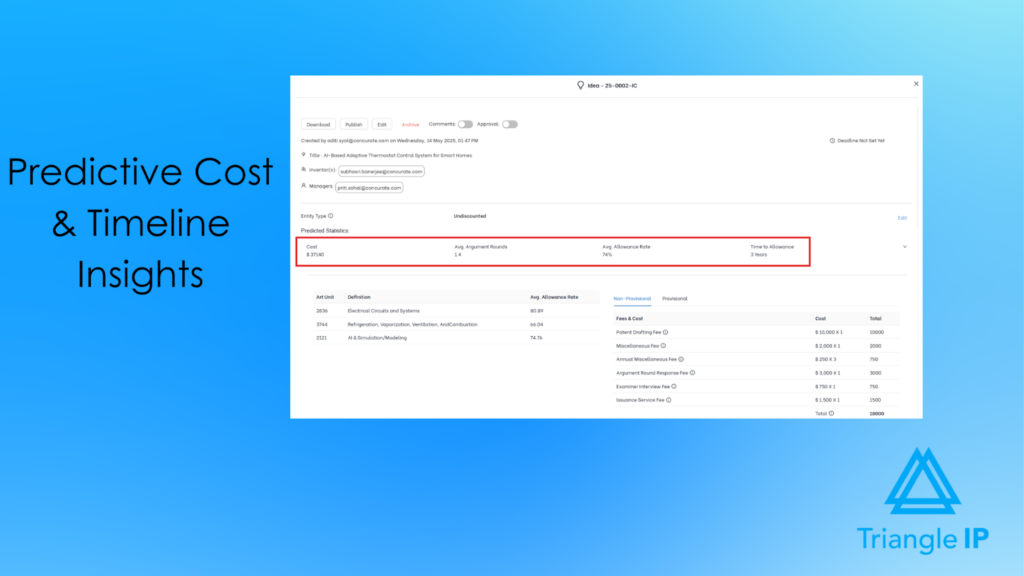
- Time-to-allowance and argument-round forecasting
The platform predicts expected prosecution length and argument rounds.
Benefit: Helps IP teams set better expectations internally around timelines, effort, and resource planning.
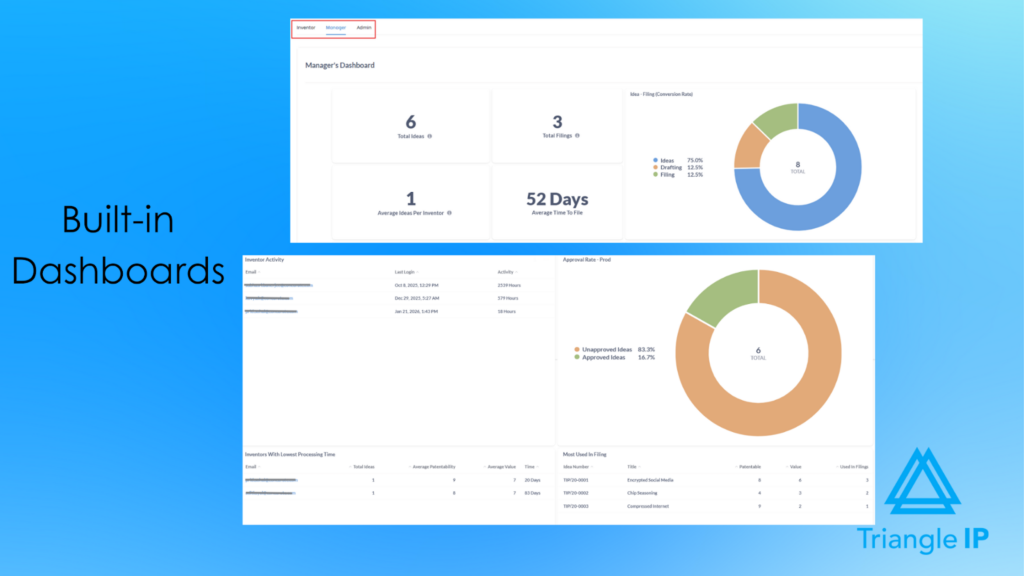
- Role-based dashboards and portfolio graphs
Different users see dashboards tailored to their role, and portfolio-level graphs show status distribution and prosecution trends.
Benefit: Helps leadership and IP teams review portfolio performance more quickly and make better strategic decisions.
Customer Success Story
A leading global technology company used The TIP Tool™ to bring data-driven clarity to patent prosecution decisions.
- 30% increase in patent allowance rates
- 35% reduction in prosecution costs
- 40% increase in strategic patent filings
With examiner and counsel analytics, the team improved predictability, cut wasted spend, and focused on filings with a higher likelihood of success. Read the full case study here.
User Rating and Reviews
The TIP Tool™ holds a strong user rating of approximately 5 out of 5 on G2.
Common themes in user reviews include:
- Ease of use: Users describe the platform as intuitive, with a simple inventor form and an easy workflow for moving ideas through different stages.
- Collaboration: Reviews highlight how the platform helps inventors, IP teams, and other stakeholders work together more smoothly during idea review and vetting.
- Prioritization: Users often point to the built-in scoring features as helpful for deciding which ideas are worth pursuing for patent protection.
Testimonials from users, including startup founders and patent practitioners, also highlight the platform’s simple setup, real-time idea tracking, and strong data security.
Limitations
- Some users may experience a small learning curve initially. To make onboarding easier, Triangle IP offers a dedicated knowledge base with step-by-step guides and feature-specific help articles.
Pricing
The TIP Tool™ follows a transparent and flexible pricing model designed for growing IP teams.
- Subscription: $50/month or $450/year
Includes idea management, portfolio tracking, docketing support, case analytics, and collaboration features. - Optional add-ons:
- Examiner Tool: $5 per user/month
- Predictor Tool: $5 per user/month
- Family Tree Generation Tool: $1 per user/month (organization-level)
What this means for IP teams: Teams can start with the core platform and add advanced analytics based on their needs, keeping costs aligned with usage. Here’s what we mean:
Trial Availability
The TIP Tool™ makes it easy for teams to evaluate the platform before committing.
- A free plan is available to get started
- Teams can request a live demo to explore how the platform fits their workflow
What this means for IP teams: You can explore the platform with minimal upfront commitment and see how it fits your processes before scaling.
2. IPfolio (Clarivate)
IPfolio (Clarivate) is a cloud-based intellectual property lifecycle management platform built on the Salesforce platform. It is designed to help organizations manage patents, trademarks, domains, and copyrights through a centralized and secure system.
Source: ipfolio-homepage
By replacing manual processes and disconnected tools, IPfolio aims to provide a more structured approach to managing IP portfolios at scale.
Best For
IPfolio is best suited for:
- Corporate IP teams managing medium to large portfolios
- Organizations that need enterprise-grade automation and data reliability
- Teams looking for customizable workflows and reporting capabilities
👉 It is particularly useful for companies that require a flexible system built on Salesforce and can support more complex IP operations.
Features and Benefits
IPfolio focuses on centralized portfolio management, automation, and analytics to support IP operations.
- Centralized IP management: Manage inventions, patents, trademarks, and designs in one place while collaborating with internal teams and outside counsel.
- Salesforce-based flexibility: Configure layouts and workflows more easily without heavy development or disruptive system changes.
- Workflow automation and deadline tracking: Automatically calculate due dates, assign tasks, and monitor deadlines using country law rules.
- Reliable IP data and validation: Connect with Clarivate’s data ecosystem to support automated data verification and enrichment.
- Embedded analytics: Use dashboards, visualizations, and reporting tools to get better visibility into the portfolio and support decision-making.
Customer Success Story
Intuit adopted IPfolio to replace its legacy IP system and gained a more flexible platform that scaled to support more than 850 granted assets. The transition also improved inventor engagement and reporting visibility across the IP program.
User Rating and Reviews
IPfolio holds a strong rating of 4.6 out of 5 stars on G2 and a 4.93 out of 5 on the Salesforce AppExchange.
Users consistently praise the platform’s incredible flexibility and customizability, noting how easily it adapts to specific organizational needs. Reviewers also frequently highlight the modern user interface and the highly responsive customer support team.
Limitations
Based on user reviews, there are a few notable limitations:
- Steep Learning Curve: Because it is so feature-rich, the system can feel complicated to use and it can be difficult to understand all of the features. It also requires a thoughtful implementation phase to get everything set up correctly.
- Integration and Sync Bottlenecks: Users note that the automatic PTO data sync currently works best with the USPTO but needs improvement for other jurisdictions.
- Document and Advanced Reporting Add-ons: Direct document editing (like working on Word files directly from the system) is not fully natively integrated and requires connecting external tools like SharePoint or Dropbox. Additionally, creating highly advanced reporting workflows with multiple documents may require purchasing and learning third-party software like Conga.
Pricing
Pricing for IPfolio is not publicly disclosed by Clarivate
Trial Availability
Prospective users can request a live demo to see the platform in action, but there is no free trial available.
3. AppColl Corporate (AppColl, Inc.)
AppColl Corporate offers cloud-based IP management software for both law firms and corporations.
Source: Appcoll-corporation-homepage
Its corporate products, including AppColl® PM Corporate™ and AppColl® Invention Manager™, are designed to help in-house IP teams manage invention disclosures, patent prosecution, and broader portfolio operations in one system.
Best For
AppColl Corporate is best suited for in-house IP teams, patent committees, and docketing specialists looking for a practical, customizable, and cost-conscious system for managing the IP lifecycle.
Features and Benefits
1. AppColl® PM Corporate™ (Prosecution & Portfolio Management):
- Comprehensive IP management: Centralizes docketing, matter tracking, contact management, document storage, and prior art management.
- Automated docketing sync: Connects with sources like the USPTO Patent Center, TSDR, and Espacenet to keep prosecution deadlines and docket data up to date.
- Financial tracking and budgeting: Helps teams track legal spend, forecast budgets, and manage outside counsel invoices through approval workflows.
- Client and counsel visibility: AppColl® Tandem™ gives corporate teams visibility into portfolios being managed by outside counsel.
2. AppColl® Invention Manager™ (Idea Capture & Vetting):
- Customizable invention disclosure forms: Supports flexible forms with required and optional questions, along with document uploads.
- Automated invention workflows and awards: Lets teams create approval flows, scoring systems, and inventor award programs.

- Enterprise integration: Supports Single Sign-On and syncing with internal systems such as HR platforms.
Customer Success Story
AppColl does not publish formal customer case studies on its website
User Rating and Reviews
AppColl holds a 4.7/5 rating on G2. Users often praise its reliability, configurability, automated USPTO task generation, and highly responsive customer support.
Limitations
Here’s what some users in the G2 reviews wrote:
- Lacks Predictive Strategic Analytics: AppColl is a powerhouse for operational prosecution management, but it does not natively provide predictive intelligence—such as pre-filing Art Unit forecasting, predictions on examiner behavior, or estimates on the expected number of argument rounds and time-to-grant.
- Complexity in Customization: While the system is highly adaptable, advanced customization can be somewhat difficult for non-technical users to set up without relying on customer support.
- Interface and Minor Delays: Some users note that the graphical user interface (GUI) prioritizes function over beauty and looks a bit dated. Additionally, users have reported occasional minor system delays (e.g., a 1+ second lag between clicking a function and its execution), particularly in the afternoons
Pricing
AppColl utilizes a transparent, subscription-based pricing model:
- AppColl PM Corporate: Plans for corporate teams start at $130 per user/month.
- AppColl Invention Manager: Priced at $350 per month.
Trial Availability
AppColl offers a free trial and also provides the option to schedule a live product demo.
4. Equinox Corporate (Equinox)
Equinox Corporate is a connected intellectual property management system and docketing software designed to help businesses manage and protect their IP.
Source: equinox-corporate-homepage
It tracks the full asset lifecycle from idea to registered IP right and provides centralized oversight of patents, trademarks, domains, and designs. For larger organizations with more complex global needs, Questel also offers Equinox Corporate+, a more advanced version built on Salesforce. It is designed for multi-entity portfolios that require deeper customization, stronger scalability, and broader cross-department collaboration.
Best For
Equinox Corporate is best suited for innovative small to medium-sized businesses and corporate IP teams that want to manage and align their IP portfolios more closely with business strategy.
Features and Benefits
- AI-assisted IP docketing: Uses a built-in law engine and IP Law Portal to automate tasks, deadlines, and reminders based on official patent office procedures. It also integrates with Questel’s Qthena AI toolkit for portfolio review, analysis, and invention disclosures.
- Automatic PTO sync: Compares, validates, and syncs data with more than 100 global Patent and Trademark Offices to save time and reduce manual errors.
- Reporting and cost forecasting: Supports custom reports, executive-level reporting, visual dashboards, and tools for forecasting future IP costs and budgets.
- Document management and communication: Lets teams create, edit, and collaborate on documents, with integrations for Microsoft Office, Outlook, and Gmail.
- High-level security and hosting options: Offers cloud-based security, 99.9%+ uptime, DDoS protection, Single Sign-On, and custom hosting and backup options.
- API connectors and integrated services: Connects with other business tools and Questel IP services for tasks such as patent translations, EP validations, and renewals.
- Dedicated onboarding support: Includes expert guidance for data migration, configuration, and training during implementation.
Customer Success Story
Riverlane implemented Equinox to improve how its IP team manages cases and workflows. The team highlighted the platform’s balance of functionality and customization, along with how quickly they were able to onboard their portfolio using automatic PTO integration and bulk document upload features. Read the full story here.
User Rating and Reviews
There is not enough independent third-party user feedback available to provide a consolidated rating or deeper buying insight for Equinox Corporate.
Limitations
Independent third-party user reviews are limited, so real-world usability insights are harder to assess.
Pricing
Pricing is not publicly disclosed.
Trial Availability
Teams can request a customized live demo to see the system in action. A free trial is not publicly advertised on the vendor’s site.
After looking at the leading AQX Corporate alternatives, one thing becomes hard to ignore: the best choice is rarely the platform with the most layers, but the one that actually fits how your IP team works.
And when you compare the options through that lens, the pattern becomes clearer.
- IPfolio brings deep customization, but often with added complexity.
- AppColl is strong on docketing and operational control, but offers less strategic insight.
- Equinox Corporate is built for structured global IP administration, but can feel heavier to implement.
Very few platforms bring together simplicity, usability, and decision-making intelligence in one place.
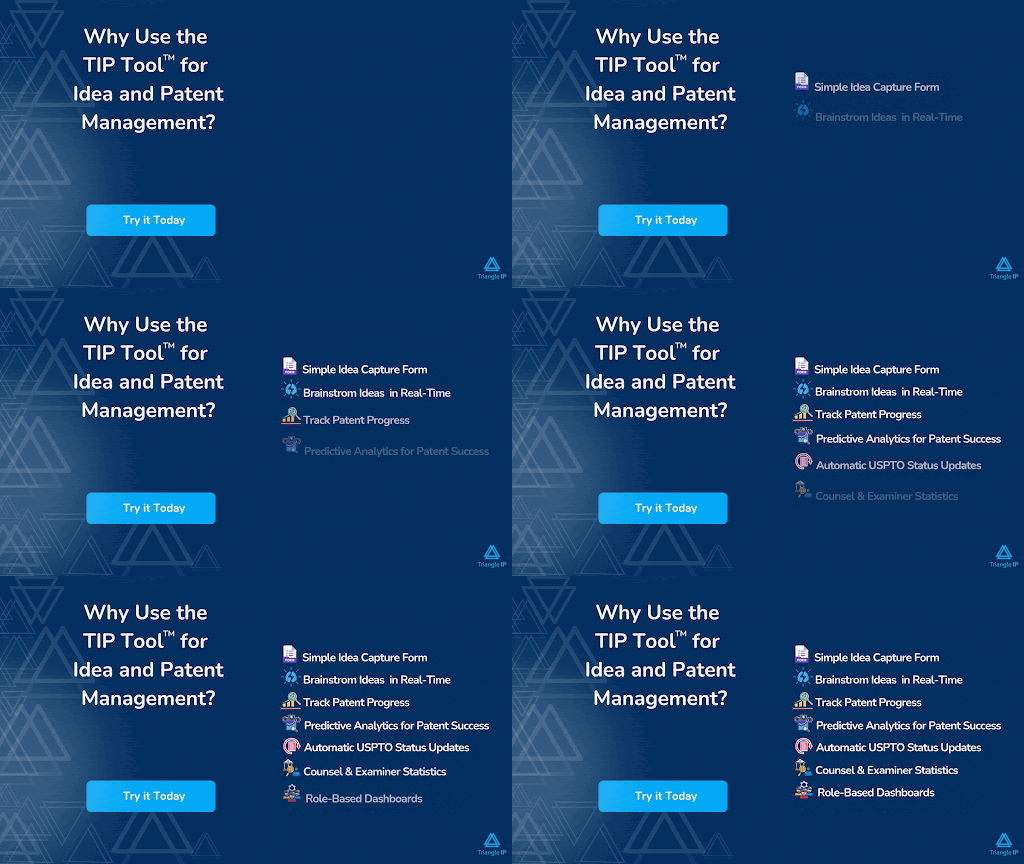
That is where the TIP Tool™ by Triangle IP clearly starts to stand apart. Let’s take a closer look at why it can be a worthwhile investment for innovation-driven companies.
Why The TIP Tool™ Is the Best AQX Corporate Alternative Your Team Can Choose
“TIP Tool makes managing innovations a breeze, with its easy forms, smooth teamwork, and tags that let us find ideas fast.”
— Michael Johnson, Innovation Manager
If that is the kind of experience your team is looking for, the decision becomes much easier.
The TIP Tool™ is built to be easy to implement, simple to use, and aligned with how innovation and IP teams actually work. And when your team needs help, support is always within reach through a dedicated knowledge base, an AI assistant, and responsive customer support.
But you do not have to take our word for it. You can try the TIP Tool™ yourself at no cost. Yes, there’s a free version for new users to explore the tool with basic functionalities.
And if you want a closer look at its capabilities, you can book a demo using the form below.
Frequently Asked Questions
1. Do I Need Separate Tools for Idea Management, Patent Workflow, and Portfolio Visibility?
Not always. Some enterprise IP teams use separate systems for invention intake, patent tracking, and portfolio reporting, but that can create more manual work and less visibility. Triangle IP’s TIP Tool™ combine these functions in one platform can reduce tool sprawl and make workflows easier to manage.
2. Can A Lower-Cost AQX Corporate Alternative Still Support Enterprise IP Needs?
Yes. Lower-cost does not always mean lower-value. Some enterprise IP teams need a platform that is easier to use, faster to implement, and more aligned with innovation workflows rather than a heavyweight system with broader administrative layers than they actually use.
3. What If My Team Already Uses Spreadsheets, Jira, Or Email For Invention Intake?
This is common, especially for growing enterprise IP teams. However, these fragmented workflows often lead to missing information, version confusion, and limited visibility across the innovation pipeline. Many innovation management software now offer structured invention capture, workflow tracking, and centralized collaboration in one system, helping teams move away from disconnected tools toward a more streamlined and scalable process.