TL;DR: Spreadsheets work for a handful of patents but break as you grow. Data ends up split across sheets kept by different people, and untagged ideas can’t be sorted by technology area. Every report waits on your docketing vendor, and the whole system depends on whoever built the sheet. Budget-friendly software like the TIP Tool™ puts every idea and patent in one view you can filter and report on yourself. Here are the 7 signs it’s worth switching now.
“You have a broken patent mining process if you are still using excel spreadsheets for managing ideas through patents.”
Managing ideas from innovation capture to patent expiration requires much different data handling than Excel spreadsheets are accustomed to handling. Some signs that your patent mining process is broken might include:
You feel that your business is not receiving enough invention disclosures to capitalize on your research and development
You are not in sync with application updates at the USPTO
Last-minute rush to outside counsel for filing patent applications just around the product releases
Your staff spends a lot of time with your outside patent counsel to remain abreast of new office actions and other correspondence from the Patent Office
Your legal bills are high because you require frequent status reports from your outside patent counsel
These are all signs that managing your Intellectual Property assets on Excel spreadsheets is ineffective.
The upside is that switching costs less than you might think. The TIP Tool™ from Triangle IP, for instance, starts with a free plan for up to 10 users.
Before a deep dive into the reasons, take a quick look at Excel sheets vs. budget-friendly software for idea and patent management.
What You Need
Excel Spreadsheets
Budget-Friendly Software Like the TIP Tool™
Invention Disclosures
❗ Cut-off, scattered notes
✅ One record per idea
Status Updates
❗ Often outdated
✅ Synced with USPTO
Accuracy
❗ Errors go unnoticed
✅ Flagged errors, tracked edits
Filtering
❗ Inconsistent tags
✅ Built-in technology tags
Collaboration
❗ Whole-file sharing
✅ Role-based access
Progress Tracking
❗ Stalls go unseen
✅ Stalled ideas flagged
Reporting
❗ Custom vendor reports
✅ Dashboards and exports
Workflow
❗ Controlled by its builder
✅ Built-in stages and alerts
Here are seven reasons spreadsheets fall short, and why now is the right time to move to a software.
Prefer watching over reading? Here you go:
#1 Excel Spreadsheets Does Not Handle Text Well
Using Excel for managing IP assets like ideas and patents is like typing an email with a TV remote. It works, but it’s slow, and it leads to clunky abbreviations and typos.
Excel is very efficient at numerical and statistical functions. But ideas and the process of protecting them create a text-based narrative. Like typing with a TV remote, it can be done, but the process is not optimal.
Excel handles text poorly. Long notes get cut off unless you turn on wrap text, and then rows grow so tall that the sheet is hard to scan. Even a small startup’s sheet quickly turns into endless scrolling.
Think about the process of pursuing a patent. While some status updates like “filed” take one word, others need a full explanation. Summarizing an office action**, the patent office’s response to your application,** in a few words is often impossible. The notes needed at many steps in the process of patent prosecution can often require long explanations.
Since these notes don’t fit in the sheet, they end up somewhere else. One person keeps them in email, while another tracks filing status in a separate sheet. Even the main sheet often lists only a title for each patent, with no summary of what it covers.
Without easily accessible explanations, you will need emails and meetings to bring decision-makers up to speed. Your Excel spreadsheet falls short, since everyone preparing responses needs more information than it can deliver.
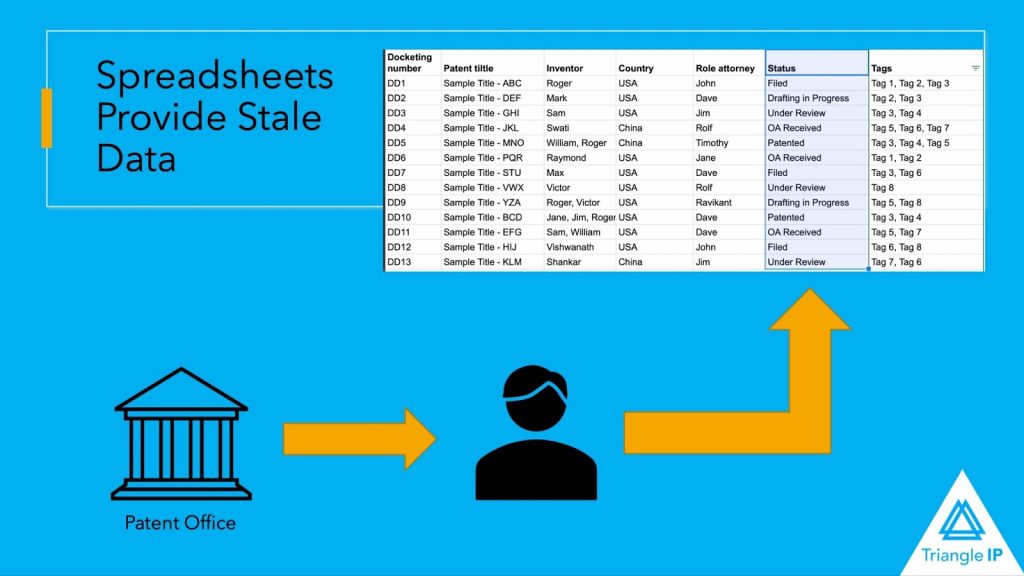
The data in a spreadsheet is only as current as its most recent update. To stay current with innovation processes, explore how innovation management software provides real-time data updates. An administrator must manually update Excel spreadsheets for the management of ideas and patents. This means that most of your data risks being out-of-date at any time. This does not mean that it is out-of-date. It means that you do not know if it is current or out-of-date since you do not know how recently the manual update occurred.
At various stages during a patent application’s life cycle, events can happen quickly or slowly. After filing, months may elapse before receiving an office action. But once an examiner sends an office action, some concerns in a rejection may be resolved through an interview or a response. That only works if you learn about the office action in time. You usually have three months to reply before extension fees apply. A timely update gives you room to schedule that interview or prepare your response. As a result, the case may move to allowance within a relatively short period.
Staying on top of the prosecution can be challenging with manually updated Excel spreadsheets. The information is often no longer relevant when you see it. Updates from the USPTO’s Patent Center are instantaneous. But your staff still needs time to run your docket reports and manually update the spreadsheet.
Even reports from your outside counsel might take a few days to docket and be sent to you. After receipt, your staff needs to manually enter the new data. Relying only on counsel’s docket also leaves you exposed, since a missed status change can cost you patent rights.
The problem spreads once the sheet leaves your desk. A copy emailed to leadership is frozen the moment you send it. If an office action arrives the next day, they still make decisions on yesterday’s status.
Having an administrator search Patent Center every day for new information can cost your business time and money. Moreover, having an administrator manually enter the status can create data integrity problems. Software that syncs with USPTO records can deliver the status updates outside counsel would otherwise bill you for.
The TIP Tool™, for instance, syncs published U.S. applications with USPTO records, so you skip the daily Patent Center check. Open any application, and its timeline shows what happened and when, from the first office action to the notice of allowance. Leadership can open a dashboard instead of waiting for an emailed sheet. If you use docketing software, you can sync it with the TIP Tool™, so everything stays in one place rather than scattered.
#3 Excel Spreadsheets are Error-Prone
Maintaining a spreadsheet in Excel is quite comfortable when you use it for numerical data. Excel will often help a data entry administrator find a typo during the analysis of the data. If the budget totals look off, the administrator knows where to go to identify the error.
A typo or other error in the text might not be as easy to identify and correct. For example, suppose your patent administrator hits CTRL + V instead of CTRL + C in a cell. The administrator just pasted data from the clipboard into your patent management spreadsheet that came from another application. Or, if the opposite happens, the data on the clipboard was overwritten by the data in the cell. Now the worst part is Excel’s undo button only helps if someone notices the mistake right away.
At best, this creates inefficiencies as your patent administrator must go back and correct these typos. But if the administrator does not catch the typos as they occur, you could end up working with a spreadsheet riddled with bad data.
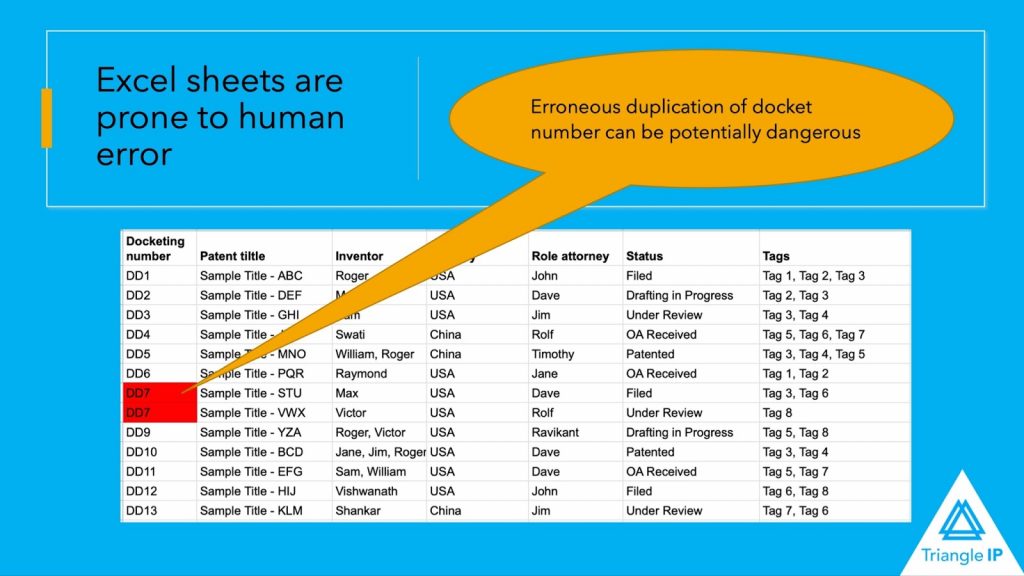
Additionally, the risk grows further when several people keep separate sheets. The same case can end up in two rows with slightly different numbers, and nobody can tell which one is right.
When you communicate with your legal department or outside patent counsel, you could end up talking about two unrelated cases because your Excel spreadsheet has duplicate application serial numbers. A nightmare scenario could happen when you instruct your patent lawyers to abandon the wrong case, and they cannot reverse the express abandonment.
The power of Excel spreadsheets comes when you need to turn a mountain of numbers into usable information. Spreadsheets, however, provide very few tools for working with a mountain of text.
Excel can alphabetize rows based on the first letters of a text field. They can search for a text string within a text field. They can even replace text strings once they find them. Newer versions add tools like the FILTER function and Power Query. But someone has to set them up and keep them working as the sheet grows.
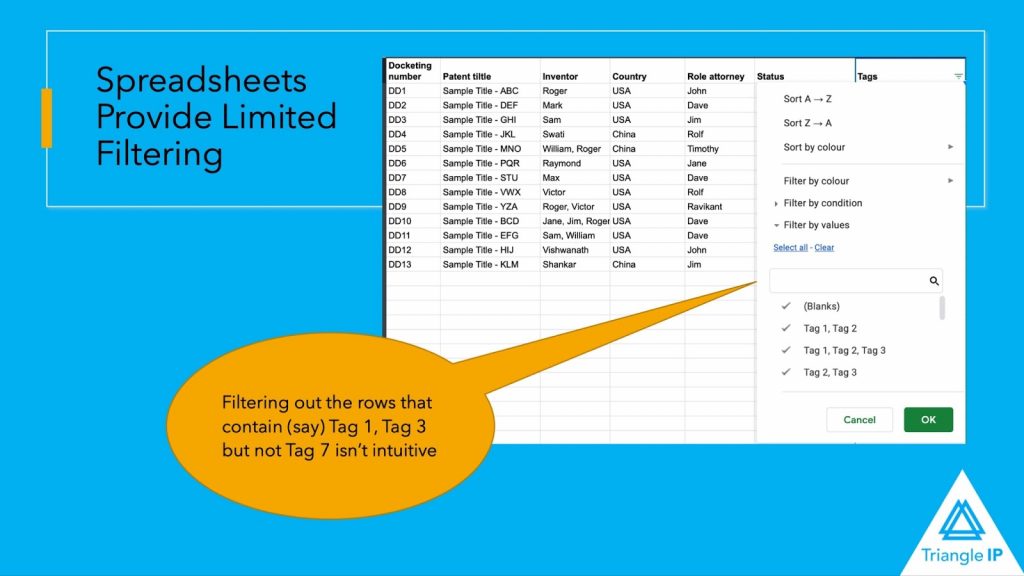
This can be a problem when managing ideas and patents. Your business may find it useful to categorize ideas and patents to identify which departments had input into them. For budgeting purposes, you might need to tag patent applications according to which subsidiaries need to contribute to the fees and costs. But Excel provides no intuitive way to tag rows so that you can recall the tagged rows in a robust way.
For example, you may need to know which patent applications are paid from your R&D budget or your manufacturing budget. Excel’s filter can handle that with an “Or” condition. But it only works if everyone types each tag exactly the same way. If one person enters “R&D” and another enters “Research,” the filter quietly misses some of your applications. As the filtering operations become more complex, you will need more customization of your Excel spreadsheet.
The same gap shows up with ideas. Say you’re the only IP person, with over 100 raw ideas in a sheet and no technology tags. Before you can decide what’s worth pursuing, you have to read every row and tag it yourself. Tagging each idea by technology area as it comes in helps you put only the most valuable ones forward for patenting.
In IP management software, tags are part of each record instead of loose text in a cell. They let you tag ideas by technology or product line and filter by any tag later. Each idea can also get a value score and a patentability score, which shows what to shortlist for vetting first. Once filed, applications can be tagged to the products they cover. A product line report then takes one filter instead of a request to your docketing vendor.
#5 Excel Spreadsheets Have Limited Collaboration Tools
This limitation highlights the need for an integrated global patent portfolio strategy, which can streamline collaboration and data management.
One of the greatest benefits of cloud-based applications and databases is that collaboration becomes seamless. But for most Excel users, collaboration is clunky, with different versions of Excel spreadsheets sent by email. Stakeholders update the spreadsheet with their most current data and share them in group messages. But users can easily lose track of which is the most current version. Excel in Microsoft 365 does let several people edit the same workbook at once. But sharing still works at the file level. To bring in outside counsel, you either give them the whole workbook or email them a copy. A copy starts the version problem all over again.
As a result, one user must manually maintain a master version with all the changes introduced by the various users. Again, this introduces costs in labor and time.
There are cloud-based spreadsheets like Google Sheets that allow collaboration. But bear in mind that patent law requires the strictest of control over your information. Under the Patent Act, you can lose the right to patent inventions that are publicly known. An open share link puts unpublished invention details one forward away from someone outside the company. Europe has almost no grace period for public disclosure, while the U.S. offers only limited flexibility. If your global patent portfolio strategy includes Europe, one leak can rule out a patent there.
IP management software organizes collaboration around each case instead of one shared file. In the TIP Tool™, for instance, colleagues can edit an idea together and tag each other in comments. Admins can add outside counsel with a prosecutor role, which limits what they can see or do in each portfolio. An idea stays visible only to its inventor until they share it with colleagues. Triangle IP is also SOC 2 Type 2 certified, with all portfolio data stored encrypted.
#6 Excel Spreadsheets Provides Limited Visibility on Progress
Excel is an excellent tool for plotting numbers. A numerical graph can show trends and progress.
However, Excel spreadsheets offer far fewer tools for plotting conceptual or text-based data. A pivot table can count cases by status. But unless someone logs every status change, it can’t show how long a case has waited. As a result, you have no easy way to identify bottlenecks in your idea and patent application process.
For example, your in-house counsel might take four weeks to send invention disclosures to your outside counsel. Similarly, your outside counsel might sit on office actions for two months before sending them to your legal department. By identifying timing issues, you can improve workflows and avoid unnecessary fees for late filings.
Visibility also depends on who is looking. Excel has no role-specific dashboards, so inventors and managers each need a separate report, often a custom one from your docketing vendor.
The TIP Tool™ gives each role its own dashboard and flags ideas that sit in vetting longer than expected. Its Portfolio Manager also charts portfolio status, and you can export the data for reporting.
#7 Excel Spreadsheets Have No Inherent Functionality to Manage Workflows
An Excel spreadsheet can perform mathematical functions between the contents of two cells. It can also join or split text. But rows have no natural way to show two ideas merging into one filing, or one filing branching into others. This can make it difficult to manage all the ways that ideas and applications may evolve over their lifetimes.
More importantly, Excel spreadsheets do not produce action items, calendars, and dockets that identify tasks that must be taken care of within a workflow. Without a way for stakeholders to know what must be done, they can become a bottleneck in your patent process.
So the workflow lives in the head of whoever acts as your patent point person. When you’re the only IP person, nothing moves unless you move it. If that person leaves, the logic behind the sheet leaves too.
Now, from what we have seen so far, there’s little doubt software helps here, since it’s built for exactly these problems. Still, IP teams stick to spreadsheets often for one reason: cost. When one person handles patents in an enterprise or budgets are tight, software feels like an expense you can put off. But saving there can mean missing out on your most promising ideas, along with the revenue their patents could protect.
Why Moving Beyond Excel Sheets to Software Costs Less Than You Think
Law firms invest heavily in docketing systems. Clients kludge together spreadsheets. But there is room in the middle for tools that capture innovations and track the progress from ideas to patents. This is the role filled by Triangle IP.
Putting software off has its own price. Many outside firms charge a few hundred dollars for each status update, even when you only talk to a paralegal. Ask for one update a month, and that adds up to a few thousand dollars a year.
The TIP Tool™, by contrast, costs a flat $495 a year for up to 100 users on its Premium plan. That’s a fraction of what a year of billed updates would cost.
If that sounds like a fit, you can book your demo here:
Frequently Asked Questions
1. Doesn’t Putting Inventions in a Cloud Tool Create the Same Disclosure Risk as Google Sheets?
Not if the tool controls who sees them. What can cost you a patent is making an invention available to the public. An open share link risks that, since anyone who gets the link can view the file. In the TIP Tool™, an idea stays visible only to its inventor until they publish it, and roles limit what each user can see.
2. If the TIP Tool™ Syncs Weekly, Isn’t That Stale Too?
A weekly sync is the minimum, not the limit. The TIP Tool™ refreshes published cases every week, and you can update any case manually when you need its latest status. You get notified whenever a sync picks up a change, so nobody checks each case by hand. That still beats a sheet that’s only as current as whoever last updated it.
3. Won’t My Spreadsheet’s Errors Just Move Into the Software?
They will if you import them as they are. Before moving, merge your sheets into one and remove duplicates. Matching serial numbers are the quickest way to spot the same case listed twice. Then bring the clean list in through the TIP Tool™’s Excel template. From there, status for published cases comes from USPTO records instead of manual entry.
4. Doesn’t the Software Also Depend on One Admin?
Someone still sets it up, but the setup doesn’t leave with them. In the TIP Tool™, each portfolio’s stages and every user’s role are saved in the tool. Each idea also keeps a record of who changed what. If your admin leaves, you give the admin role to someone else, and they pick up where things stand.
We’ve answered the most common ones – straight from real customer demos. If you’re curious about features, pricing, or workflows, you’ll likely find your answer here.
📘 The TIP TooI™ FAQS
1. How does TIP Tool™ help with idea evaluation? 2. Can I collaborate with co inventors or outside counsel? 3. Does TIP support international patents?